If you interact with the digital design world, you've probably encountered DWG files a lot. The DWG format is quite popular for engineering, architecture, and construction drawings, but not everyone wants to pay for expensive software just to view or share a DWG file. Accessing a DWG file with special software may require a learning curve.
That's why a DWG to PDF converter can simplify your workflow and improve compatibility. Today, you can download our Total CAD Converter and convert AutoCAD files to different output formats, including PDF and PNG. Ready to start converting DWG to PDF in minutes?
Download Now!
Buy License
What Is a DWG File?
DWG, which gets its name from the term «drawing,» serves as a proprietary binary file format used to store 2D and 3D graphics such as sketches, models, maps, and images. It is the native file format for several CAD (Computer Aided Design) packages including IntelliCAD and Caddie because it is relatively compact and easy to share.
Why Convert DWG to PDF?
There are some advantages of converting DWG to PDF format, such as:
- Easy sharing: You'll be able to easily share your drawings with any user without having them install specific CAD software.
- Smaller file size: Design files can be relatively large if they are detailed. A PDF file can be compressed and optimized, which makes it faster to upload, download, and email.
- Broader compatibility: PDF (Portable Document Format) is platform-independent and can be viewed on all major operating systems, including Windows, Mac, Linux, Android, and iOS, with free apps like Adobe Acrobat.
- Collaboration: The PDF format enhances collaboration by allowing users to view, mark up, and edit PDF files on desktop computers and mobile devices.
- Documentation: If you need to create reports, manuals, or presentations, you can produce professional-looking documents in the Portable Document Format.
- Password protection: PDF document properties allow you to encrypt your drawings and restrict various actions, which is especially useful for sensitive or confidential material.
- Archiving: Aside from easy sharing, converting drawings to PDF can help maintain their quality and fidelity.
How to Convert DWG to PDF
Using Total CAD Converter
Our DWG to PDF converter is a powerful tool that can convert DWG files to various high-quality output formats, including PDF, TIFF, JPEG, BMP, XPS, SVG, BMP, JPEG, PNG, WMF, EMF, CGM, HPGL, SWF, EPS, and DXF file format.
| Full Software Name | Total CAD Converter |
| Description | Convert DWG file created in AutoCAD to over 16 alternative formats. Access easy-to-share formats such as PNG, SVG, BMP, and PDF. Enjoy secure file conversion and file integrity. |
| Processor | At least 2.4 GHz |
| RAM | 2 GB |
| Minimum Hard Drive Space | 193.2 MB |
| Operating System | Windows
2000/2003/Vista/7/8/10/11 |
| Trial version | Download and install CoolUtils Outlook to PDF Converter to perform unlimited free conversions for the next 30 days! Convert your emails, contacts, and even calendar items, and enjoy the ease of sharing them! |
Here is how to convert DWG files to PDF:
Step 1: Download and install the Total CAD Converter.
![CAD Converter]()
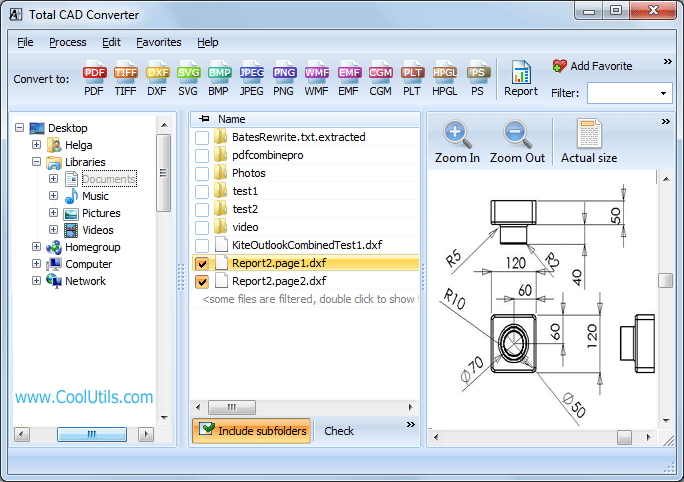
Step 2: Launch the program and select the DWG file to convert to PDF.
![DWG Preview]()
The tool gives you the ability to preview your files or use batch mode by selecting multiple files.
Step 3: Convert DWG file to PDF by specifying the conversion format: Process > Convert to > PDF.
![CAD Converter]()
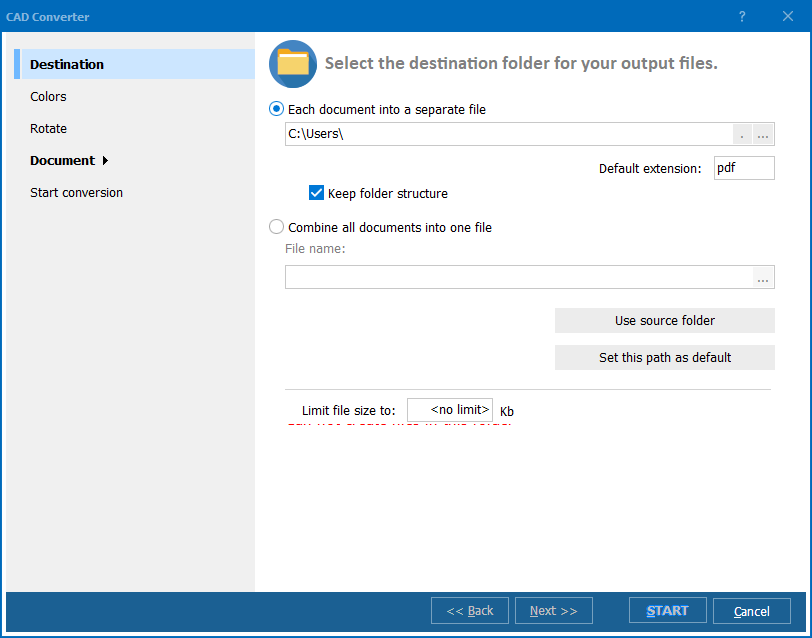
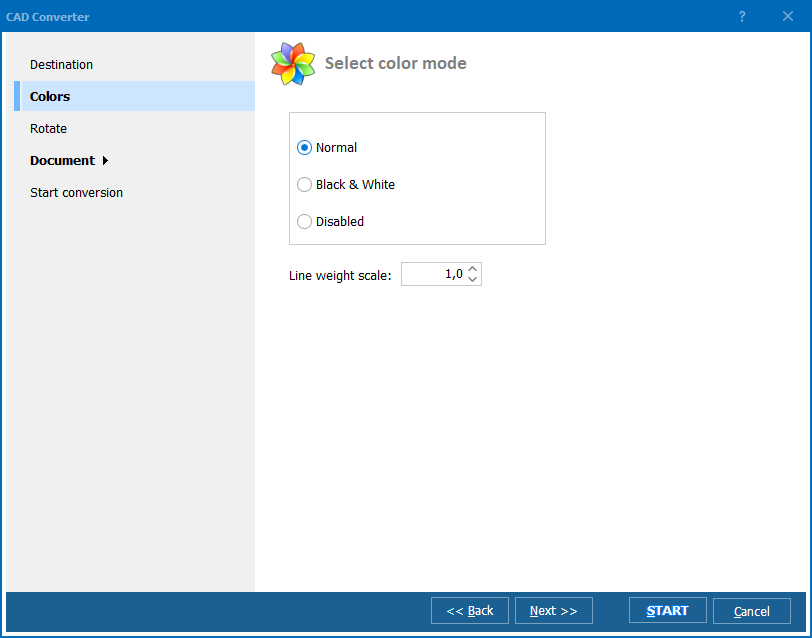
Step 4: Set the customizable options, such as the Destination, Colors, Rotate, and Document settings.
![CAD Wizard]()
Step 5: Start the conversion process by selecting «START.» The tool will save the new document to the specified location.
![CAD Wizard finish]()
You can use our software for free within the 30-day trial period. The full version of the tool allows you to convert files in batch mode, access command line support/server version, and customize your output files.
Alternative Methods
If you need to export DWG to PDF, you can use the software that created the drawing or an online DWG service. For professional use, CAD software gives more control over the quality and settings. Using an online conversion service is faster and easier, suitable for those who want to convert a single AutoCAD file to a PDF file format. Here are quick instructions for each method.
Using CAD Software
To use AutoCAD, follow these steps:
- Open the file in the program.
- Click on the Application Menu.
- Go to Print > Plot.
- In the Plot — Model menu, select Name: under the Printer/plotter option. Choose .dwg to PDF from the list of available options.
- You can also customize PDF document properties and paper settings if you want.
- Click OK and select the file location to save the converted PDF file.
Using an Online DWG to PDF Converter
To process DWG to PDF online with our service, you only need to have an internet connection. Follow these steps:
- Go to our DWG to PDF converter page.
- Upload your DWG file and select PDF.
- Wait for the conversion and download the PDF file.
If this sounds like something you need to do regularly, consider the full version of our conversion tool for offline functionality and advanced features!
Advanced Features of Total CAD Converter
Batch Conversion
No matter how many CAD files you have, you can process them all in batch mode. This makes our batch conversion tool perfect for large projects that demand fast and consistent results.
Customization Options
You can tailor your output to your requirements and tastes. Some customizable options include changing the size of your converted files, modifying the compression settings, and selecting the paper size and orientation.
Quality and Reliability
As one of the best PDF to DWG converter options, our conversion tool delivers a high-quality output that maintains the layout and format of the original design files. You don't have to worry about losing any details or accuracy.
Ease of Use
With CoolUtils, you can convert DWG to PDF without AutoCAD, which can be complicated for non-professional users. The interface is intuitive and clear, guiding you through the conversion steps.
Security and Privacy Considerations
Our PDF converter DWG tool works offline, which ensures a secure file conversion process. CoolUtils' online converter maintains your security just as well by transferring files via secure protocols and deleting them from our servers after the conversion.
Get Total CAD Converter with a Free Trial
With CoolUtils' Total CAD Converter, you'll be able to convert DWG files to PDF with ease, perform batch conversions, customize the output, streamline file management, and make your images easier to view with Adobe Acrobat or other applications. Try it out with a free 30-day trial, or buy now for unlimited professional use!
For more inquiries, please don't hesitate to contact us on our USA/Canada Toll-Free line (1-888-803-4224) or visit the support page.


 +1 (855) 418-2323

 File Converters