Need help? Reach us at 

 +1 (855) 418-2323
Need help? Reach us at
+1 (855) 418-2323

 File Converters TIFF and PDF apps Forensic Freeware
Need to turn a web page or HTML file into an editable Word document? Total HTML Converter converts HTML and HTM files to Word (DOC) in batch — keeping the original text, tables, images, and layout — so you can edit the result in Microsoft Word without retyping anything.
HTML is a markup language for web pages; it depends on external CSS, images, and scripts that break when a page is moved or emailed. DOC is the native Microsoft Word format — self-contained, editable, and easy to share. Converting HTML to Word gives you a clean, portable document you can revise, comment on, and print. Total HTML Converter processes an entire folder at once, offline, with command-line support for automation.
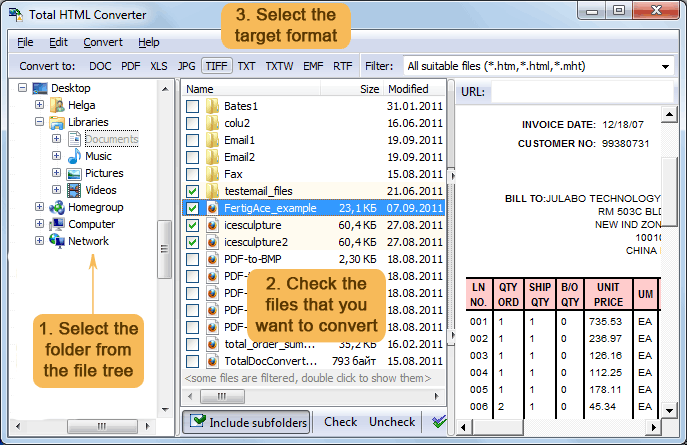
Quick answer: To convert HTML to DOC, download and install Total HTML Converter, open the folder with your HTML files, check the files to convert, click the DOC button, then click Start. The whole batch converts offline into editable Word documents with no upload and no file-size limit.
Download free trial and convert your files in minutes.
No credit card or email required.

Related Topics
Total HTML Converter