Need help? Reach us at 

 +1 (855) 418-2323
Need help? Reach us at
+1 (855) 418-2323

 TIFF and PDF apps
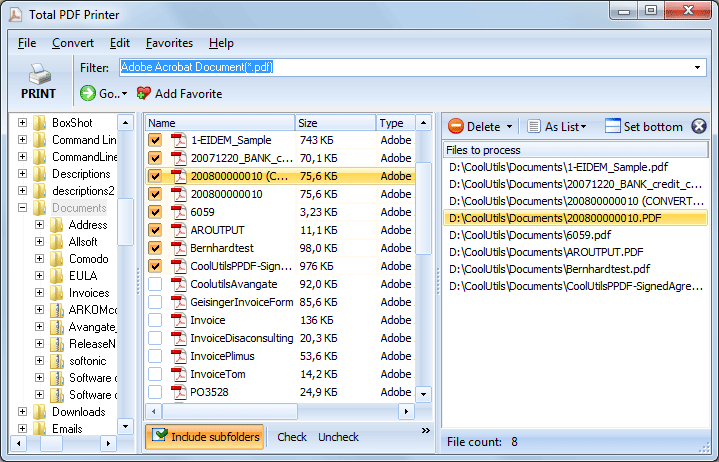
Printing one PDF is simple — open it and press Ctrl+P. Printing 200 PDFs from a project folder is a different story. Opening each file in a viewer, waiting for it to render, clicking Print, closing it, repeating — this eats hours out of your workday. Total PDF Printer prints multiple PDF files at once — entire folders — on any printer, with no manual file-by-file handling.
Partly. In File Explorer you can select several PDFs, right-click and choose Print — but the command disappears once you select more than 15 files, the printing order is not guaranteed, and each file is briefly handed to the default PDF app. There is no duplex, tray, scaling, or separator control. For a folder of two hundred invoices, a dedicated batch printer is the practical route.
Total PDF Printer includes a full command-line interface for automation. Example:
PDFPrinter.exe "C:\Invoices\*.pdf" -p "HP LaserJet" -log "C:\Logs\print.log"
Wrap the command in a .bat file to print a folder of PDFs every evening, after a scheduled scan, or as part of an ERP workflow. The command line supports all the same options as the GUI: tray, duplex, scaling, orientation, separators, and page ranges.
You do not have to print every page. Total PDF Printer can print only landscape pages, only portrait pages, odd pages, even pages, or a custom page range from each file in the batch.
| Feature | Total PDF Printer | Opening Each PDF Manually |
|---|---|---|
| Print 200 files | One click, unattended | 200 open-print-close cycles |
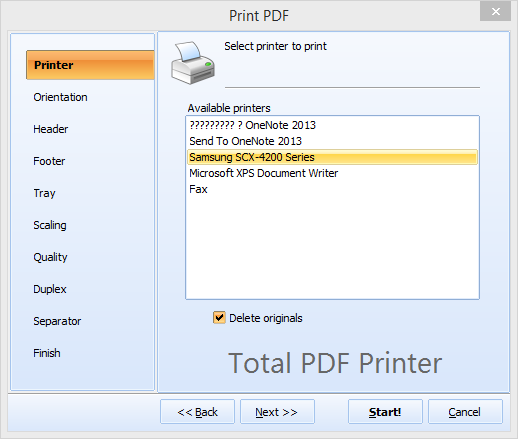
| Separator pages | Blank, custom PDF, or page range | Not available |
| Auto-rotate mixed orientation | Yes | Manual per file |
| Fit-to-page | Automatic | Depends on viewer |
| Duplex control | Yes, with auto blank page insert | Varies by viewer |
| Command-line automation | Yes | No |
| Print by date order | Yes | Manual sorting |
For unattended server-side printing, Total PDF Printer X runs as a Windows service with ActiveX support. It processes print jobs silently without displaying any UI or message boxes — ideal for web servers, ERP integrations, and automated document workflows.
Total PDF Printer is part of CoolUtils' printing tools. Licenses start at $49.90. Download the free 30-day trial and test it with your own files.
"The application is working great. We print 300+ work orders a day and it has performed flawlessly. I especially like the command line interface — I was able to create a batch file our end users click on, which makes things much easier."
 Tony Aguila Auto Warehousing Company
"We print case files for court every morning — sometimes 150 PDFs in one go. Before Total PDF Printer, an assistant spent two hours opening and printing each file. Now the whole batch goes to the printer in minutes with separator pages between cases. Huge time saver."
Linda Sorensen Office Administrator, Law Firm
"We integrated Total PDF Printer into our ERP workflow via the command line. Shipping labels and pick lists print automatically every evening. The duplex and tray selection features work reliably across our three different printer models. Solid tool for the price."
 Robert Engström IT Manager, Logistics Company
Download free trial and convert your files in minutes.
No credit card or email required.

Related Topics
How to Print PDF Fit-to-Page — Scale Any PDF to Your Paper Size


