Logo
Home Products Support Contact About Us
arrow1 TIFF and PDF apps

How to Print PDF Double-Sided in Batch (Duplex)


You have a folder of 50 reports to print double-sided. Opening each PDF, switching the print dialog to duplex, clicking Print, closing the viewer — that is an hour of clicking. Total PDF Printer prints the whole folder duplex in one job: enable double-sided once, and it applies to every file in the batch.

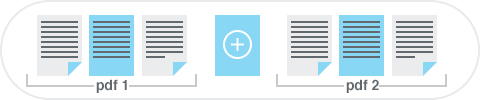
Batch duplex printing also has a catch that most people discover at the printer tray: documents with an odd number of pages. The printer fills both sides of every sheet, so the next document starts on the back of the previous one's last page — reports mix together and binding becomes impossible. Total PDF Printer fixes this automatically: it adds a blank page after every odd-paged file, and each document starts on a fresh sheet.

Key Duplex Features

  • Duplex for the whole batch — enable double-sided printing once and print hundreds of PDFs unattended.
  • Automatic blank page after odd-paged files — documents never share a sheet of paper.
  • Long-edge or short-edge binding — flip on the long side for portrait reading or on the short side for calendar-style pages.
  • Combine with other batch optionstray selection, separator sheets, fit-to-page scaling, and print quality control work alongside duplex.
  • GUI and command line — click through the options or script the job in a .bat file.

How to Print PDFs Double-Sided in Batch

  1. Download and install — get the free 30-day trial (Windows 7/8/10/11). No email or credit card required.
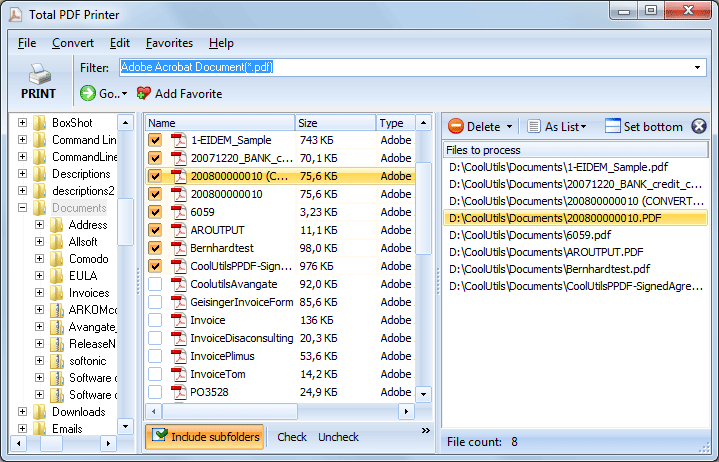
  2. Select files — browse to the folder in the left panel and check the PDFs to print, or click Check All.
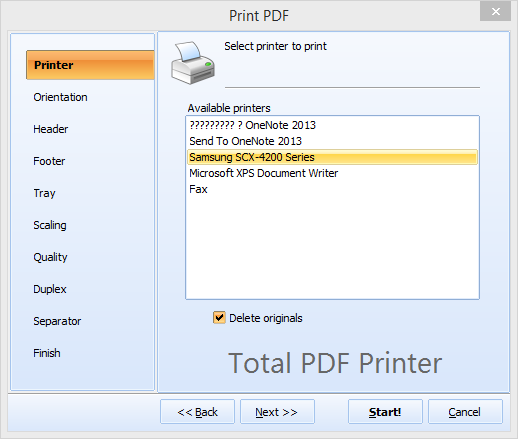
  3. Choose the printer — any local or network printer with automatic duplex support. Total PDF Printer sends the duplex command to the printer driver.
  4. Enable duplex — in the print settings, switch on double-sided mode and pick long-edge or short-edge binding. Turn on the automatic blank page for odd-paged files.
  5. Click Print — the entire batch prints double-sided without further attention.

print pdf duplex double-sided in batch


Download Free Trial

Buy Now — $49.90

Windows 7/8/10/11 • 30-day free trial

Duplex from the Command Line

The command-line interface accepts the same duplex settings as the GUI. Wrap the command in a .bat file to print a folder double-sided every evening or right after a scheduled export from your accounting system. For unattended server-side printing with no UI at all, use Total PDF Printer X.

When Do You Need Batch Duplex Printing?

  • Monthly report packs — double-sided output halves the paper stack and the binder count.
  • Invoices and statements — accounting departments print hundreds for mailing; duplex cuts postage weight.
  • Training handouts and manuals — booklet-style materials need correct long-edge binding from the first sheet.
  • Review copies of case files — legal teams print working copies double-sided, with separator sheets between matters.

Already merged everything into one PDF? Then insert the blank pages at merge time instead: PDF Combine adds empty pages after odd-paged documents while combining. And for the general workflow — sorting, separators, scaling — see how to batch print PDF files on Windows.


quote

Total PDF Printer Customer Reviews 2026

Rate It
Rated 4.8/5 based on customer reviews
5 Star

"Duplex printing of insurance policies cut our paper consumption by 45%. Total PDF Printer applies the setting to 500+ documents per day automatically. The command-line integration runs unattended every morning."

5 Star Sandra Keller Office Manager, Allianz Versicherung

"Student handouts and course materials need double-sided printing to save paper. Total PDF Printer handles the entire batch with duplex enabled. Faculty just drop PDFs in a folder and the scheduled task does the rest."

5 Star David Morrison IT Administrator, Oxford University

"Regulatory reports printed in duplex save storage space in our physical archives. Total PDF Printer with long-edge binding produces correctly oriented double-sided output for our ring binders."

4.5 Star Anna Kowalczyk Administrative Director, PKO Bank Polski

FAQ: Duplex PDF Printing ▼

In Total PDF Printer, enable the Duplex option in print settings. The printer produces double-sided output, reducing paper consumption by half.
Yes. The printer hardware must support automatic duplex printing. Total PDF Printer sends the duplex command to the printer driver.
Yes. Choose between long-edge (flip on long side, for portrait reading) or short-edge (flip on short side, for landscape/calendar style) duplex binding.
Yes. The duplex setting applies to all files in the batch. Every PDF prints double-sided without per-file configuration.
Yes. Set the duplex parameter in command-line arguments for scheduled batch printing.
The duplex setting applies uniformly to the batch. For mixed simplex/duplex, run separate batches with different settings.


Start working now!

Download free trial and convert your files in minutes.
No credit card or email required.

⬇ Download Free Trial Windows 7/8/10/11 • 27 MB

Support
Total PDF Printer Preview1
Total PDF Printer Preview2

Latest News

Newsletter Subscribe

No worries, we don't spam.


© 2026. All rights reserved. CoolUtils File Converters

Cards