Need help? Reach us at 

 +1 (855) 418-2323
Need help? Reach us at
+1 (855) 418-2323

 File Converters TIFF and PDF apps Forensic Freeware
You need to turn Outlook emails into PDF documents for archiving, legal compliance, or sharing with people who do not have Outlook. MSG is Microsoft Outlook's proprietary format — it stores the message body, headers, attachments, and metadata in a single binary file that requires Outlook or a specialized viewer to open. Total Mail Converter reads MSG files directly from disk, renders each email as a formatted PDF — with headers, body text, images, and optionally attachments — and processes thousands of files in a single batch.
MSG is the native format of Microsoft Outlook. Each MSG file contains a single email message: sender, recipients, subject, date, body (plain text or HTML), embedded images, and file attachments. MSG uses Microsoft's Compound File Binary Format (CFBF). Opening an MSG file requires Outlook, or a third-party MSG viewer — it cannot be read in a standard text editor or web browser.
PDF (Portable Document Format) is the universal standard for fixed-layout documents. A PDF file looks the same on every screen, every printer, and every operating system. PDFs can be read by hundreds of free viewers (Adobe Reader, Foxit, browser built-in readers). They support text search, encryption, digital signatures, and PDF/A archival compliance.
| Feature | MSG | |
|---|---|---|
| Creator | Microsoft Outlook | Adobe / ISO 32000 |
| Viewer required | Outlook or MSG viewer | Any PDF reader, web browser |
| Content | Email message + attachments | Fixed-layout document |
| Editable | Yes (in Outlook) | Read-only by default |
| Text search | Requires Outlook indexing | Built-in full-text search |
| Digital signatures | S/MIME (email-level) | PFX/X.509 (document-level) |
| Archival standard | None | PDF/A (ISO 19005) |
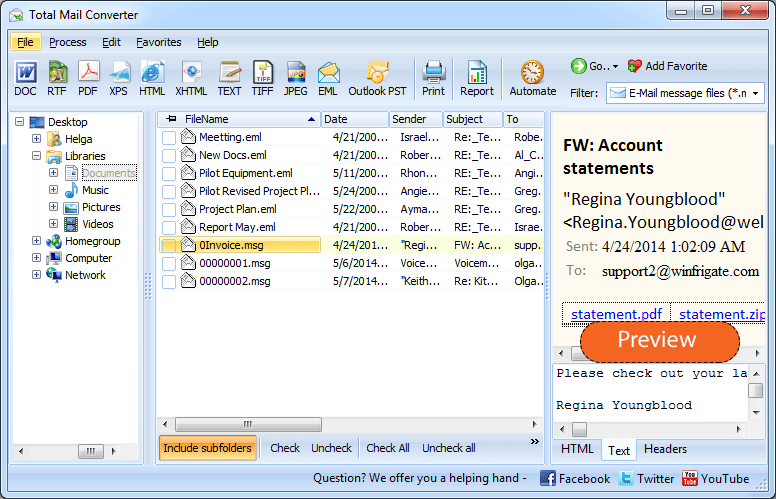
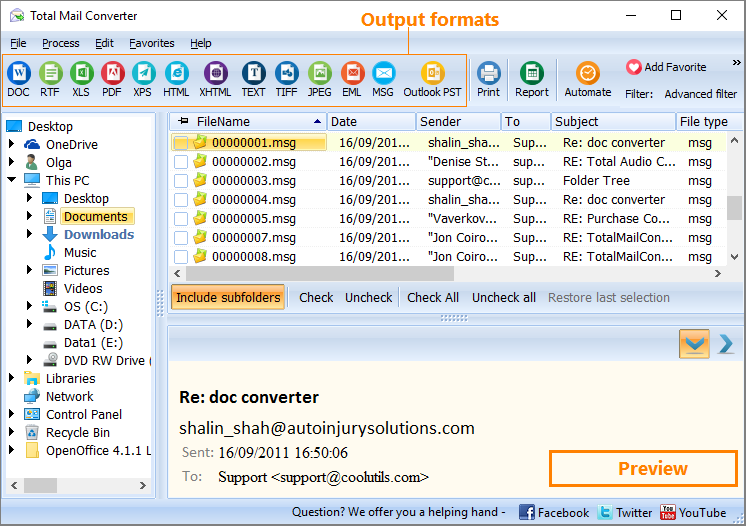
Launch Total Mail Converter. The folder tree on the left shows your local drives and network folders. Navigate to the directory containing your MSG files. The file list displays each email with its sender, subject, date, and file size.
Tick individual files or click Check All to select the entire folder. Total Mail Converter handles batch conversion — one file or ten thousand in the same run.
Click the PDF button on the toolbar. The settings wizard opens with all PDF output options.
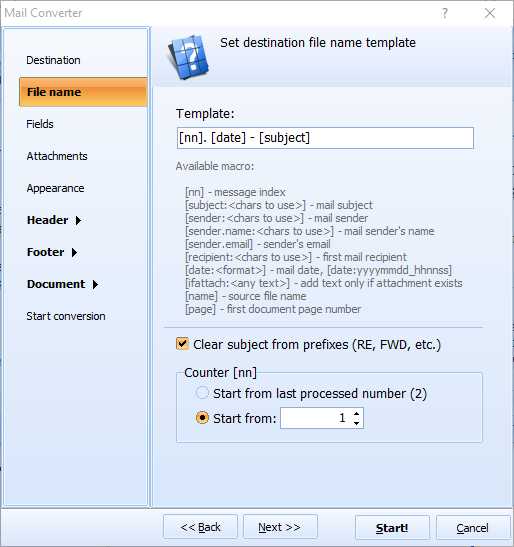
Set the output folder and file naming pattern. Configure the following:
Click Start. Each MSG file is rendered as a PDF document: the email header (From, To, Subject, Date) appears at the top, followed by the message body with full HTML formatting, images, and links. The conversion log shows the status of every file.
Total Mail Converter includes a command-line interface for automated and server-side workflows:
MailConverter.exe "C:\Emails\*.msg" -oPDF -d "C:\Archive\pdf\" -bates "DOC-{N6}" -sign "C:\cert.pfx" -pwd MyPass
Parameters: source files (wildcards supported), -oPDF sets the output format, -d specifies the destination folder, -bates enables Bates stamping with a pattern, -sign attaches a digital signature. Schedule the command with Windows Task Scheduler for nightly archiving.
The GUI generates ready-to-use command lines automatically: configure settings in the wizard, and the program outputs the exact command you can paste into a .bat file.
| Option | Description | Use Case |
|---|---|---|
| Standard PDF | Searchable text with formatted layout | General-purpose email archiving and sharing |
| Non-searchable PDF | Image-based pages, text not selectable | Tamper-evident records, legal evidence |
| PDF/A | ISO 19005 archival format, self-contained | Long-term compliance archives (SEC, HIPAA) |
| Password protection | Encrypt PDF with owner/user passwords | Confidential emails, restricted distribution |
| Digital signature | PFX/X.509 certificate-based signing | Proof of authenticity, legal submissions |
| Bates stamps | Sequential numbering on every page | Litigation, e-discovery, regulatory filings |
| Merge into one PDF | Combine multiple MSG files into a single PDF | Case files, project correspondence bundles |
| Feature | Online MSG-to-PDF Services | Total Mail Converter |
|---|---|---|
| Privacy | You upload confidential emails to a third-party server. | Runs locally. No data leaves your computer. |
| Batch mode | One file at a time, manual upload each. | Entire folders in one batch, thousands of files. |
| Bates stamps | Not available. | Customizable Bates numbering on every page. |
| Digital signatures | Not available. | PFX certificate signing during conversion. |
| PDF/A | Rarely supported. | Full PDF/A output for archival compliance. |
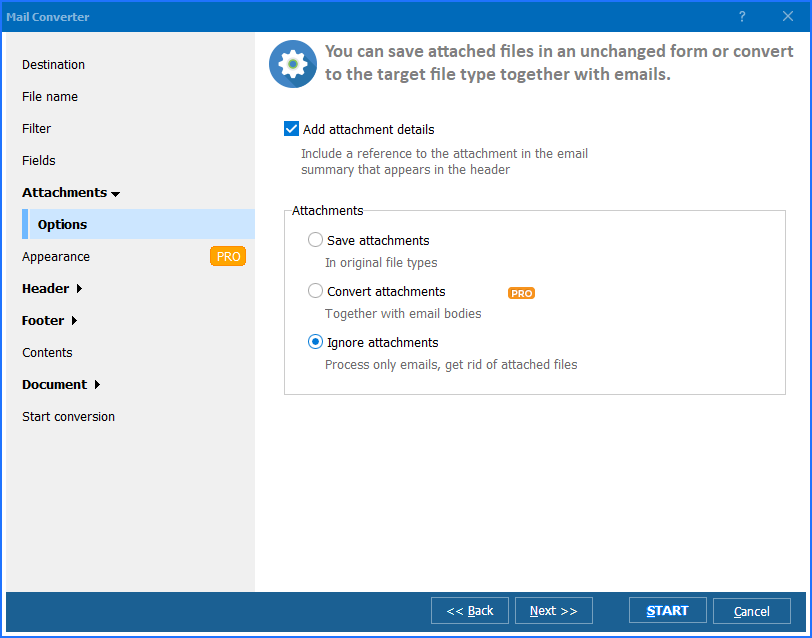
| Attachments | Usually stripped or ignored. | Embed, save separately, or convert (Pro). |
| Automation | Not available. | Command-line with Task Scheduler. |
| Cost | Free for small files, paid subscriptions. | One-time purchase: $59.90. Free 30-day trial. |
Total Mail Converter reads MSG files directly from disk using its own parser. It does not call Outlook, does not need MAPI, and does not require any Microsoft Office component on the machine. Install the converter on a clean Windows server and run it.
Legal professionals add Bates numbers to email evidence for court filings and e-discovery productions. Total Mail Converter stamps each page during conversion — configurable font, size, position, prefix, and numbering format. No separate PDF editing tool needed.
PDF/A (ISO 19005) is the standard for documents that must remain readable for decades. Total Mail Converter produces PDF/A output directly — all fonts are embedded, no external dependencies, compliant with archival regulations.
Convert each MSG to a separate PDF, or combine an entire folder of emails into one multi-page PDF. Both modes are available in the GUI and on the command line.
Protect output PDFs with passwords and user permissions: allow or forbid printing, editing, and text copying. Sign PDFs with a PFX certificate to guarantee document authenticity.
PDF is one option among many. Total Mail Converter also exports MSG files to DOC, DOCX, HTML, TXT, RTF, TIFF, JPEG, XPS, and more. One tool covers all email conversion needs.
Download the free 30-day trial — no email or credit card required. A personal license costs $59.90 and includes one year of free upgrades. Works on Windows 7/8/10/11.
Download Free Trial Buy License — $59.90
"We convert custodian MSG files to PDF for e-discovery productions. Total Mail Converter adds Bates stamps during conversion — no need for a separate PDF editor. The batch mode handles 50,000+ emails per case. Courts accept the output without objection. The command-line mode runs on our evidence processing server unattended."
 Robert Harmon Litigation Support Manager, Baker & Cole LLP
"Regulatory auditors require email archives in PDF/A format. Total Mail Converter produces compliant PDF/A output directly from MSG files exported from Outlook. We process quarterly archives of 15,000 emails. The digital signature option adds our compliance certificate to every document automatically."
Ingrid Svensson Compliance Analyst, Nordic Banking Group
"When employees leave, we archive their Outlook MSG files as PDFs for the company records. Total Mail Converter processes entire mailbox exports in one batch without needing Outlook on the server. The merge option combines related emails into single PDF files. Only suggestion: add an option to sort emails by date before merging."
 David Chen IT Administrator, Pacific Rim Consulting
Download free trial and convert your files in minutes.
No credit card or email required.

Related Topics
How to Convert Email to PDF

