Need help? Reach us at 

 +1 (855) 418-2323
Need help? Reach us at
+1 (855) 418-2323

 File Converters TIFF and PDF apps Forensic Freeware
(includes 30 day FREE trial)
(only $99.90)
Quick answer: To convert SVG to DXF, install Total CAD Converter, browse to the folder with your SVG files, check the ones you want, click the DXF button, set any scaling or page options, then press Start. The whole folder converts to native CAD entities readable by AutoCAD, LibreCAD, and CNC software in one batch — offline, with no rasterization.
SVG (Scalable Vector Graphics) is an XML-based format for 2D vector images. Browsers render SVG natively, and designers use it for icons, logos, illustrations, and interactive web graphics. SVG stores shapes, paths, text, and gradients as XML tags that CSS and JavaScript can manipulate. However, SVG is a web format. CAD applications, CNC controllers, laser cutters, and vinyl plotters do not read SVG files.
DXF (Drawing Exchange Format) was created by Autodesk as a universal interchange format for CAD drawings. Every CAD program reads DXF — AutoCAD, SolidWorks, LibreCAD, FreeCAD, DraftSight, BricsCAD, and many more. DXF stores entities such as lines, arcs, circles, polylines, splines, and text in a well-documented structure. CNC machines, laser cutters, plasma cutters, vinyl plotters, and engravers accept DXF as input.
| SVG | DXF | |
|---|---|---|
| Created by | W3C (open standard) | Autodesk (open format) |
| Primary use | Web graphics, icons, logos | CAD drawings, manufacturing, engineering |
| Content | XML-based paths, text, gradients, CSS styles | CAD entities: lines, arcs, polylines, splines |
| Opened by | Web browsers, Inkscape, Illustrator | Any CAD application, CNC software |
| Manufacturing use | Not accepted | CNC, laser, plasma, vinyl cutting |
| Editability | Code editors, vector editors | Full CAD editing with dimensions, layers, snapping |
Converting SVG to DXF bridges the gap between web design and engineering. A logo created in Inkscape becomes a file that AutoCAD can open. A vector illustration from a web project becomes a template for a laser cutter.
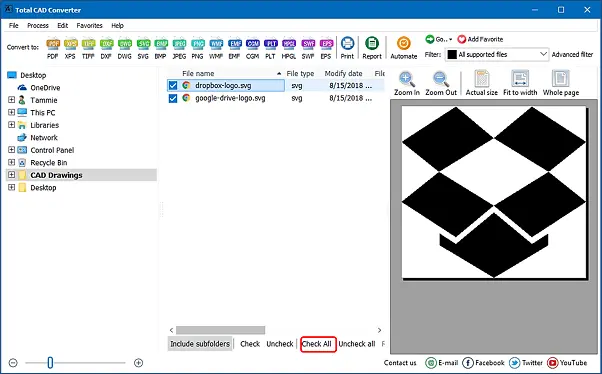
Processing takes seconds per file. A batch of 500 SVG drawings finishes in a few minutes with no user interaction after pressing Start.
Total CAD Converter includes a command-line interface for automated and server-side workflows:
CADConverter.exe C:\Designs\*.svg C:\Output\ -cDXF
This converts every SVG file in the source folder to DXF. Useful flags:
-cDXF — set target format to DXF-SubFolders — include SVG files from subfolders-log C:\Logs\convert.log — write a log file for trackingSave the command in a .bat file and schedule it with Windows Task Scheduler. Every night, new SVG assets are converted to DXF automatically.
SVG paths and shapes are translated into native DXF entities: polylines, arcs, splines, and text. Nothing is rasterized. The resulting DXF file is a real CAD drawing that you can snap to, dimension, and edit in any CAD tool.
Select a folder of 50 or 5,000 SVG files, click Start, and walk away. Total CAD Converter handles the entire batch without interaction. For recurring tasks, use the command line with a scheduled script.
You do not need Adobe Illustrator, Inkscape, or AutoCAD installed. Total CAD Converter reads SVG files and writes DXF output using its own engine. This saves hundreds of dollars in licensing fees.
Beyond SVG, Total CAD Converter reads DWG, DXF, DWF, DWFX, HPGL, PLT, CGM, and more. Output to DXF, PDF, TIFF, JPEG, PNG, BMP, WMF, SVG, and other formats. One tool covers all your CAD conversion needs.
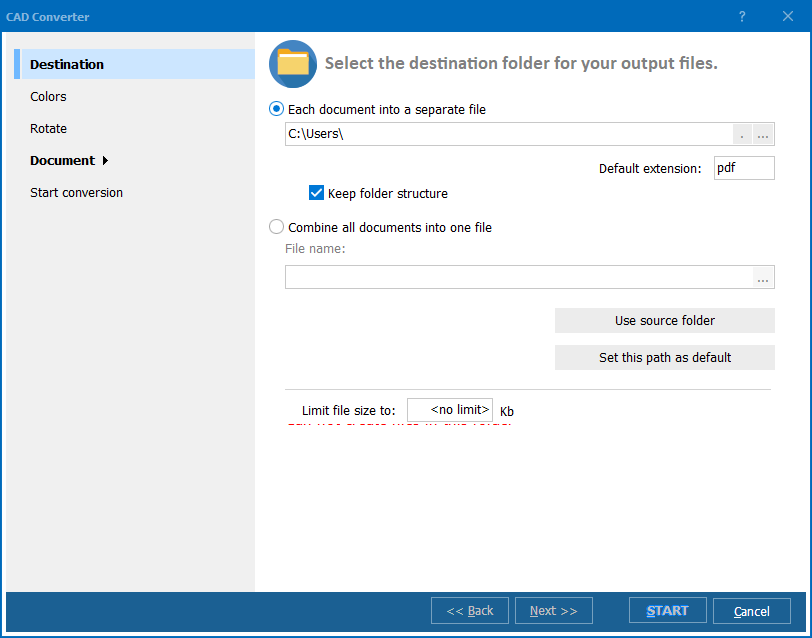
Adjust drawing dimensions during conversion. Scale an SVG logo to fit a specific sheet size, rotate the output, or set custom page dimensions — all from the settings dialog or command-line flags.
All conversion runs locally on your Windows PC. Client logos, proprietary designs, and engineering drawings never leave your machine. No internet connection required after installation.
| Feature | Online Tools | Total CAD Converter |
|---|---|---|
| Batch conversion | One file at a time | Unlimited files per batch |
| File privacy | Files uploaded to third-party server | 100% offline |
| File size limit | 5–50 MB | No limit |
| Output quality | Often rasterized or simplified | Native vector DXF entities |
| DXF compatibility | Limited — may not open in AutoCAD | Standard DXF readable by any CAD tool |
| Command line | Not available | Full CLI for automation |
| Speed | Depends on upload/download | Instant (local processing) |
| Pricing | Free tier with limits, then subscription | One-time $99.90 |

(includes 30 day FREE trial)
(only $99.90)
"Clients send logos and patterns as SVG from their web designers. My CNC router needs DXF. Total CAD Converter handles the entire batch in one click. Paths come through clean, closed, and ready to cut. Saved me from re-tracing every design in AutoCAD."
 Kevin Driscoll CNC Fabrication Shop Owner
"We receive SVG files daily from graphic designers and need DXF for our vinyl plotter. The batch mode is a lifesaver when processing 40-50 client logos at once. Output quality is consistent and the files import into our cutting software without errors."
Marta Lindqvist Sign Production Manager
"I use this to convert web-published component diagrams (SVG) into DXF so I can overlay them with our CAD drawings in AutoCAD. Vector accuracy is good and the command line fits into our nightly build script. Would appreciate layer support for complex SVG files."
 James Callahan Mechanical Engineer
CADConverter.exe C:\Designs\*.svg C:\Output\ -cDXF to convert an entire folder. Ideal for scripted workflows and scheduled tasks.
Download free trial and convert your files in minutes.
No credit card or email required.

Related Topics
Convert SVG to JPEG in Batch — CAD Drawings to Images

