Need help? Reach us at 

 +1 (855) 418-2323
Need help? Reach us at
+1 (855) 418-2323

 TIFF and PDF apps
Your shared drive has 2,000 PDF files across 50 folders. Management asks for a spreadsheet listing every file with its page count, file size, and creation date. Opening each PDF and writing down the numbers would take days. Even a PowerShell script only gets you file size and date — not the page count.
Tiff Teller scans folders of PDF and TIFF files, reads internal metadata (pages, dimensions, compression, DPI), and exports a complete report to Excel, CSV, PDF, or 15 other formats. Point it at a folder, choose the columns you need, and click Export. The report is ready in seconds.
Quick answer: To create a report on PDF files, launch Tiff Teller, open the folder with your PDFs, pick the columns you want (File Name, Pages, Size, Created, Compression, DPI), and click Export. Choose Excel, CSV, PDF, or one of 15 other formats, set the destination, and the finished report with page counts and metadata is ready in seconds.
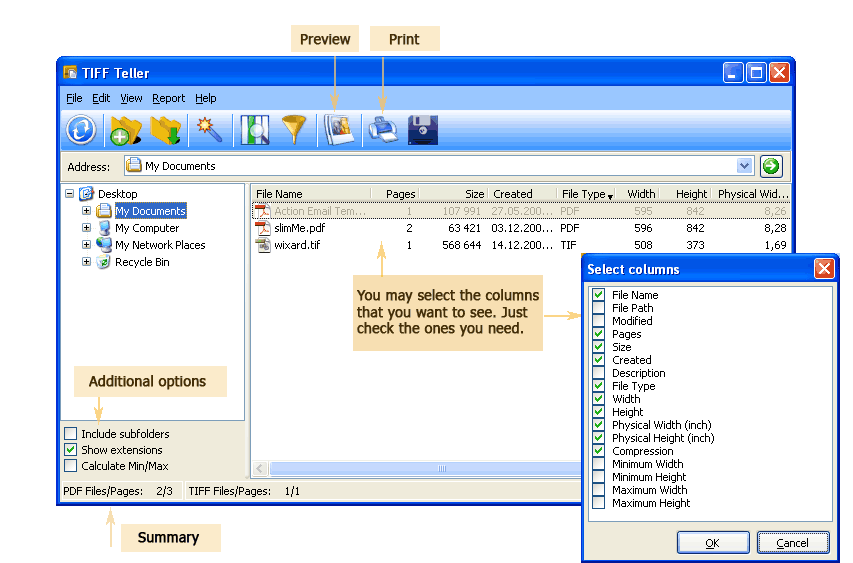
Tiff Teller reads properties that standard file managers cannot show. You choose which columns appear in the report:
| Column | What It Shows |
|---|---|
| File Name | Name and extension of the PDF file |
| Location | Full directory path to the file |
| Pages | Number of pages inside the PDF |
| Size | File size in bytes, KB, or MB |
| Width × Height | Page dimensions in pixels |
| Physical Size (inches) | Physical page dimensions based on DPI — useful for checking if files are Letter, A4, or Legal |
| DPI | Resolution (dots per inch) — important for print-ready files |
| Compression | Compression method used inside the PDF |
| Creation Date | When the file was originally created |
| Modification Date | When the file was last saved |
Hide columns you don't need and reorder the rest. The table on screen matches exactly what gets exported to the report file.
Tiff Teller exports reports to more than 15 formats. The most common options:
| Format | Best For | Notes |
|---|---|---|
| Excel (XLS/XLSX) | Sorting, filtering, pivot tables, charts | Most popular choice for data analysis |
| CSV | Database import, scripting, automation | Plain text, opens in any tool |
| Sharing read-only reports with clients or auditors | Professional formatting, cannot be edited | |
| Word (DOC/DOCX) | Adding narrative text around the table | Include the report in a larger document |
| HTML | Publishing on intranet, embedding in emails | Opens in any browser |
| XML / SQL / DBF | Direct database import, ERP/DMS integration | Structured format for enterprise systems |
| LaTeX / ODS / RTF | Academic publishing, OpenOffice, cross-platform | Niche formats for specific workflows |
Tiff Teller includes a command-line interface for unattended reporting. Generate a CSV report of all PDF files in a folder:
TiffTeller.exe /s "C:\Documents\*.pdf" /o "C:\Reports\pdf_report.csv" /f CSV /cols "FileName,Pages,Size,Created"
Parameters:
/s — source path with wildcard (e.g., *.pdf)/o — output report file path/f — export format (CSV, XLS, PDF, DOC, XML, etc.)/cols — columns to include in the reportSave this command in a .bat file and schedule it with Windows Task Scheduler. A nightly script can scan incoming folders and drop a fresh report on a shared drive every morning — no manual work needed.
| Task | Manual Approach | Tiff Teller |
|---|---|---|
| Page count | Open each PDF, check properties | Shown instantly for all files in the folder |
| File size & dates | Right-click → Properties per file | Visible in the table alongside page counts |
| Dimensions & DPI | Need Adobe Acrobat or third-party tools | Read automatically, displayed in columns |
| Report creation | Copy-paste into Excel row by row | One-click export to 15+ formats |
| Subfolders | Navigate each subfolder separately | Tick "Include subfolders" for recursive scan |
| 500 files | 3–4 hours of manual work | Under 15 seconds including export |
| Scheduling | Not possible | Command-line + Task Scheduler |
A print shop receives 300 PDFs from a client and needs the total page count to quote paper, ink, and binding costs. Tiff Teller shows the grand total in the status bar and exports a per-file breakdown to Excel.
Corporate and government archives require a catalog of digitized documents: file name, page count, dimensions, creation date. Tiff Teller generates this catalog as an Excel or CSV file in one click.
A scanning service bills per page. At the end of the day, the operator runs Tiff Teller on the output folder to confirm the total page count matches the invoice. Discrepancies are caught before the client receives the files.
Regulations may require tracking every document in a record-keeping system with its properties. Tiff Teller's export to Excel gives auditors a complete, sortable inventory with page counts, sizes, and dates.
Before migrating PDF files to a new document management system, you need to know total volume: how many files, how many pages, how much disk space. Tiff Teller provides these numbers for thousands of files in seconds.
Tiff Teller reads PDF metadata directly. It does not depend on Adobe Acrobat, Adobe Reader, or any other third-party software. Install Tiff Teller and it works immediately.
Scan an entire folder — or a folder tree with subfolders — in one operation. There is no file-count limit. Tiff Teller handles hundreds of thousands of files without slowing down.
Choose exactly which columns to include. Add headers, footers, and captions in the export wizard. The report comes out clean and ready to share, with no extra editing needed.
Tiff Teller never modifies your files. It reads metadata without touching content, compression, or any property of the original PDF. Your documents stay exactly as they are.
The command-line interface lets you integrate Tiff Teller into automated workflows. Generate daily, weekly, or monthly reports from .bat scripts run by Task Scheduler.
Download the free 30-day trial — no email or credit card required. A personal license costs $49.90 and includes one year of free upgrades.
Download free trial and convert your files in minutes.
No credit card or email required.

Related Topics
How to View the Number of Pages in Multiple PDF Files
