Logo
Home Products Support Contact About Us
arrow1 File Converters
arrow1 TIFF and PDF apps
arrow1 Forensic
arrow1 Freeware

PLT to HPGL Converter — Re-export Plotter Files to Standard HPGL


PLT files are already plotter output, but not every device reads every PLT variant correctly. Need to re-export PLT files into clean, standards-compliant HPGL? Total CAD Converter converts PLT to HPGL quickly and accurately, normalizing pen commands and output structure. Our PLT to HPGL converter:
  • Normalizes PLT output to clean HPGL/HPGL2 format
  • Converts hundreds of PLT files in one batch
  • Lets you adjust pen widths, paper size, and orientation
  • Works offline — drawings never leave your PC
  • Provides a command-line interface for automation
  • Includes a 30-day free trial with full functionality

Download Total CAD Converter and start converting PLT files to standard HPGL today.


Download Now!

(includes 30 day FREE trial)

Buy License

(only $99.00)

PLT vs HPGL: What Is the Difference?

PLT (Plotter File) is a generic file extension used by many CAD and plotting applications to store vector output destined for pen plotters and wide-format printers. PLT files can be written by AutoCAD, CorelDRAW, various EDA tools, and CNC software. Because each application may use a slightly different subset of plotter commands, PLT files are not always interchangeable between devices.

HPGL (Hewlett-Packard Graphics Language) is the industry-standard plotter command language defined by HP. HPGL uses a well-documented instruction set: PU (pen up), PD (pen down), SP (select pen), PA (plot absolute). HPGL2 extends this with polygon fill, raster graphics, and arc commands. Files with .hpgl or .hgl extensions follow this specification strictly.

The difference is compliance. A PLT file may contain non-standard or vendor-specific commands that cause errors on certain plotters. Converting PLT to HPGL strips non-standard instructions and produces output that any HPGL-compatible plotter reads without issues.

FeaturePLTHPGL
SpecificationNo formal standardHP-defined standard
File extensions.plt.hpgl, .hgl, .hp, .hpg
Written byAutoCAD, CorelDRAW, CNC toolsHPGL-compliant applications
CompatibilityVaries by source applicationUniversal across HPGL plotters
Vendor-specific commandsMay containStrictly standard
Typical usePrint output from CADPlotter interchange format

How to Convert PLT to HPGL

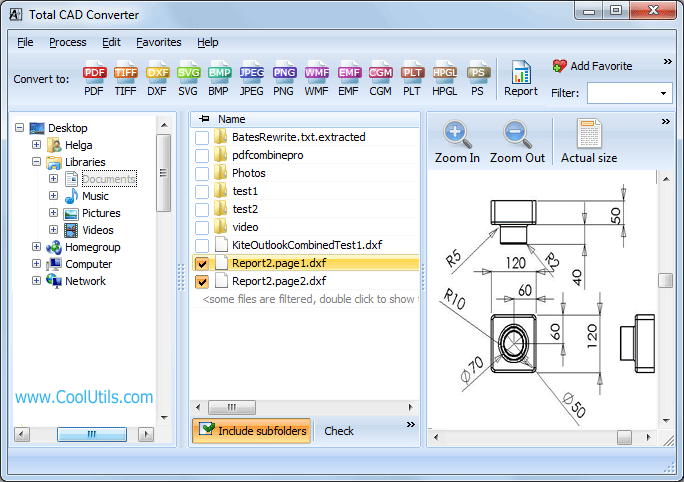
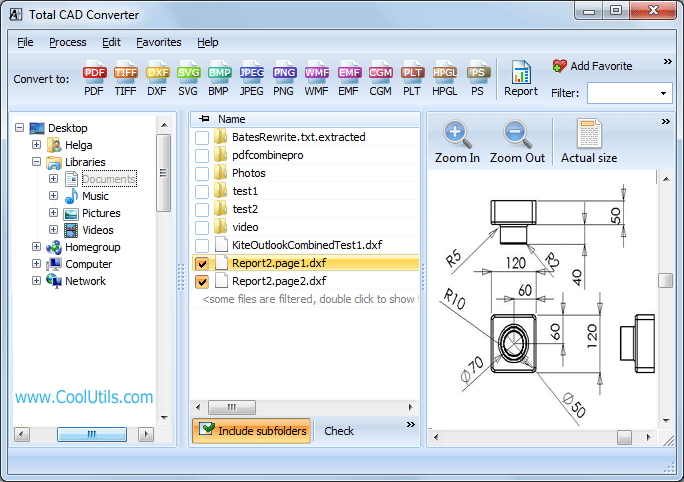
  • Step 1. Launch Total CAD Converter. The left panel shows a folder tree for quick navigation.
  • Step 2. Browse to the folder containing your PLT files. The central file list displays all supported CAD and plotter files.
  • Step 3. Check the PLT files you want to convert. Use Check All to select every file in the folder for batch processing.
  • Step 4. Click HPGL in the format toolbar at the top of the window.
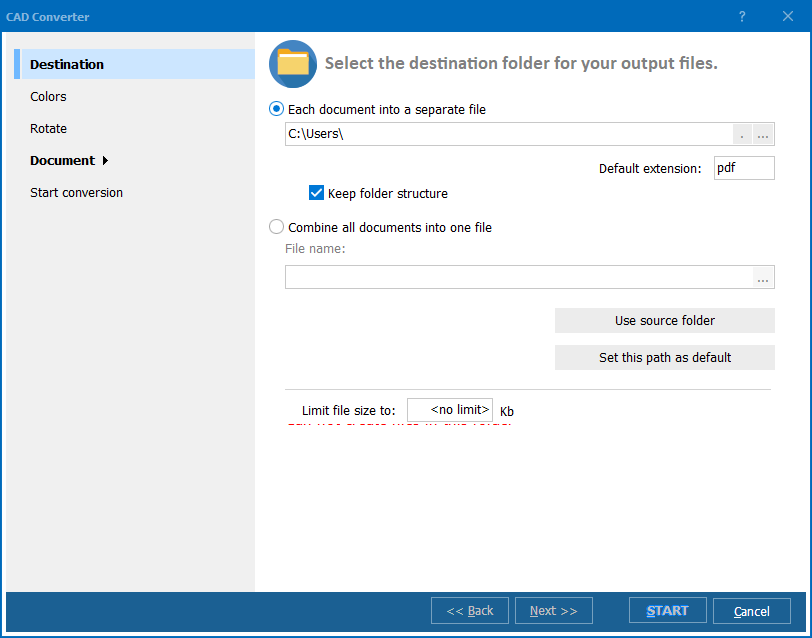
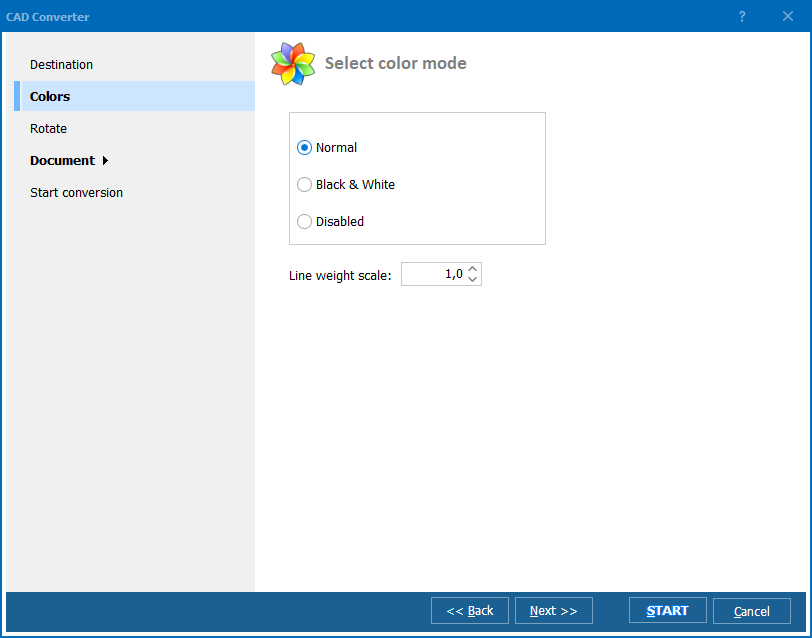
  • Step 5. Set the output folder and adjust settings: paper size, pen width, orientation, and color palette.
  • Step 6. Press Start. The converter processes all selected files and saves clean HPGL output to your chosen folder.

Total CAD Converter - PLT to HPGL interface

Conversion completes in seconds, even for large batches. Your original PLT files remain untouched.

Command-Line Conversion

Total CAD Converter includes a command-line interface for scripting and automation. Example:

CADConverter.exe C:\Plots\drawing.plt C:\Output\drawing.hpgl -cHPGL

Process an entire folder at once:

CADConverter.exe C:\Plots\*.plt C:\Output\ -cHPGL

Wrap these commands in a .bat file or a Windows Task Scheduler job to convert PLT files to HPGL on a fixed schedule — overnight, after each CAD export, or whenever new files appear in a watched folder.

Why Use Total CAD Converter?

Batch processing

Select a folder with hundreds of PLT files and convert them all to HPGL in a single run. The program handles large queues without slowing down.

Standards-compliant output

The converter normalizes PLT content into clean HPGL commands. Non-standard instructions, vendor-specific extensions, and malformed sequences are resolved during conversion. The resulting file works on any HPGL-compatible plotter.

Pen and paper control

Adjust pen widths, select pen colors, set paper size (A4 through A0, ANSI A through E, or custom dimensions), and choose landscape or portrait orientation before conversion starts.

Built-in viewer

Preview any PLT file before conversion to check line work, dimensions, and layout. No separate CAD application is needed to inspect the source drawing.

100% offline

All processing happens locally on your PC. Engineering drawings, manufacturing layouts, and proprietary designs never leave your machine. No internet connection is required.

13+ output formats

Besides HPGL, convert PLT to PDF, TIFF, JPEG, PNG, BMP, SVG, WMF, CGM, DXF, and more — all from the same tool.

Online Converters vs Desktop Converter

FeatureOnline ToolsTotal CAD Converter
File size limit10–50 MBNo limit
Batch conversionOne file at a timeUnlimited
PrivacyDrawings uploaded to cloud100% offline
SpeedDepends on connectionInstant (local)
Plotter settingsNone or minimalPen width, paper, orientation
HPGL complianceUnpredictableStandards-compliant
AutomationNot availableBuilt-in command line
PricingSubscription / per-fileOne-time $99.00

download PLT to HPGL converter

Windows 7/8/10/11 • 30-day free trial

When Do You Need PLT to HPGL Conversion?

There are several common scenarios where re-exporting PLT files to standard HPGL is necessary:
  1. Plotter compatibility issues. A PLT file exported from one CAD application may contain vendor-specific commands that your plotter rejects. Converting to clean HPGL eliminates these errors and produces output your device can read.
  2. Sharing with external print shops. When sending drawings to a third-party print service, HPGL is the safest plotter format. It is universally supported by HP, Canon, Epson, and other wide-format printers.
  3. Archiving plotter output. PLT files tied to a specific software version may become unreadable over time. Converting to standardized HPGL ensures long-term accessibility on any compliant device.
  4. CNC and cutting machine input. Some CNC routers and vinyl cutters accept HPGL but choke on non-standard PLT variants. A clean HPGL file feeds directly into the machine controller without manual editing.
  5. Normalizing files from multiple CAD tools. When your team uses different CAD applications (AutoCAD, CorelDRAW, SolidWorks), each generates PLT files with slightly different command sets. Batch-converting to HPGL normalizes them into a single, consistent format for your plotter queue.


Download Now!

(includes 30 day FREE trial)

Buy License

(only $99.00)


quote

Total CAD Converter Customer Reviews 2026

Rate It
Rated 4.7/5 based on customer reviews
5 Star

"We receive PLT files from a dozen different engineering firms, each using different CAD software. Some files would cause our HP DesignJet to halt mid-print. Converting everything to standard HPGL first solved the problem completely. Batch mode handles 300+ files before the morning shift starts."

5 Star Erik Lindqvist Print Production Manager

"Our CNC cutting machine only accepts clean HPGL input. PLT files exported from SolidWorks contained commands the controller could not parse. Total CAD Converter strips the non-standard parts and produces files the machine reads without errors. The command line version fits perfectly into our production script."

5 Star Angela Rossi Mechanical Engineer

"I archive plot files from legacy mapping projects. The original PLT files were created in software we no longer have. Converting to HPGL ensures they remain readable on any plotter in the future. The built-in viewer is a nice bonus for quick checks. Would appreciate a Linux version."

4 Star Brendan O'Neill GIS Technician

FAQ ▼

PLT is a generic plotter file extension used by many CAD applications. HPGL is a standardized plotter command language defined by Hewlett-Packard. PLT files may contain vendor-specific commands that some plotters reject, while HPGL files follow a strict, universally supported specification.
Different CAD applications write PLT files with different command subsets. If your plotter fails to read a PLT file, converting it to standard HPGL normalizes the commands and resolves compatibility issues.
Yes. Total CAD Converter supports batch conversion. Select all PLT files in a folder (or use Check All), choose HPGL as the target format, and press Start. Hundreds of files are processed in seconds.
No. Total CAD Converter is a standalone application. It reads PLT files and writes HPGL files using its own engine — no AutoCAD, CorelDRAW, or any other CAD software is required.
Yes. The conversion wizard lets you set paper size (A4 to A0, ANSI A through E, or custom dimensions), pen width, orientation (landscape or portrait), and color palette before starting.
Yes. Total CAD Converter includes a built-in command-line interface. You can automate PLT-to-HPGL conversion in batch scripts, scheduled tasks, or server-side workflows. Example: CADConverter.exe C:\Plots\drawing.plt C:\Output\drawing.hpgl -cHPGL
A personal license costs $99. A commercial license is $129. Both are one-time purchases with no subscription. A 30-day free trial is available with full functionality — no credit card or email required.


Start working now!

Download free trial and convert your files in minutes.
No credit card or email required.

⬇ Download Free Trial Windows 7/8/10/11 • 201 MB

Support
Total CAD Converter Preview1
Total CAD Converter Preview2
Total CAD Converter Preview3

Latest News

Newsletter Subscribe

No worries, we don't spam.


© 2026. All rights reserved. CoolUtils File Converters

Cards