Logo
Home Products Support Contact About Us
arrow1 File Converters
arrow1 TIFF and PDF apps
arrow1 Forensic
arrow1 Freeware

Total Image Converter Video Tutorial


Why Should You Try Total Image Converter


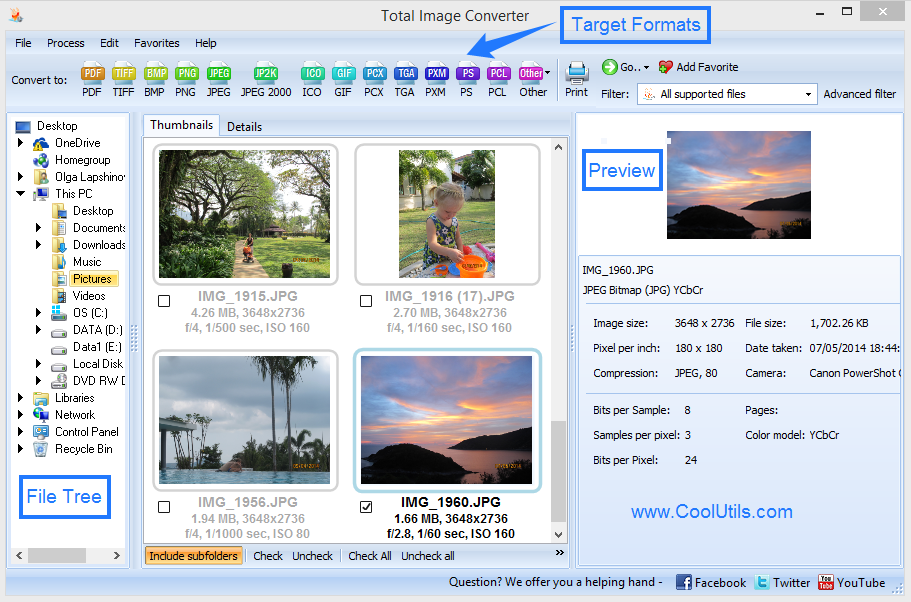
  • Converts TIFF, JPEG, JPEG2000, PNG, PSD, BMP, PSD, TGA, and many other image formats
  • Supports almost all RAW photos (ORF, PXM, NEF, PEF, RAF, NRW)
  • Resizes files to reduce size
  • Crops images as you like
  • Rotates photos in batch based on EXIF info
  • Adds your watermark to the output file
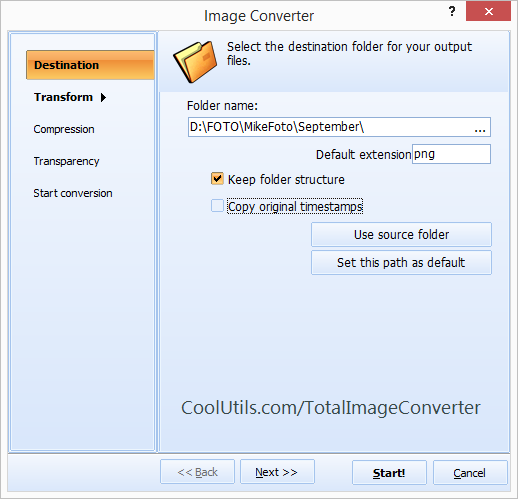
  • Works in a batch mode and keeps folders' structure
  • Clear user interface and command line
  • Free to try! Download the 30-day copy now.


quote

Total Image Converter Customer Reviews 2026

Rate It
Rated 4.8/5 based on customer reviews
5 Star

"I shoot in RAW and need JPEG exports for clients and PNG for web galleries. Total Image Converter batch-processes entire shoots in minutes. The resize and watermark features save me from opening Photoshop for routine exports."

5 Star Sarah Mitchell Photographer, Mitchell Studios

"We digitize historical documents as TIFF and need JPEG copies for our online catalog. Total Image Converter processes 10,000+ images per batch via command line. The DPI and quality controls give us consistent output."

5 Star Hans Weber IT Administrator, Stadtarchiv Munchen

"Client assets arrive in every format imaginable — PSD, TIFF, BMP, WebP. Total Image Converter standardizes everything to optimized JPEG and PNG for web use. The CMYK-to-RGB conversion is accurate. Great time saver."

4.5 Star Maria Santos Web Developer, Agencia Digital Lisboa

FAQ: Total Image Converter Tutorial ▼

Over 35 formats including TIFF, JPEG, RAW, PNG, BMP, PSD, TGA, WebP, PCX, EMF, GIF, ICO, JPEG2000, and many more. Both common and legacy formats are supported.
Select an entire folder in the file browser, check all files, choose the output format, and press Start. Total Image Converter processes all selected images in one run.
Yes. The conversion wizard includes resize (by pixels, percentage, or fit-to-size) and crop options. Both are applied during conversion — no extra step needed.
Yes. RAW files from Canon, Nikon, Sony, Fuji, and other camera manufacturers are supported. Convert them to JPEG, TIFF, PNG, or any other format.
Yes. Add text, logos, dates, or custom images as watermarks. Position, size, and transparency are configurable.
Yes. All conversion options are available via command line for automation, scripting, and scheduled batch processing.
A personal license costs $24.90 (one-time payment, lifetime use). A 30-day free trial with full functionality is available — no registration required.


Start working now!

Download free trial and convert your files in minutes.
No credit card or email required.

⬇ Download Free Trial Windows 7/8/10/11 • 41 MB

Related Articles

Command line guide
PCX Converter — Convert PCX Files in Batch on Windows
JPEG Converter — Convert JPEG Files in Batch on Windows
PNG Converter — Convert PNG Files in Batch on Windows
Convert EMF to PNG in Batch on Windows
Convert PNG to PDF in Batch on Windows
Convert PNG to BMP in Batch on Windows
Convert BMP to TIFF in Batch on Windows
Convert BMP to RAW in Batch on Windows
TGA Converter — Convert TGA Files in Batch on Windows
Crop TIFF Images in Batch — Batch TIFF Cropper for Windows
Convert TIFF to PDF
PSD to PDF Converter — Convert Photoshop Files to PDF in Batch
Convert TIFF to PDF in Batch Comfortably
Easily Convert JPEG to PDF in Batch
Convert WebP to GIF
Convert ICNS to JPEG with ease and smile
Convert WebP to JPEG in batch.
How to convert JPG to ICO and get neat output?
Convert JPG to JPEG2000 and get a neat output.
Convert TIFF to PNG in batches fast
Crop PNG Images in batches with comfort.
Resize TIFF Images in batches with comfort.
Rotate TIFF Images in batches and preserve high quality
Convert RAW to TIFF automatically.
Try to convert BMP to JPEG in batches with Coolutils Tools!
How to convert JPEG to TIFF in batches?
Convert JPEG to BMP in batches automatically
Convert files from RAW to JPEG
Convert JPEG files to PDF with comfort
Convert JPEG to PNG in batches with comfort
Convert files from PSD into BMP in batches
Converting PSD to JPEG in batches just in few clicks!
Converting PSD to TIFF in batches has never been so easy!
Convert PCD documents to JPEG with ease.
The best way to combine PNG images into 1 Multi-page PDF file
The best way to combine JPEG images into 1 Multi-page PDF file
Export CMYK to RGB any number of files in one go
Try batch image Converter with many handy options
How to crop an image with accurate results?

Friday Sale
Image Converter Preview1
Image Converter Preview2

Latest News

Newsletter Subscribe

No worries, we don't spam.


© 2026. All rights reserved. CoolUtils File Converters

Cards