Need help? Reach us at 

 +1 (855) 418-2323
Need help? Reach us at
+1 (855) 418-2323

 File Converters TIFF and PDF apps Forensic Freeware
Combine your TIFF files easily
Windows
2000/2003/Vista
7/8/10/11/Citrix
Scanners, fax machines, and document management systems produce dozens of separate TIFF files for what is logically one document. Emailing 40 single-page TIFFs as attachments is impractical. Printing them one by one wastes time. Tiff Combine merges multiple TIFF files into a single multi-page TIFF or PDF — in seconds, with full control over compression, page order, and grouping.
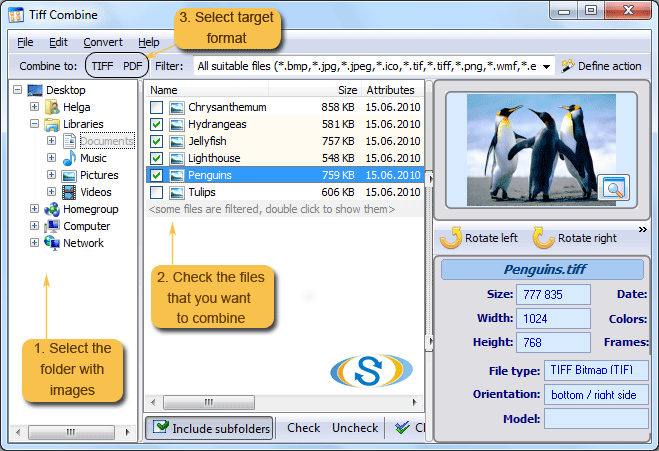
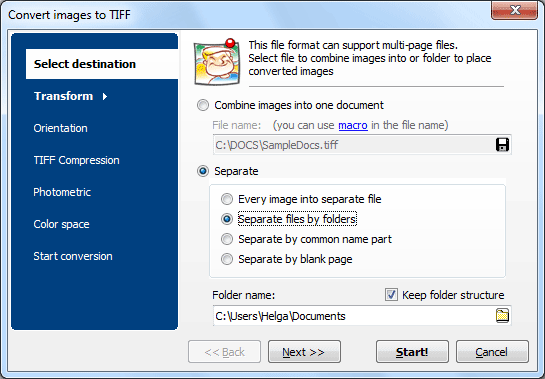
Quick answer: To combine TIFF files into one document, install Tiff Combine, add a folder of TIFFs, choose the output — a single multipage TIFF or one PDF — set compression and page order, then click Combine. It merges by folder or by a shared keyword in the file name, processes thousands of files in one batch, runs offline, and works from the command line. Free 30-day trial.
Tiff Combine can be run via user interface or command line. For web servers and services, use TiffCombine X (ActiveX available for registered users). Works on Windows 7/8/10/11. Download size: 23.5 MB. 30-day free trial, no credit card or email required.
| Feature | Tiff Combine | Online Services |
|---|---|---|
| Batch merge (thousands of files) | Yes | 5–10 files per upload |
| File size limit | None | Usually 50–200 MB |
| Combine by folder / by name | Yes | No — manual selection only |
| Privacy (files stay on your PC) | Yes | Uploaded to third-party servers |
| Compression control | LZW, CCITT, JPEG, ZIP | No or limited |
| Auto-rotate by text direction | Yes | No |
| PDF output with password | Yes | Rarely |
| Command-line automation | Yes | No |
| Resize / crop during merge | Yes | No |
| Pricing | $49.50 one-time | Monthly subscription or per-file fees |
(includes 30 day FREE trial)
(only $49.50)

"Tiff Combine seems to be perfect perfect for my use, and I cannot help you so much because we use it only to combine scanned tif documents with the very old Kodak Imaging, oldest but still perfect with Win 7 too!!!
May be could be a good idea to add a "scanner function"!!! (But pls. don't forget the black&white option). In addition I would congratulate your company because has given enough time for a correct software evaluation. I would just pay before, by end of November, but I had problems issuing payment with my Visa Electron. I've been obliged to use PayPal!"
 Nicola Menna
CRESO DIVISIONE ITALIANA
Trusted across industries that rely on TIFF document workflows
Merge scanned pages into organized files
Scan departments produce hundreds of single-page TIFFs daily. Tiff Combine merges them by folder or naming convention into multi-page documents, eliminating manual assembly and keeping archives organized.
Organize case files and court records
Law firms and courts need consolidated multi-page TIFF files for case records. Combine depositions, contracts, and evidence pages into single files with optional PDF output, password protection, and digital signatures.
Consolidate patient imaging files
Healthcare facilities combine radiology scans, lab reports, and patient records from TIFF-based imaging systems into organized multi-page files per patient or study for PACS archiving and record keeping.
Batch-process claims and financial documents
Banks and insurers process thousands of scanned checks, claim forms, and policy documents daily. Tiff Combine automates merging by folder or name pattern, integrating into existing batch workflows via command line.
Combine technical drawings and blueprints
Engineering firms merge large-format scanned blueprints, technical drawings, and specification sheets into organized multi-page TIFF archives with controllable compression for optimal file size.
| Full Software Name | Coolutils Tiff Combine |
| Description | Easily merge multiple TIFF files into one with Coolutils Tiff Combine. Whether you're combining dozens of single-page TIFFs or assembling multi-page documents, this tool offers flexible control over file order, page structure, and naming. Ideal for archiving, legal, and scanning workflows. |
| Processor | At least 2.4 GHz |
| RAM | 4 GB |
| Minimum Hard Drive Space | 64.5 MB |
| Operating System | Windows 2000 / 2003 / 7 / 8 / 10 / 11 |
| Trial version | Download Tiff Combine and try it free for 30 days. Test its ability to merge TIFF images with ease and precision, including support for batch processing, bookmarks, and more. |
Updated Tue, 15 Sep 2026
(only $49.50)
Updated Tue, 15 Sep 2026
(only $49.50)
Download free trial and convert your files in minutes.
No credit card or email required.



