Need help? Reach us at 

 +1 (855) 418-2323
Need help? Reach us at
+1 (855) 418-2323

 File Converters TIFF and PDF apps Forensic Freeware
Detect and delete blank pages in scanned tiff and pdf files in batch.

Windows
2000/2003/Vista
7/8/10/11/Citrix
Scanned documents almost always contain blank pages. Duplex scanners, fax machines, and document feeders insert empty sheets that waste storage, slow down OCR, and clutter archives. Tiff PDF Cleaner detects and deletes blank pages from TIFF and PDF files automatically — processing thousands of documents in one batch without manual review.
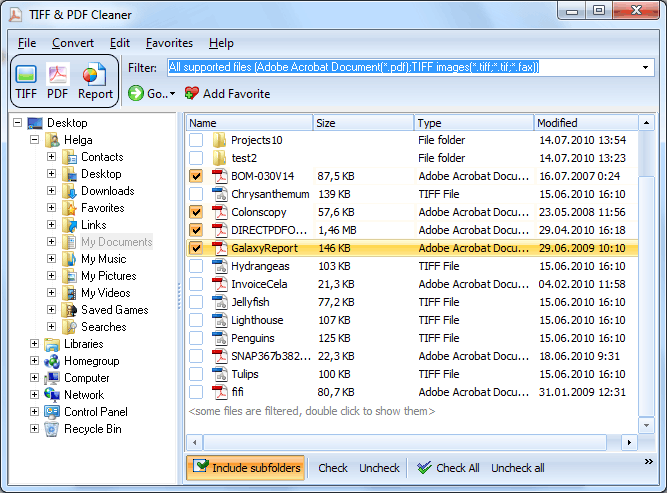
Quick answer: To clean scanned TIFF or PDF files, install Tiff PDF Cleaner, add the folder of files, and run it — it detects and deletes blank pages, removes black scan borders, and auto-deskews skewed pages in one batch. You can also extract blank pages to separate files for review, or automate it from the command line. Free 30-day trial.
If you want to double-check before deletion, the program can extract blank pages and save them as separate files for manual verification. No important data is lost.
Tiff PDF Cleaner also removes unnecessary black borders from scanned pages (black border on white background) and straightens skewed pages with the built-in auto-deskew option.
The workspace setting lets you define exactly which area of the page must be empty. Faxes with headers or footers are correctly identified as blank because only the workspace zone is analyzed. A separate tolerance control handles scanner noise — minor specks and artifacts on otherwise empty pages won't prevent detection.
After processing, the History Journal shows a complete summary: which files were processed, how many pages were detected as blank, and how many were deleted or extracted.
Tiff PDF Cleaner has an intuitive interface that takes seconds to learn. Advanced users can automate blank page removal via command line or .BAT scripts. Works on Windows 7, 8, 10, and 11. Download size: 41.3 MB. 30-day free trial, no credit card or email required.
| Feature | Tiff PDF Cleaner | Online Services |
|---|---|---|
| Batch processing (thousands of files) | Yes | 1–5 files at a time |
| File size limit | None | Usually 50–100 MB |
| Privacy — files stay on your PC | Yes | Uploaded to third-party servers |
| Works offline | Yes | No |
| Adjustable workspace & tolerance | Yes | Rarely |
| Auto-deskew & border crop | Yes | No |
| Command-line / automation | Yes | No |
| Speed on 1,000+ files | Minutes | Hours (manual uploads) |
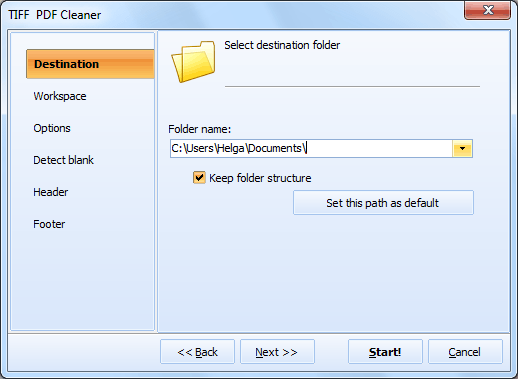
| Preserves folder structure | Yes | No |
| One-time payment | $59.90 lifetime | Monthly subscription or per-file fees |
(includes 30 day FREE trial)
(only $59.90)

"Our company is very satisfied with the process and easy accessibility of our TiffPDFCleaner. Uploading mail, documents and so forth into here has been very self-explanatory for all users. We use this software primarily to delete blank pages from large documents and everything has come out accurate and smooth. Thank you!"
 Jena Mancino
Alliance Insurance Group, Receptionist
www.allianceinsgrp.com
"I had a single use case, which was filing all my mail correspondence and wanted to remove blank pages from PDFs. This is working like a charm. I am using with WatchDir which monitors my scan directory and when a file arrives it runs TiffPDFCleaner via BAT to remove the pages. Works like a charm."
 James Hogg, MBA
Managing Director
IOH Injury and Occupational Health, www.ioh.net
Trusted by teams that process large volumes of scanned documents
Remove blank pages from large document archives
Organizations with years of scanned documents use Tiff PDF Cleaner to batch-process entire archive folders, automatically removing blank pages to reclaim storage space and streamline document retrieval.
Clean up scanned batches automatically
High-volume scanning departments produce thousands of pages daily with unavoidable blank sheets. Tiff PDF Cleaner processes output folders recursively, eliminating blanks while preserving folder structure.
Prepare clean records for courts and regulators
Law firms and compliance teams need blank-free documents for case filing and audits. Tiff PDF Cleaner ensures depositions, contracts, and evidence files contain only meaningful pages before submission.
Speed up OCR by removing empty pages first
Blank pages waste OCR processing time and introduce garbage output. Running Tiff PDF Cleaner before OCR reduces processing time, improves accuracy, and keeps text-searchable archives clean.
Clean patient files and claim documents
Healthcare providers and insurers process stacks of scanned forms with frequent blank separators. Tiff PDF Cleaner strips those blanks in batch, keeping patient records and claim files compact and organized.
| Full Software Name | Coolutils Tiff PDF Cleaner |
| Description | Coolutils Tiff PDF Cleaner automatically removes blank pages from scanned TIFF and PDF files. Save time and storage by eliminating empty pages during batch processing. Perfect for optimizing archives, preparing documents for OCR, or reducing unnecessary file size. |
| Processor | At least 2.4 GHz |
| RAM | 4 GB |
| Minimum Hard Drive Space | 41.3 MB |
| Operating System | Windows 2000 / 2003 / 7 / 8 / 10 / 11 |
| Trial version | Download Tiff PDF Cleaner and use it free for 30 days. Automatically detect and remove blank pages from hundreds of files with just a few clicks. |
Updated Wed, 09 Sep 2026
(only $59.90)
Updated Wed, 09 Sep 2026
(only $59.90)
Download free trial and convert your files in minutes.
No credit card or email required.



