Logo
Home Products Support Contact About Us
arrow1 File Converters
arrow1 TIFF and PDF apps
arrow1 Forensic
arrow1 Freeware

Convert M4A to MP3 — Batch M4A to MP3 Converter


Voice memos from an iPhone, songs bought on iTunes, or audio exported from GarageBand usually land in your folder as M4A. That is fine on Apple devices, but plenty of car stereos, older MP3 players, and Windows software still expect MP3. Total Audio Converter converts M4A to MP3 in batch — point it at a folder and every file comes out as a universal MP3 that plays anywhere, with the ID3 tags carried over.

Quick answer: To convert M4A to MP3, install Total Audio Converter, select your M4A files, choose MP3 as the output format, set the bitrate, then click Start. The whole folder converts offline in one batch, with artist and album tags kept and no file-count limit.

Download Now!

(includes 30 day FREE trial)

Buy License

(only $24.90)

M4A vs MP3: What Is the Difference?

M4A is an MPEG-4 audio container, most often holding AAC-encoded sound. It is the default format for iTunes purchases, Apple voice memos, GarageBand exports, and Siri recordings. At the same bitrate, AAC inside M4A sounds slightly better than MP3 — but support outside the Apple ecosystem is inconsistent.

MP3 is the oldest and most universally supported audio format. Every car stereo, MP3 player, smart speaker, and piece of Windows software plays MP3 without question. Converting M4A to MP3 trades a small amount of audio quality for guaranteed playback everywhere.

How to Convert M4A to MP3

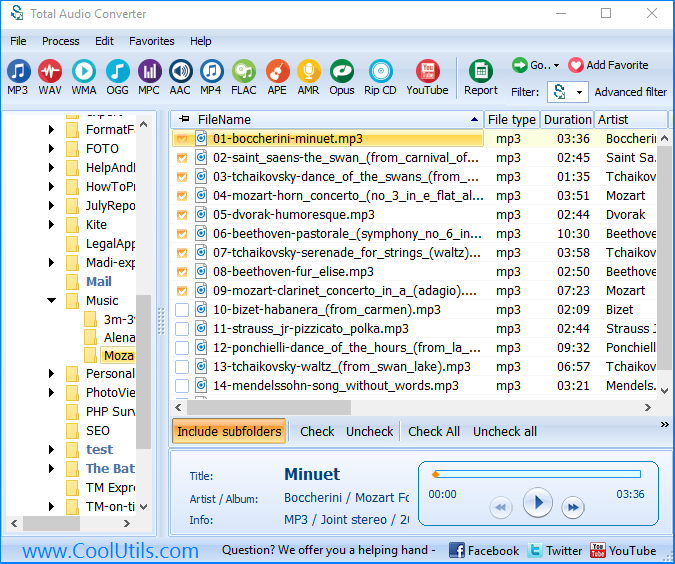
  • Step 1. Launch Total Audio Converter. The left panel shows a folder tree for quick navigation.
  • Step 2. Browse to the folder that holds your M4A files.
  • Step 3. Check the files you want, or click Check All to select the whole folder.
  • Step 4. Click MP3 in the format toolbar at the top of the window.
  • Step 5. Set the bitrate (320 kbps for near-lossless, 192 kbps for a balance, 128 kbps for smaller files) and choose a destination folder.
  • Step 6. Press Start. Total Audio Converter writes an MP3 for every M4A file.

Each M4A file becomes a separate MP3. The original files are never modified, and ID3 tags — artist, album, track name, cover art — carry over automatically.

Command-Line Conversion

Total Audio Converter includes a command-line interface for converting M4A without the GUI. Example:

AudioConverter.exe C:\Music\*.m4a C:\Output\ -c MP3 -b 320

Wrap this in a .bat file or a scheduled task to convert M4A files automatically — useful for a watched folder that receives new voice memos or recordings.

Why Use Total Audio Converter?

Green PlusTrue batch conversion. Convert one M4A file or an entire music library in a single run. No dragging files one by one.

Green PlusTags preserved. Artist, album, track title, and embedded cover art transfer automatically to the MP3 output.

Green PlusBitrate control. Choose the exact MP3 bitrate you need, from small 128 kbps files to near-lossless 320 kbps.

Green Plus100% offline. Your audio files never leave your PC. Nothing is uploaded to a cloud server.

Green Plus30+ formats. Besides MP3, convert M4A to WAV, FLAC, OGG, AAC, WMA, and more — all from the same program.

Online Converters vs Desktop Converter

FeatureOnline ToolsTotal Audio Converter
Files per job5–20 typicalUnlimited
File size limit10–50 MBNo limit
PrivacyFiles uploaded to cloud100% offline
ID3 tagsOften strippedPreserved
Bitrate controlRarelyFull control
AutomationManual onlyCommand line
PricingSubscription or per-fileOne-time $24.90

download M4A to MP3 converter

Windows 7/8/10/11 • 30-day free trial

When Do You Need M4A to MP3 Conversion?

Here are the most common situations where converting M4A to MP3 is necessary:
  1. Car stereos and older devices. Many car head units and older MP3 players do not recognize M4A. Converting to MP3 guarantees playback.
  2. Sharing with non-Apple users. Android phones, Windows software, and cross-platform apps handle MP3 more reliably than M4A.
  3. Uploading to platforms that reject M4A. Some forums, podcast hosts, and web players only accept MP3.
  4. Editing in older audio software. Programs that predate widespread M4A support often only import MP3 or WAV.
  5. Archiving a music or voice-memo library. Storing files as MP3 guarantees they will still play on any device years from now.


Download Now!

(includes 30 day FREE trial)

Buy License

(only $24.90)


quote

Total Audio Converter Customer Reviews 2026

Rate It
Rated 4.8/5 based on customer reviews
5 Star

"Guests send voice memos from their iPhones as M4A and my editing software wants MP3. Converting a whole folder at once with the tags intact saves me from renaming and re-tagging every episode by hand."

5 Star Derek Holt Podcast Editor

"My students record practice sessions on iPads and email M4A files that half of them cannot play on their own laptops. Batch converting to MP3 before I hand feedback back has solved that completely."

5 Star Chloe Bennett Music Teacher

"Customers bring in USB drives full of iTunes M4A purchases that their head unit will not read. I convert the whole drive to MP3 in one pass now instead of file by file."

4 Star Ray Ortiz Car Audio Installer

M4A to MP3 — FAQ ▼

Install Total Audio Converter, add your M4A files, click MP3 in the toolbar, set the bitrate, then click Start. Each M4A becomes an MP3. You can also right-click an M4A file in Explorer and choose Convert To.
Yes. Point Total Audio Converter at a folder, select every M4A file, and convert them all to MP3 in one run. It also runs unattended from the command line.
There is some loss, since both formats are lossy and this is a lossy-to-lossy transcode. At 256-320 kbps the difference is inaudible to most listeners.
Yes. Total Audio Converter reads the metadata from each M4A file and writes the corresponding ID3 tags into the MP3 output, including embedded cover art.
No. Total Audio Converter reads M4A files directly on your PC. Nothing is uploaded and no Apple software is required. It runs on Windows 7, 8, 10, and 11.
Total Audio Converter comes with a fully functional 30-day free trial, no registration required. A lifetime license is $24.90.
Yes. Total Audio Converter includes a command-line interface. Build a .bat file with your bitrate settings to automate M4A to MP3 conversion on a workstation or server.


Start working now!

Download free trial and convert your files in minutes.
No credit card or email required.

⬇ Download Free Trial Windows 7/8/10/11 • 79 MB

Support
Audio Converter Preview1
Audio Converter Preview2
Audio Converter Preview3

Related Topics

Latest News

Newsletter Subscribe

No worries, we don't spam.


© 2026. All rights reserved. CoolUtils File Converters

Cards