Logo
Home Products Support Contact About Us
arrow1 File Converters
arrow1 TIFF and PDF apps
arrow1 Forensic
arrow1 Freeware

Convert VOX to MP3


VOX files come from telephony systems, IVR platforms, and digital voice recorders. They store raw ADPCM audio at 8 kHz mono with no file header — which means standard media players cannot identify them, let alone play them. If you have call recordings, voicemail exports, or IVR prompts in VOX format, they are effectively unplayable without specialized software.

MP3 is the opposite: every phone, car stereo, media player, and audio editing tool understands it. Converting VOX to MP3 turns an opaque telephony file into something you can play, share, archive, or import into any workflow. Total Audio Converter handles this conversion in batch — drop a folder of VOX files, choose MP3, and the converter processes them all without manual steps.

Download Now!

(includes 30 day FREE trial)

Buy License

(only $49.90)

Key Features

  • Batch conversion. Process an entire folder of VOX recordings in one operation. No file-by-file repetition.
  • Adjustable output quality. Set MP3 bitrate from 32 to 320 kbps. For voice recordings at 8 kHz source quality, 64–128 kbps is typically sufficient.
  • Command-line interface. Automate nightly exports from call center archives or IVR log directories with a single command or a scheduled .bat script.
  • Built-in audio preview. Play source VOX files inside the converter before processing to confirm you have the right recordings.
  • Folder structure preservation. Output files can mirror the source folder tree — useful when converting organized call logs sorted by date or agent.
  • No internet required. All conversion runs locally. Call recordings never leave your machine.

VOX vs MP3: What Is the Difference?

VOX is a raw ADPCM (Adaptive Differential Pulse Code Modulation) audio format used in telephony and embedded voice systems. It has no file header — the data starts at byte zero. Playback rate is typically 8 kHz mono, matching the bandwidth of telephone-quality audio. Because there is no header declaring sample rate, bit depth, or channel count, a player must be told these parameters in advance. Almost no consumer software includes that logic. VOX files are also sometimes called Dialogic VOX after the telephony hardware vendor that popularized the format.

MP3 (MPEG-1 Audio Layer III) is a compressed audio format with a well-defined header structure. Every player, operating system, and streaming platform supports it natively. MP3 files carry metadata, are seekable, and can represent any sample rate or channel configuration. The format has been a universal standard since the late 1990s and remains the default for audio sharing and archiving.

FeatureVOXMP3
File headerNone (headerless raw data)Yes (ID3 tags, frame headers)
Typical sample rate8 kHz8–48 kHz
ChannelsMonoMono or stereo
Native playback supportTelephony software onlyUniversal
CodecADPCMMPEG Layer III
Metadata supportNoYes (ID3 tags)
Typical use caseIVR, call centers, voice recordersMusic, podcasts, voice archives

How to Convert VOX to MP3

  1. Download and install Total Audio Converter. The 30-day trial is fully functional — no email or credit card required.
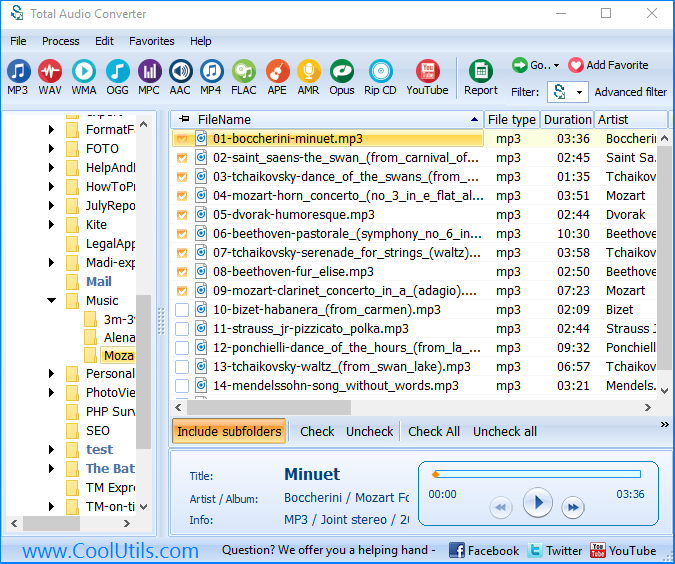
  2. Open the program. The left panel shows your folder tree. Navigate to the folder containing your VOX files.
  3. Check the boxes next to the files you want to convert. Use Ctrl+A to select all files in the folder at once.
  4. Click MP3 in the format toolbar at the top of the window.
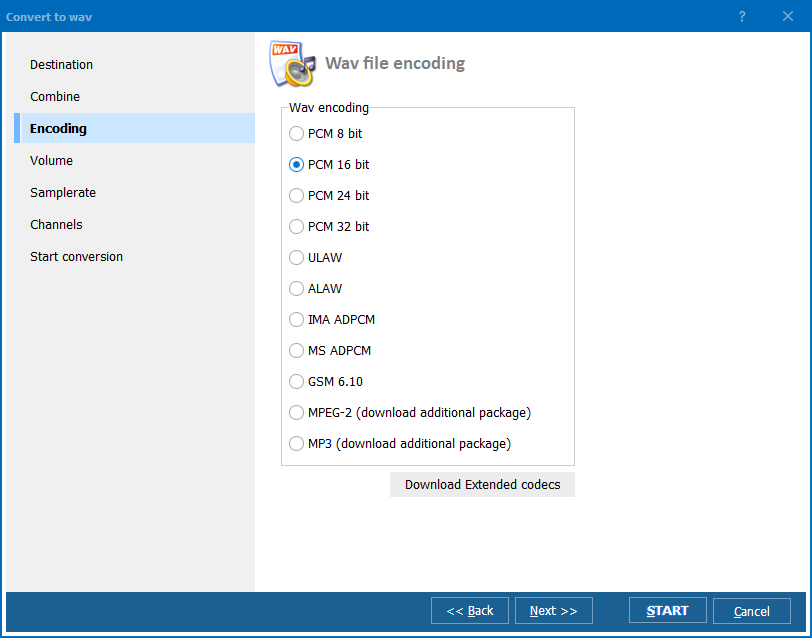
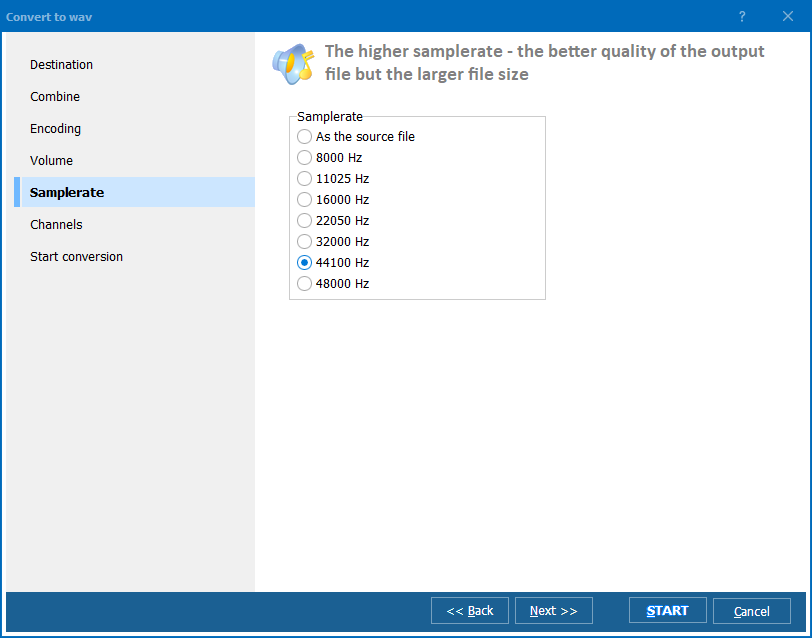
  5. In the conversion settings dialog, set the output bitrate and destination folder. For telephone-quality voice recordings, 64 or 128 kbps is standard. Click Start.
  6. The converter processes each file sequentially and saves MP3 files to the output folder. A progress bar shows status per file.

Command-Line Conversion

Total Audio Converter includes a command-line version for server use and automation. Example command:

TotalAudioConverter.exe C:\CallRecordings\VOX\ C:\CallRecordings\MP3\ -c MP3 -b 128

This converts all VOX files in the source folder to MP3 at 128 kbps and saves them to the output folder. You can wrap this in a .bat script and trigger it with Windows Task Scheduler — for example, to process overnight call recordings every morning before the team starts reviewing them. For IVR systems that export VOX logs to a network share, this approach handles conversion automatically with no manual steps.

Why Use Total Audio Converter?

Handles headerless VOX files correctly

VOX files have no header, so a converter must know to treat the input as raw 8 kHz mono ADPCM data. Generic audio converters that rely on file headers to determine format will fail or produce distorted output. Total Audio Converter understands the VOX format specifically and applies the correct decoding parameters without requiring manual configuration for each file.

Processes large call archives in one run

Call centers and IVR systems accumulate thousands of VOX recordings. Converting them one at a time is not workable. Total Audio Converter processes entire folder trees in a single operation, including subfolders when recursive mode is enabled. You select the root folder, start the conversion, and the program works through every VOX file it finds.

Output quality is configurable

Voice recordings at 8 kHz source quality do not benefit from high bitrates — but the right bitrate depends on your use case. Legal and compliance archives may require a specific bitrate for consistency. Playback-only archives can use 64 kbps to minimize storage. Total Audio Converter lets you set the bitrate per conversion profile so the output matches your requirements.

Works without an internet connection

Call recordings frequently contain confidential information — customer data, legal discussions, HR conversations. Total Audio Converter runs entirely locally. No files are uploaded anywhere. This matters for compliance with data protection policies and for environments where internet access from workstations is restricted.

Automatable for recurring workflows

If your telephony system exports VOX files on a schedule, you can match that schedule with a .bat script calling the command-line converter. The script can specify source and destination paths, bitrate, and naming conventions. Combined with Windows Task Scheduler, this creates a hands-free pipeline from VOX export to MP3 archive.

Online Converters vs Desktop Converter

FeatureOnline convertersTotal Audio Converter
VOX format support Rarely supported Native VOX support
File size limitTypically 50–200 MBNo limit
Batch conversion Usually one file at a time Unlimited batch
Files uploaded to server Yes — confidential recordings exposed No — local only
Command-line / automation No Yes
Works offline No Yes
Conversion speed for large batchesSlow (upload + server queue)Fast (local CPU)

When Do You Need VOX to MP3 Conversion?

  • Call center recording review. Supervisors need to review agent calls for quality assurance. VOX files from the recording system cannot be played in standard media players or imported into QA software. Converting to MP3 makes recordings immediately accessible to reviewers without special telephony software installed.
  • IVR log archiving. Interactive Voice Response systems log caller interactions as VOX files. Long-term archives need a format that will remain playable decades from now. MP3 is a documented, widely supported format. VOX depends on knowing the original recording parameters — information that may not survive with the files.
  • Legal and compliance documentation. Recorded calls may be needed as evidence in disputes or regulatory audits. Legal teams and compliance officers work with standard audio tools. Providing VOX files requires explaining the format and supplying playback software. Providing MP3 files removes that friction entirely.
  • Dictation and voice memo migration. Older digital dictation recorders — particularly in medical and legal environments — recorded to VOX format. Migrating these archives to MP3 makes them compatible with modern transcription software and storage systems.
  • IT system migration. When replacing an old telephony or IVR system, historical recordings stored as VOX need to be migrated to a format the new system or archive platform accepts. Batch conversion with Total Audio Converter handles thousands of files in a single job.
Download Now!

(includes 30 day FREE trial)

Buy License

(only $49.90)


quote

Total Audio Converter Customer Reviews 2026

Rate It
Rated 4.8/5 based on customer reviews
5 Star

"We archive every agent call and our old system saved everything as VOX. Nobody on the team could play them without digging up the legacy telephony software. Total Audio Converter let us batch-convert three years of recordings over a weekend. The command-line mode was key — I scheduled it to run every night so new VOX exports become MP3 files automatically by morning."

5 Star Sandra Kowalski Call Center Operations Manager

"Clients occasionally send me VOX recordings from older phone systems that need transcribing. Nothing in my normal toolkit would open them. Total Audio Converter converted them cleanly to MP3 without any distortion or sync issues. The voice quality is exactly what you'd expect from an 8 kHz telephone recording — no degradation from the conversion itself."

5 Star David Marsh Legal Transcriptionist

"We migrated off an old IVR platform and had about 12,000 VOX prompt and log files to convert before decommissioning the system. Total Audio Converter handled the whole archive in a few hours via the command line. The folder structure was preserved in the output, which saved a lot of reorganization work afterward. Solid tool for this kind of migration job."

4 Star Lena Brecht IT Systems Administrator

VOX to MP3 Conversion — Frequently Asked Questions ▼

VOX is a raw ADPCM audio format used in telephony systems, IVR platforms, and digital voice recorders. It stores audio at 8 kHz mono with no file header. Because there is no header to declare the format, standard media players cannot open VOX files.
VOX files have no file header. Players like Windows Media Player and VLC rely on headers to identify the format and codec. Without one, they cannot determine how to decode the data. You need software that specifically supports headerless ADPCM VOX — or you convert the file to MP3 first.
VOX recordings are telephone-quality audio at 8 kHz mono. MP3 at 64–128 kbps comfortably represents this quality level. You will not hear a meaningful difference between the VOX source and a properly converted MP3. The original recording quality (8 kHz mono) is the limiting factor, not the conversion.
Yes. Total Audio Converter processes entire folders in batch. Select the source folder, choose MP3 as the output format, set the bitrate and destination, then click Start. The converter works through every VOX file sequentially without any manual intervention per file.
Use the command-line version of Total Audio Converter in a .bat script. Example: TotalAudioConverter.exe C:\Source\VOX\ C:\Output\MP3\ -c MP3 -b 128. Schedule this script with Windows Task Scheduler to run at a set time — for example, nightly after your telephony system exports new recordings.
No. Online converters require uploading your files to a remote server. Call recordings typically contain sensitive customer data, confidential conversations, or legally protected information. Total Audio Converter processes files locally on your machine. Nothing is uploaded anywhere.
64 kbps is sufficient for telephone-quality speech at 8 kHz mono. 128 kbps gives a small margin if you want to be conservative. There is no benefit to going higher — the source audio was captured at 8 kHz, so no additional detail exists to preserve at higher bitrates.


Start working now!

Download free trial and convert your files in minutes.
No credit card or email required.

⬇ Download Free Trial Windows 7/8/10/11 • 78 MB

Support
Audio Converter Preview1
Audio Converter Preview2
Audio Converter Preview3

Latest News

Newsletter Subscribe

No worries, we don't spam.


© 2026. All rights reserved. CoolUtils File Converters

Cards