Logo
Home Products Support Contact About Us
arrow1 File Converters
arrow1 TIFF and PDF apps
arrow1 Forensic
arrow1 Freeware

Convert PSD to TIFF in Batch


A folder of layered Photoshop PSD files is hard to hand off. The files are large, they carry hidden layers and extra channels, and most print shops and archives want a single flat TIFF instead. Opening each PSD in Photoshop and exporting it one by one wastes an afternoon. Total Image Converter flattens and converts the whole folder to TIFF in one batch, and no Photoshop is required.

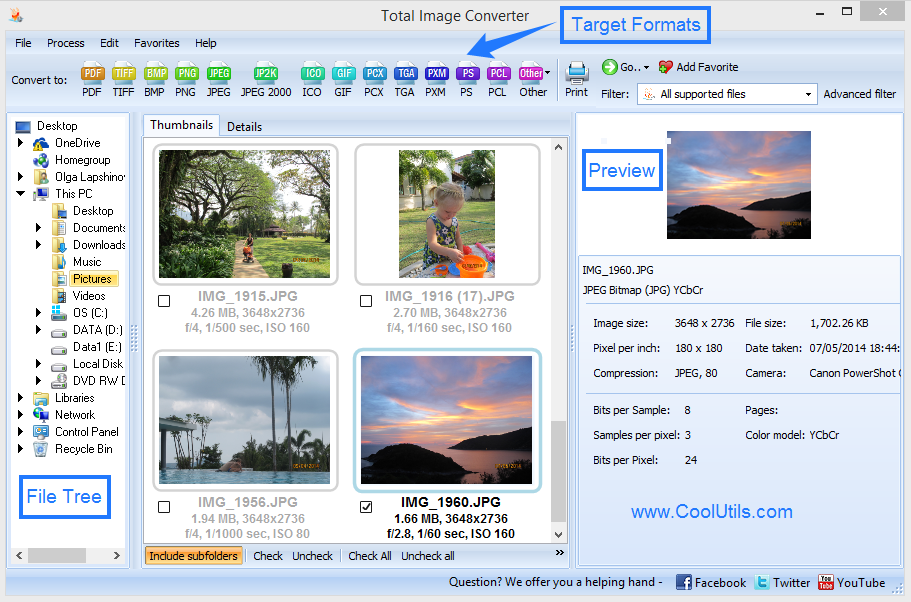
Quick answer: To convert PSD to TIFF, install Total Image Converter, open the folder that holds your PSD files, check the ones you need, click the TIFF button, set the compression and resolution, then press Start. The program flattens every layered PSD and writes a print-ready TIFF for each file in one offline batch, with no upload and no size limit.

How do I convert PSD to TIFF in batch?

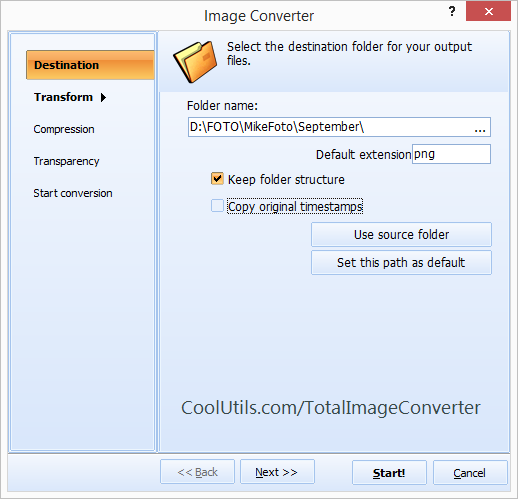
Point the program at the folder with your PSD files and it lists them all. Check the files you want, or click Select All to grab the whole set. Click TIFF, confirm the compression and resolution, pick an output folder, and press Start. Total Image Converter flattens the layers and saves a clean TIFF for each source file. The built-in viewer lets you compare source and result before you commit.

Why flatten PSD to TIFF for print and archive?

TIFF is the format print houses and long-term archives trust. It stores bitmap data losslessly, works on every professional editor, and needs no Photoshop to open. Flattening a PSD to TIFF locks the layers into one stable image so the file prints exactly as you see it. For a document-style hand-off instead, convert the same files with PSD to PDF; to bundle finished TIFFs into one document, use TIFF to PDF.

  • Flatten multi-layer PSD files into single-layer TIFF automatically
  • Choose LZW or no compression to balance size against quality
  • Set the output resolution for print or archival needs
  • Resize, rotate, or crop images during the same run
  • Process hundreds of PSD files in one batch, fully offline

Keep the default settings for the fastest run — the program saves each PSD as a full-quality TIFF with no manual tuning. Adjust compression only when you need to trim file size for storage.

Working on a server or a nightly job? The command-line version converts PSD to TIFF from a .bat script or a scheduled task, so a watched folder can flatten new files without anyone opening the interface.

A personal license starts at $49.90 and unlocks unlimited conversions. The 30-day trial is fully functional and needs no email or credit card.


quote

Total Image Converter Customer Reviews 2026

Rate It
Rated 4.7/5 based on customer reviews
5 Star

"Clients keep sending cover art as layered PSD files, but our imagesetter only takes flat TIFF. Total Image Converter flattens a whole job folder to TIFF in one pass with the resolution locked where I need it, so I stopped opening Photoshop just to export files one at a time."

5 Star Marcus Feldman Prepress Operator, Halton Print House

"We archive scanned poster designs and needed a lossless master format, not PSD. Batch-converting to uncompressed TIFF preserved every detail, and processing a few hundred files at once saved days compared to the manual route we used before."

5 Star Priya Nair Digital Archivist, Westmoor Historical Society

"Our large-format printer chokes on multi-layer PSD, so I flatten everything to TIFF first. The batch mode handles the full folder and the LZW option keeps file sizes reasonable. It took a moment to find the resolution setting, but once set it just works."

4 Star Gregory Osei Production Assistant, Brightline Signage

PSD to TIFF — FAQ ▼

How do I convert PSD to TIFF?

Install Total Image Converter, open the folder with your PSD files, check the ones you want, click the TIFF button, set the compression and resolution, then press Start. The program flattens each layered PSD and writes a single TIFF for every file.

Can I convert PSD to TIFF in batch?

Yes. Total Image Converter is built for batch work. Put your PSD files in one folder, check them all or click Select All, and the program converts the whole set to TIFF in one run without repeating the steps for each file.

Do I need Photoshop to convert PSD to TIFF?

No. Total Image Converter reads and flattens PSD files on its own, so you do not need Photoshop or any Adobe software installed. It runs on Windows 7, 8, 10, and 11.

Does converting PSD to TIFF keep the image quality?

Yes. TIFF stores bitmap data losslessly, so the flattened image keeps its full quality. You can pick LZW compression to reduce size without losing detail, or save with no compression for archival masters.

Is converting PSD to TIFF free?

Total Image Converter offers a fully functional 30-day free trial with no email or credit card required. A personal license starts at $49.90 and unlocks unlimited conversions after the trial.

Can I convert PSD to TIFF from the command line?

Yes. Total Image Converter includes a command-line version for automation and server use. You can script PSD to TIFF conversion in a .bat file or a scheduled task to flatten new files automatically.


Start working now!

Download free trial and convert your files in minutes.
No credit card or email required.

⬇ Download Free Trial Windows 7/8/10/11 • 80 MB

Support
Image Converter Preview1
Image Converter Preview2

Latest News

Newsletter Subscribe

No worries, we don't spam.


© 2026. All rights reserved. CoolUtils File Converters

Cards