Logo
Home Products Support Contact About Us
arrow1 File Converters
arrow1 TIFF and PDF apps
arrow1 Forensic
arrow1 Freeware

Total Image Converter Video Tutorial


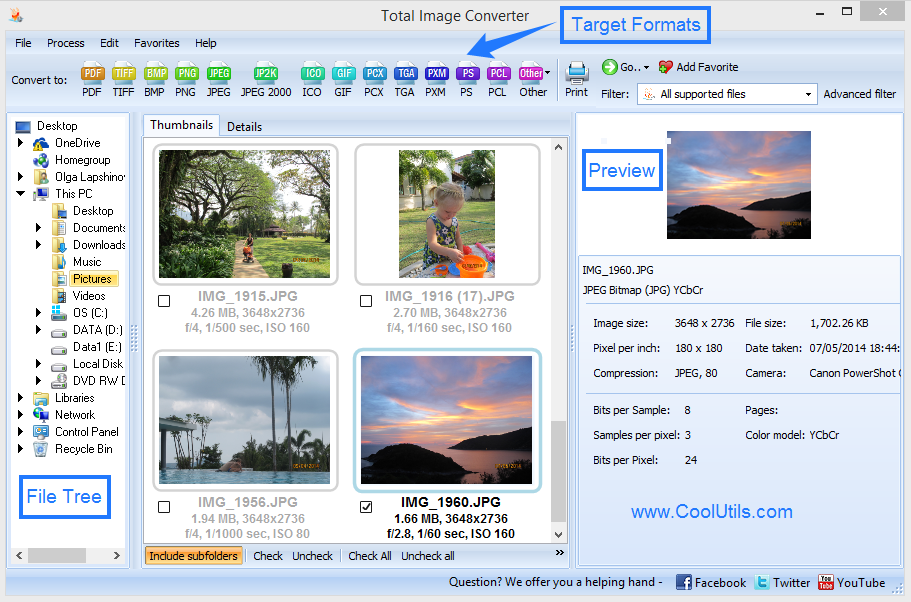
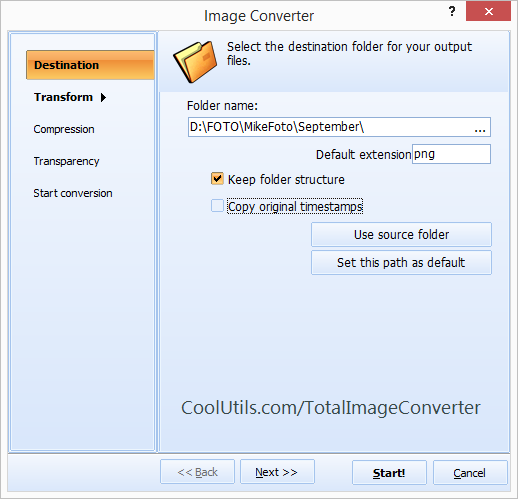
Quick answer: Total Image Converter converts images in batch on Windows. Open the folder with your files in the left panel, select the images, click the button for the output format you want (PDF, JPEG, PNG, TIFF, and more), set options like resize, crop, rotate, or watermark in the wizard, then press Start. The whole folder converts in one run — offline, with a clear interface and a command line.


Why Should You Try Total Image Converter


  • Converts TIFF, JPEG, JPEG2000, PNG, PSD, BMP, PSD, TGA, and many other image formats
  • Supports almost all RAW photos (ORF, PXM, NEF, PEF, RAF, NRW)
  • Resizes files to reduce size
  • Crops images as you like
  • Rotates photos in batch based on EXIF info
  • Adds your watermark to the output file
  • Works in a batch mode and keeps folders' structure
  • Clear user interface and command line
  • Free to try! Download the 30-day copy now.


quote

Total Image Converter Customer Reviews 2026

Rate It
Rated 4.8/5 based on customer reviews
5 Star

"I shoot in RAW and need JPEG exports for clients and PNG for web galleries. Total Image Converter batch-processes entire shoots in minutes. The resize and watermark features save me from opening Photoshop for routine exports."

5 Star Sarah Mitchell Photographer, Mitchell Studios

"We digitize historical documents as TIFF and need JPEG copies for our online catalog. Total Image Converter processes 10,000+ images per batch via command line. The DPI and quality controls give us consistent output."

5 Star Hans Weber IT Administrator, Stadtarchiv Munchen

"Client assets arrive in every format imaginable — PSD, TIFF, BMP, WebP. Total Image Converter standardizes everything to optimized JPEG and PNG for web use. The CMYK-to-RGB conversion is accurate. Great time saver."

4.5 Star Maria Santos Web Developer, Agencia Digital Lisboa

FAQ: Total Image Converter Tutorial ▼

What image formats does Total Image Converter support?

Over 35 formats including TIFF, JPEG, RAW, PNG, BMP, PSD, TGA, WebP, PCX, EMF, GIF, ICO, JPEG2000, and many more. Both common and legacy formats are supported.

How do I convert images in batch?

Select an entire folder in the file browser, check all files, choose the output format, and press Start. Total Image Converter processes all selected images in one run.

Can I resize and crop images during conversion?

Yes. The conversion wizard includes resize (by pixels, percentage, or fit-to-size) and crop options. Both are applied during conversion — no extra step needed.

Does Total Image Converter support RAW camera files?

Yes. RAW files from Canon, Nikon, Sony, Fuji, and other camera manufacturers are supported. Convert them to JPEG, TIFF, PNG, or any other format.

Can I add watermarks to images?

Yes. Add text, logos, dates, or custom images as watermarks. Position, size, and transparency are configurable.

Is there a command-line interface?

Yes. All conversion options are available via command line for automation, scripting, and scheduled batch processing.

How much does Total Image Converter cost?

A personal license costs $24.90 (one-time payment, lifetime use). A 30-day free trial with full functionality is available — no registration required.


Start working now!

Download free trial and convert your files in minutes.
No credit card or email required.

⬇ Download Free Trial Windows 7/8/10/11 • 80 MB

Related Articles

Command line guide
Convert RAW to JPEG in Batch
Convert JPEG to TIFF in Batch
Convert WebP to JPEG in Batch
Convert PSD to TIFF in Batch - Flatten Photoshop Files
Convert PSD to JPEG in Batch - No Photoshop Needed
Rotate TIFF Images in Batch - Fix Scan Orientation
PCX Converter — Convert PCX Files in Batch on Windows
JPEG Converter — Convert JPEG Files in Batch on Windows
PNG Converter — Convert PNG Files in Batch on Windows
Convert EMF to PNG in Batch on Windows
Convert PNG to PDF in Batch on Windows
Convert HEIC to JPG
Convert HEIC to PDF
Convert JFIF to JPG
Convert PNG to BMP in Batch on Windows
Convert BMP to TIFF in Batch on Windows
Convert BMP to RAW in Batch on Windows
TGA Converter — Convert TGA Files in Batch on Windows
Crop TIFF Images in Batch — Batch TIFF Cropper for Windows
Convert TIFF to PDF
PSD to PDF Converter — Convert Photoshop Files to PDF in Batch
Convert TIFF to PDF in Batch Comfortably
Easily Convert JPEG to PDF in Batch
Convert WebP to GIF
Convert ICNS to JPEG with ease and smile
How to convert JPG to ICO and get neat output?
Convert JPG to JPEG2000 and get a neat output.
Convert TIFF to PNG in batches fast
Crop PNG Images in batches with comfort.
Resize TIFF Images in batches with comfort.
Convert RAW to TIFF automatically.
Try to convert BMP to JPEG in batches with Coolutils Tools!
Convert JPEG to BMP in batches automatically
Convert JPEG files to PDF with comfort
Convert JPEG to PNG in batches with comfort
Convert files from PSD into BMP in batches
Convert PCD documents to JPEG with ease.
The best way to combine PNG images into 1 Multi-page PDF file
The best way to combine JPEG images into 1 Multi-page PDF file
Export CMYK to RGB any number of files in one go
Try batch image Converter with many handy options

Support
Image Converter Preview1
Image Converter Preview2

Latest News

Newsletter Subscribe

No worries, we don't spam.


© 2026. All rights reserved. CoolUtils File Converters

Cards