Need help? Reach us at 

 +1 (855) 418-2323
Need help? Reach us at
+1 (855) 418-2323

 File Converters TIFF and PDF apps Forensic Freeware
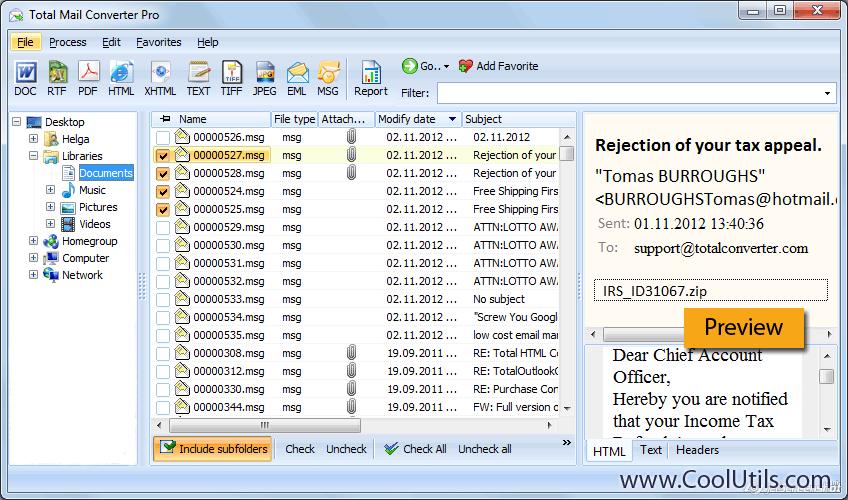
Is an email converter a missing part in your system? Take our reasy-to-use solution, add a few lines of code (we provide the samples in PHP, C++, C#, etc.) and save emails with attachments as PDF, TIFF, JPEG, DOC, HTML, EML, PST files.
Quick answer: To embed email conversion in your app, license Total Mail Converter Pro X under a Royalty-Free or Server License, call the command-line or ActiveX interface from PHP, C++, or C#, point it at the source EML, MSG, or PST files, and set the output to PDF, TIFF, JPEG, DOC, HTML, or PST. Your customers never see CoolUtils inside, and Server licenses start at $1,900.

Our clients say:
"I am very pleased with the product. So far it has passed all of our initial QA tests. I am making use of the tool programmatically as part of a larger custom stand-alone custom legacy content management system migration. The current legacy system stores email content in MSG format. We recommended that we provide that content in the EML and PDF formats during the migration in order to provide more standardized access to this content. This is where your tool fits in. We have successfully integrated your tool into our migration program to facilitate this task for this customer."
Total Mail Converter ProX is perfect for email migration and archiving, legal matters, adding emails to any electronic document system or freedon of information requests.
Server License:
If Total Mail Converter ProX is licensed with server license terms, you are granted the non-transferable, non-exclusive, and perpetual right to deploy the licensed software to one server to be used in one company by up to 100 employees. One server license restricts to one server. ActiveX is included.
Royalty-free License:
You may implement Total Mail Converter ProX into your product and distribute the program to third parties as an integral part of such product. RFL is licensed per project. Your customers are unaware that CoolUtils app is inside, no additional registration from them is required. It's the easiest way for you to add email conversion functionality into your system.
Coolutils converters are most cost-effective solutions. Pricing is very flexible and is good for a small company with 5 employees and large corporations like Deloitte or PricewaterhouseCoopers. Server licenses start from $1,900 only!
Download free trial and convert your files in minutes.
No credit card or email required.
string src  = @"C:\test\Source.eml";
string dest = @"C:\test\Dest.pdf";

var cnv = new MailConverterX();
cnv.Convert(src, dest, "-cPDF -attach -docs -log c:\\test\\Mail.log");

if (!string.IsNullOrEmpty(cnv.ErrorMessage))
    throw new Exception(cnv.ErrorMessage);
public static class Function1
    {
        [FunctionName("Function1")]
        public static async Task Run(
            [HttpTrigger(AuthorizationLevel.Anonymous, "get", "post", Route = null)] HttpRequest req,
            ILogger log)
        {
            StringBuilder sbLogs = new StringBuilder();
            sbLogs.AppendLine("started...");
            try
            {
                ProcessStartInfo startInfo = new ProcessStartInfo();
                startInfo.CreateNoWindow = true;
                startInfo.UseShellExecute = false;
                var assemblyDirectoryPath = Path.GetDirectoryName(Assembly.GetExecutingAssembly().Location);
                assemblyDirectoryPath = assemblyDirectoryPath.Substring(0, assemblyDirectoryPath.Length - 4);

                var executablePath = $@"{assemblyDirectoryPath}\Converter\MailConverterX.exe";
                sbLogs.AppendLine(executablePath + "...");
                var srcPath = $@"{assemblyDirectoryPath}\src\sample.msg";
                var outPath = Path.GetTempFileName() + ".pdf";
                startInfo.FileName = executablePath;

                if (File.Exists(outPath))
                {
                    File.Delete(outPath);
                }

                if (File.Exists(executablePath) && File.Exists(srcPath))
                {
                    sbLogs.AppendLine("files exists...");
                }
                else
                    sbLogs.AppendLine("EXE & source files NOT exists...");
                startInfo.WindowStyle = ProcessWindowStyle.Hidden;
                startInfo.Arguments = $"{srcPath} {outPath} -cPDF -attach -docs";
                using (Process exeProcess = Process.Start(startInfo))
                {
                    sbLogs.AppendLine($"wait...{DateTime.Now.ToString()}");
                    exeProcess.WaitForExit();
                    sbLogs.AppendLine($"complete...{DateTime.Now.ToString()}");
                }

                int sleepCounter = 10;

                while(!File.Exists(outPath) && sleepCounter > 0)
                {
                    System.Threading.Thread.Sleep(1000);
                    sbLogs.AppendLine("sleep...");
                    sleepCounter--;
                }
                if (File.Exists(outPath))
                    sbLogs.AppendLine("Conversion complete successfully.");
            }
            catch (Exception ex)
            {
                sbLogs.AppendLine(ex.ToString());
            }

            return new OkObjectResult(sbLogs);
        }
    }
dim C
Set C=CreateObject("MailConverterPro.MailConverterX")
C.Convert "c:\test\source.eml", "c:\test\dest.pdf", "-cPDF -attach -docs -log c:\Mail.log"
Response.Write C.ErrorMessage
set C = nothing
dim C
Set C=CreateObject("MailConverterPro.MailConverterX")
Response.Clear
Response.AddHeader "Content-Type", "binary/octet-stream"
Response.AddHeader "Content-Disposition", "attachment; filename=test.pdf"
Response.BinaryWrite C.ConvertToStream("C:\www\ASP\Source.eml", "C:\www\ASP", "-cpdf -attach -docs -log c:\html.log")
set C = nothing
$src="C:\\test\\test.msg";
$dest="C:\\test\\test.pdf";
if (file_exists($dest)) unlink($dest);
$c= new COM("MailConverterPro.MailConverterX");
$c->convert($src,$dest, "-cPDF -attach -docs -log c:\\Mail.log");
if (file_exists($dest)) echo "OK"; else echo "fail:".$c->ErrorMessage;
require 'win32ole'
c = WIN32OLE.new('MailConverterPro.MailConverterX')

src = "C:\\test\\test.eml"
dest = "C:\\test\\test.pdf"

c.convert(src, dest, "-cPDF -attach -docs -log c:\\test\\Mail.log")

if not File.exist?(dest)
  puts c.ErrorMessage
end
import win32com.client
import os.path

c = win32com.client.Dispatch("MailConverterPro.MailConverterX")

src  = "C:\\test\\test.eml"
dest = "C:\\test\\test.pdf"

c.convert(src, dest, "-cPDF -attach -docs -log c:\\test\\Mail.log")

if not os.path.exists(dest):
    print(c.ErrorMessage)
uses Dialogs, Vcl.OleAuto;

var
  c: OleVariant;
begin
  c := CreateOleObject('MailConverterPro.MailConverterX');
  c.Convert('c:\test\source.eml', 'c:\test\dest.pdf', '-cPDF -attach -docs -log c:\test\Mail.log');
  if c.ErrorMessage <> '' then
    ShowMessage(c.ErrorMessage);
end;
var c = new ActiveXObject("MailConverterPro.MailConverterX");
c.Convert("C:\\test\\source.msg", "C:\\test\\dest.pdf", "-cPDF -attach -docs");
if (c.ErrorMessage != "")
  alert(c.ErrorMessage)
use Win32::OLE;

my $src  = "C:\\test\\test.eml";
my $dest = "C:\\test\\test.pdf";

my $c = CreateObject Win32::OLE 'MailConverterPro.MailConverterX';
$c->convert($src, $dest, "-cPDF -attach -docs -log c:\\test\\Mail.log");
print $c->ErrorMessage if -e $dest;