Need help? Reach us at 

 +1 (855) 418-2323
Need help? Reach us at
+1 (855) 418-2323

 File Converters TIFF and PDF apps Forensic Freeware
PostScript (PS) files are generated by publishing systems, scientific tools, and older print workflows. The problem: opening a PS file requires Ghostscript, Adobe Acrobat, or Adobe Illustrator — applications that cost hundreds of dollars or require manual installation and configuration. PDF is the universal document format, viewable in every browser and on every device. Total PDF Converter converts PS files to PDF in batch, preserving the original layout, fonts, and vector graphics — with no Ghostscript setup or Adobe subscription needed.
(includes 30 day FREE trial)
(only $39.90)
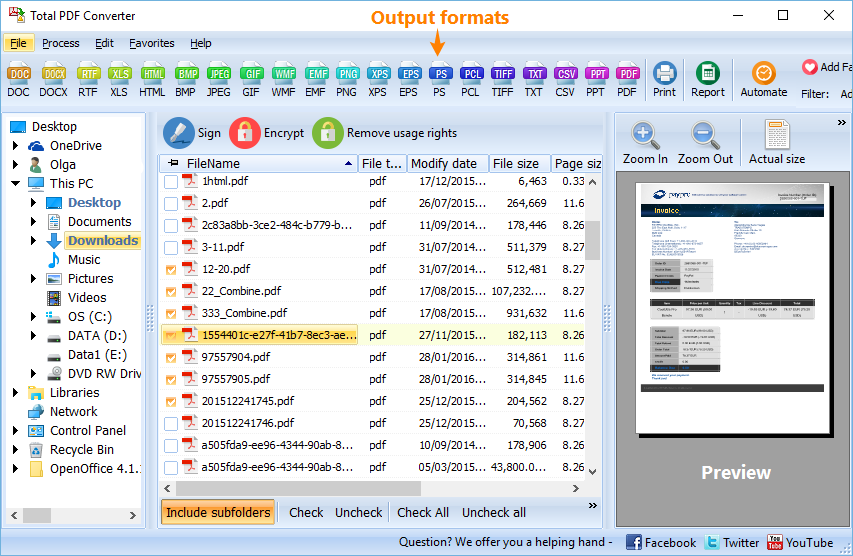
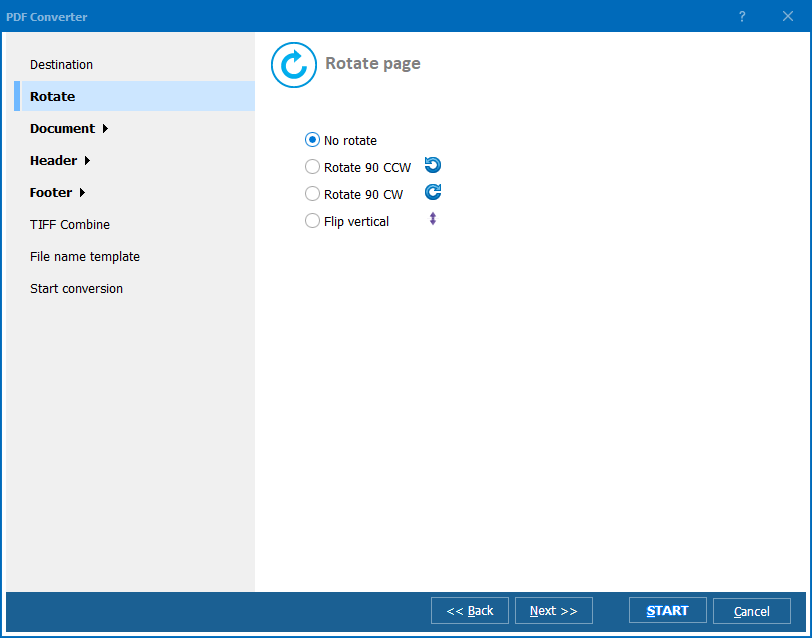
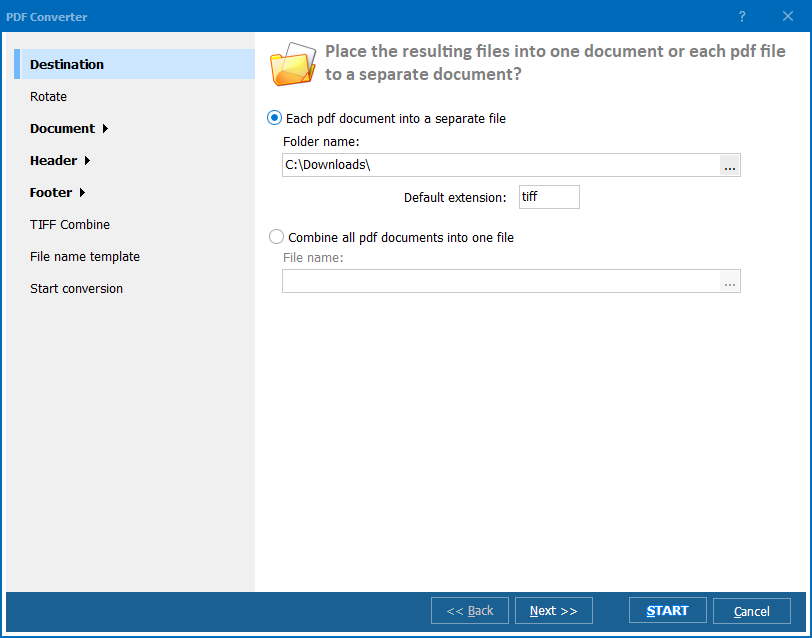
Quick answer: To convert PS to PDF, launch Total PDF Converter, browse to the folder with your PostScript files and check them, click the PDF button, choose the destination and any security options, then click Start. The converter renders PostScript with its own engine, so an entire folder converts in one offline batch with no Ghostscript and no upload.
PS (PostScript) is a page description language developed by Adobe in 1982. A PostScript file contains a program that describes the appearance of a page: text placement, font definitions, vector shapes, and raster images. The file is processed sequentially by a PostScript interpreter (RIP) to produce output. PostScript was designed for printers and typesetters, not for on-screen viewing. Opening a PS file on a computer requires an interpreter like Ghostscript, or software that includes one (Adobe Acrobat, Illustrator).
PDF (Portable Document Format) evolved from PostScript but added random access, embedded fonts, hyperlinks, bookmarks, and a fixed-layout structure that any viewer can render consistently. PDF is the world standard for document exchange. Every browser, mobile device, and operating system includes a PDF viewer. PDF files can be secured with passwords, digitally signed, and optimized for web viewing — features that PostScript does not support.
| PostScript (PS) | ||
|---|---|---|
| Type | Page description language (program) | Fixed-layout document format |
| Viewing | Requires Ghostscript or Adobe software | Any browser, any device |
| Access model | Sequential (stream-based) | Random access (page-based) |
| Security | None | Passwords, encryption, permissions |
| Embedded fonts | Optional, interpreter-dependent | Always embedded, consistent rendering |
| Interactive features | None | Hyperlinks, bookmarks, forms |
| File size | Often large (uncompressed) | Compact (compressed streams) |
Converting PS to PDF takes a printer-oriented program and produces a portable, viewable, searchable document that anyone can open without installing special software.
For a folder of 200 PS files, the batch runs in minutes without any user interaction after clicking Start. Each PS file produces one PDF file with the same name.
Total PDF Converter includes a command-line interface for automated and scheduled workflows:
PDFConverter.exe C:\Archive\report.ps C:\Output\report.pdf -cPDF
Convert an entire folder of PS files:
PDFConverter.exe C:\Archive\*.ps C:\Output\ -cPDF
Add flags to control output:
-cPDF — target format-SubFolders — include files from subfolders-OwnerPassword secret — set PDF owner password-NoPrint — disable printing in the output PDF-log C:\Logs\convert.log — write a log fileSave the command in a .bat file and run it via Windows Task Scheduler for fully automated nightly conversion.
| Feature | Online Converters | Total PDF Converter |
|---|---|---|
| Batch processing | One file at a time | Unlimited files per batch |
| File privacy | Files uploaded to third-party server | Files stay on your machine |
| File size limit | Typically 5–50 MB | No limit |
| PS rendering quality | Varies, often basic | Full PostScript interpreter |
| PDF security | Rarely available | Passwords, encryption, permissions |
| Command line | Not available | Full command-line interface |
| Requires internet | Yes | No — 100% offline |
| Price | Free or subscription | One-time $39.90 |
Total PDF Converter renders PostScript files using its own engine. You do not need to install Ghostscript, configure environment variables, or troubleshoot path settings. Download, install, convert.
Add password protection, restrict printing, or prevent text extraction — directly during conversion. Online converters rarely offer this. For sensitive documents, the security step eliminates a separate post-conversion tool.
Select a folder with thousands of PS files, click Start, and walk away. The converter processes every file without user interaction. For recurring jobs, use the command line with a scheduled .bat file to automate the entire workflow.
Total PDF Converter handles PS, EPS, PDF, PRN, and XPS as input and converts to PDF, DOC, XLS, HTML, TIFF, JPEG, PNG, TXT, CSV, and more. One tool covers all your document conversion needs. If tomorrow you need PS to TIFF or EPS to JPEG, the same license covers it.
Personal license: $39.90. Free 30-day trial with no restrictions — no email or credit card required.
Windows 7/8/10/11
PDFConverter.exe C:\Archive\*.ps C:\Output\ -cPDF. Use Windows Task Scheduler to automate recurring conversions.
Download free trial and convert your files in minutes.
No credit card or email required.

Related Topics
Convert XPS to JPEG