Logo
Home Products Support Contact About Us
arrow1 File Converters
arrow1 TIFF and PDF apps
arrow1 Forensic
arrow1 Freeware

Convert MBox to PDF — Save Thunderbird Emails as PDF Documents


A client requests copies of all project correspondence. A legal team needs email evidence in a tamper-proof format. A departing employee's mailbox must be archived before the account is deleted. In each case, the emails sit in Thunderbird as MBOX files, and the target format is PDF. Total Thunderbird Converter reads your Thunderbird mailbox and exports each email as a formatted PDF document. Here is what it does:
  • Converts emails to PDF with sender, recipient, date, subject, and full message body
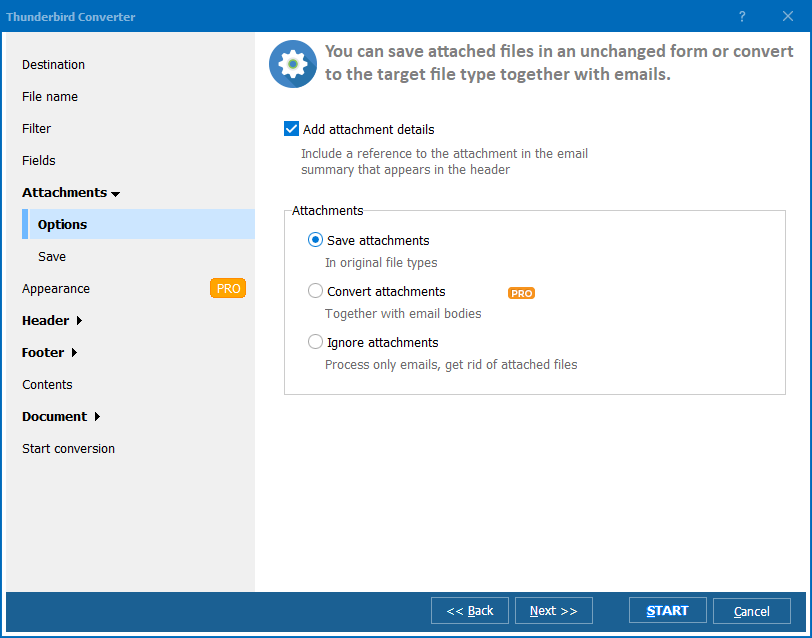
  • Saves attachments alongside the PDF or embeds them (depending on settings)
  • Processes thousands of emails from multiple folders in one batch
  • Supports one PDF per email or all emails combined into a single PDF file
  • Includes a command-line interface for automation and scheduled exports
  • 30-day free trial, no email or credit card required

Download Total Thunderbird Converter and save your Thunderbird emails as PDF documents today.


Download Now!

(includes 30 day FREE trial)

Buy License

(only $49.90)

MBox vs PDF: What Is the Difference?

MBox is a plain-text email storage format used by Thunderbird, Apple Mail, and other mail clients. Messages are stored sequentially in a single file — one MBox file per mail folder. MBox files can only be opened by email applications that support the format.

PDF (Portable Document Format) is the universal standard for sharing documents. PDF files look identical on every device, cannot be accidentally edited, and are accepted by courts, regulators, and archival systems worldwide. Every computer, phone, and tablet can display PDF files without special software.

Converting MBox to PDF turns email messages into permanent, shareable documents. The email header (sender, recipient, date, subject) and the full message body are rendered as a formatted page. PDFs can be printed, attached to reports, submitted as evidence, or stored in document management systems where MBOX files are not supported.

How to Convert MBox to PDF

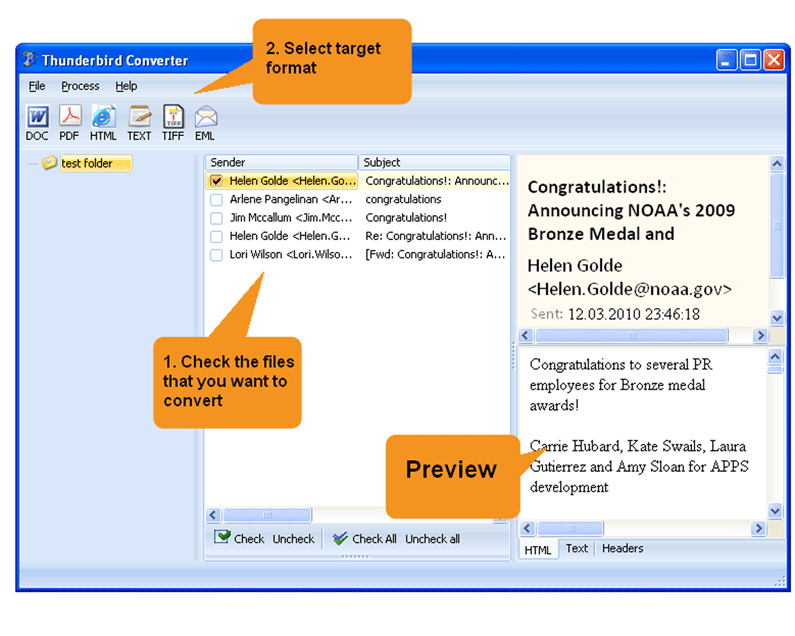
  • Step 1. Launch Total Thunderbird Converter. The program detects your Thunderbird profile and displays all mail folders in a tree view.
  • Step 2. Select the folders containing emails you want to convert. Use Check All to include everything, or pick individual folders.
  • Step 3. Click PDF in the format toolbar at the top of the window.
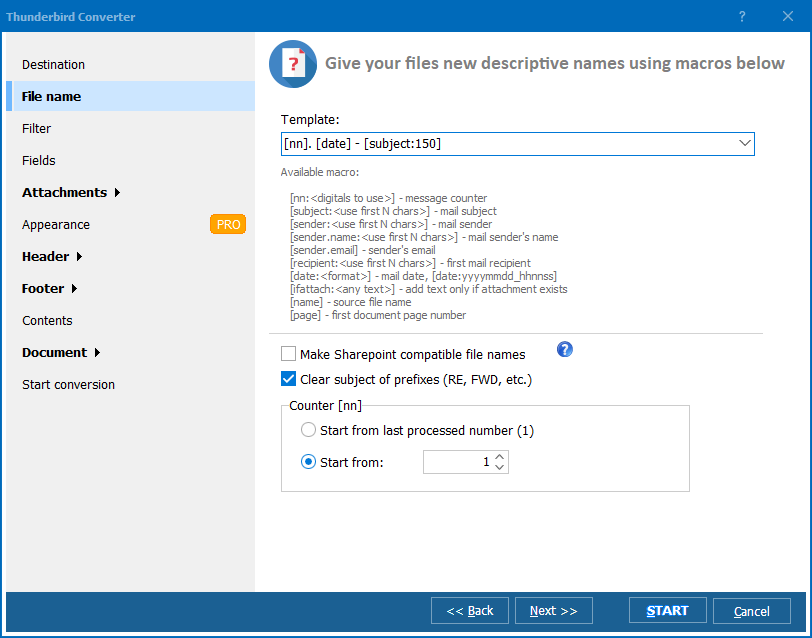
  • Step 4. Configure PDF settings: page size (A4, Letter), margins, header/footer content. Choose whether to create one PDF per email or merge all emails into a single document.
  • Step 5. Set the destination folder for the output files.
  • Step 6. Click Start. The converter processes all selected emails and saves PDF files to the destination folder. Each PDF contains the email header and formatted body text.

The resulting PDFs are ready to print, email, archive, or import into a document management system.

Command-Line Conversion

Total Thunderbird Converter includes a command-line interface for scripted and automated exports:

ThunderbirdConverter.exe -sPDF "C:\Users\John\AppData\Roaming\Thunderbird\Profiles\abc123.default\Mail\Local Folders\Inbox" C:\Output\

Additional flags control the output:

  • -PageSize A4 — set PDF page dimensions
  • -MergeAll — combine all emails into one PDF file

Save the command in a .bat file and schedule it with Windows Task Scheduler to generate automated email archives.

Why Use Total Thunderbird Converter?

Green PlusDirect Thunderbird access. The converter connects to your Thunderbird profile automatically. All mail folders appear in a familiar tree view — no need to locate MBOX files manually on disk.

Green PlusFormatted PDF output. Emails are rendered as clean, readable documents with header fields (From, To, Date, Subject) at the top and the message body below. HTML emails retain their formatting.

Green PlusAttachment handling. Attachments can be saved alongside the PDF files in a companion folder, keeping the email content and its files together.

Green PlusMerge option. Combine all emails from a folder into a single PDF document for easy review. A 500-email folder becomes one searchable PDF file instead of 500 separate documents.

Green PlusBatch processing. Convert thousands of emails from multiple folders in one session. The converter handles large mailboxes without memory issues.

Green PlusNo cloud upload. All processing happens on your PC. Confidential correspondence, client communications, and internal emails stay on your machine.

Print/Forward vs Total Thunderbird Converter

FeaturePrint to PDF / ForwardTotal Thunderbird Converter
Batch conversionOne email at a timeThousands in one run
Consistent formattingVaries by printer driverUniform page layout
Header fieldsMay be incompleteFull header: From, To, Date, CC, BCC
AttachmentsNot includedSaved alongside PDF
Merge optionNot availableAll emails in one PDF
AutomationManual onlyCommand line + Task Scheduler
CostFree (your time)One-time $49.90

download MBox to PDF converter

Windows 7/8/10/11 • 30-day free trial

When Do You Need MBox to PDF Conversion?

There are several common scenarios where converting Thunderbird emails to PDF is necessary:
  1. Legal evidence. Courts and regulatory bodies accept PDF as a standard document format. Converting email correspondence to PDF creates a tamper-proof record with sender, recipient, date, and content preserved on each page.
  2. Employee offboarding. When an employee leaves, their Thunderbird mailbox must be archived before the account is deactivated. PDF provides a permanent, readable archive that does not require an email client to open.
  3. Client deliverables. A client requests copies of all project-related emails. PDF files are universally readable and look professional when attached to a final project report.
  4. Compliance archiving. Regulations in finance, healthcare, and government require email retention for specific periods. PDF archives are easier to store, search, and retrieve than raw MBOX files.
  5. Sharing without email access. You need to share specific emails with someone who does not use Thunderbird. PDF files open on any device without special software.


Download Now!

(includes 30 day FREE trial)

Buy License

(only $49.90)


quote

Total Thunderbird Converter Customer Reviews 2026

Rate It
Rated 4.7/5 based on customer reviews
5 Star

"We archive all client correspondence as PDF for litigation holds. Total Thunderbird Converter processes 2,000 emails in about five minutes and the PDF output includes every header field our attorneys need. The merge option is especially useful when we need a single document for case files."

5 Star Catherine Moreau Corporate Paralegal

"When employees leave, I convert their entire Thunderbird mailbox to PDF before deactivating the account. The command-line mode lets me script the whole process. A typical 5 GB mailbox converts in 20 minutes and the PDFs are stored on our document server for seven years per company policy."

5 Star James Whitfield IT Administrator

"At the end of every project I export all related emails to PDF for the final deliverables package. The converter picks up my Thunderbird folders automatically and the PDFs look clean with sender, date, and subject at the top of each page. Would be nice to have a built-in search across the output PDFs, but that is what PDF viewers are for."

4 Star Anita Desai Project Manager

FAQ ▼

Attachments are saved as separate files alongside the PDF. The PDF itself contains the email header and message body. Attachment file names are listed in the email header section of the PDF.
Yes. The merge option combines all selected emails into one PDF document. Each email starts on a new page with its header fields. This is useful for creating a single archive file for an entire mail folder.
Yes. HTML emails are rendered with their original formatting — fonts, colors, inline images, and links. Plain-text emails are formatted with a clean, readable layout.
Yes. The conversion wizard lets you choose standard page sizes (A4, Letter, Legal) and set custom margins. You can also add headers and footers with page numbers, date, or custom text.
The converter processes thousands of emails per minute on a modern PC. A mailbox with 10,000 messages typically finishes in under 15 minutes. Processing happens offline, so internet speed is irrelevant.
Yes. Use File → Open to load any MBOX file from disk. The converter handles MBOX exports from Apple Mail, Eudora, SeaMonkey, and other mail clients that use the MBOX format.
No. PDF is a document format, not an email format. The conversion is one-way. Always keep your original MBOX files as the primary source.


Start working now!

Download free trial and convert your files in minutes.
No credit card or email required.

⬇ Download Free Trial Windows 7/8/10/11 • 45 MB

Support
Total Thunderbird Converter Preview1
Total Thunderbird Converter Preview2
Total Thunderbird Converter Preview3

Latest News

Newsletter Subscribe

No worries, we don't spam.


© 2026. All rights reserved. CoolUtils File Converters

Cards