Logo
Home Products Support Contact About Us
arrow1 File Converters
arrow1 TIFF and PDF apps
arrow1 Forensic
arrow1 Freeware

Total WebMail Converter

Convert emails from Gmail, Yahoo and other services.
Convert emails from Gmail, Yahoo and other services to PDF, DOC.

Windows
2000/2003/Vista
7/8/10/11/Citrix

Total Webmail Converter receives emails directly from your POP3 account and converts them to PDF, HTML, DOC, TXT, TIFF, JPEG and RTF. Convert emails directly from Gmail, Office 365 and Windows Live without having to export them first! The program is so easy to use, all you need to do is enter your account information and the program automatically locates your messages.

Quick answer: Total Webmail Converter pulls emails straight from your POP3 account — Gmail, Office 365, Windows Live — and converts them to PDF, HTML, DOC, TXT, TIFF, JPEG, or RTF without exporting first: enter your account details, let it locate your messages, pick the format, and it converts many emails in one pass, even combining them into a single file.

Additionally, the Total Webmail Converter converts emails with attachments. Loaded with customization options, you'll also be able to:
  • Convert several emails in a single pass and keep organized with new names.
  • Combine multiple emails into one PDF, TIFF, DOC, HTML, TXT or JPEG file.
  • Generate a report about your emails in PDF, TXT, HTML, CSV, XLS formats.
  • Add headers and footers to the output file, including page number, date or any other customized text (i.e. stamp bates). More unique options..

Whether you're looking to save space by archiving past emails, share a folder's worth of emails with a co-worker, or create advanced reports, the Total Webmail Converter can help. Download your free trial copy today (valid for 30 days).

Download Now!

(includes 30 day FREE trial)

Buy License

(only $49.90)

 
Accept Payment Methods

quote

Total WebMail Converter Customer Reviews 2026

Rate It
Rated 4.8/5 based on customer reviews
5 Star

"Thanks for the email. I'm not fully used to the software yet - have done a bit of gmail backing up but yet to do the full job. On first use, it seems very good though - better that the other programs I've tried in the past (GmailKeeper, Aid4Mail and one or two others). Both really - simple to use (though I've not fully checked it out) and the pdf files are clear (one of the other programs printed text in yellow for some reason)."

4.5 Star Rob Harper Watermill Environment Ltd.

"I use Webmail converter to save copies of my emails before I retire. I like the interface, it's very logic without any unwanted messages. I had a small struggle with Gmail not wanting to give access to your app, but after it was settled everything went smoothly. Thank you."

5 Star Kim Morris


Unique options of Total Webmail Converter


webmail converter
Total Webmail Converter converts emails from Gmail, Office 365, Windows Live Mail, Lotus, Outlook.com, etc.

migrate to outlook
Migrate to Office Outlook by converting your emails into one PST file.

combine emails
Combine several emails into one multi-page document (PDF, DOC, TIFF or a very long TXT file).

links in emails
Sometimes emails contain links to images in the web. If you want you can save time and traffic and tell Total Webmail Converter not to access internet for images" option.

attachments
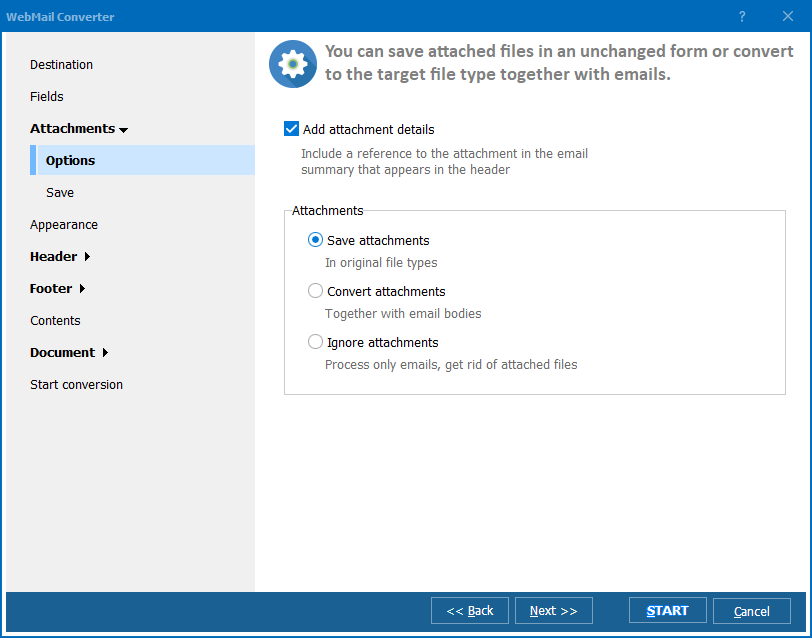
Aren't attachments as important as email bodies? Total Webmail Converter can keep attached files intact and save to the same or a new folder. The Pro version will convert them to PDF, DOC, etc. together with emails.

sort emails
Want to sort emails by sender or date? Get detailed reports about your emails in PDF, DOC, XLS, CSV formats. Just click Report button the main menu.


interface
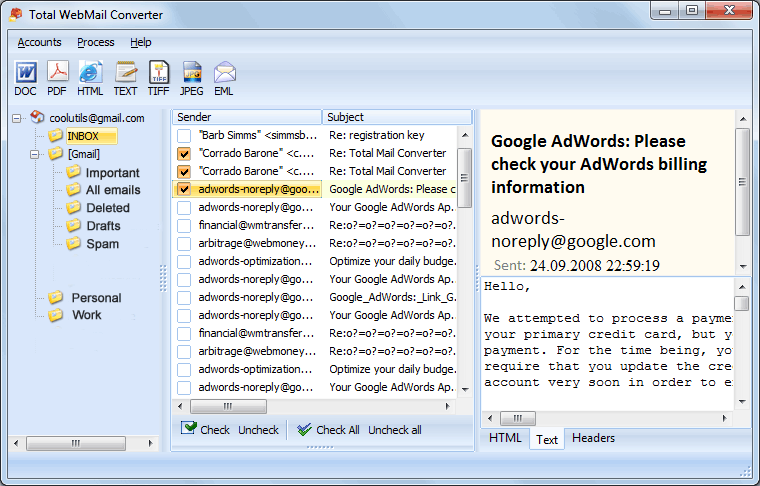
Total Webmail Converter is built around a clear, easy-to-follow interface.


page counters
Want more order? Add page counters! Basically, you can add any text to the footer or the header of the file (page counters, images like your company's logo, bates numbers, etc.)
webmail formats
The widest list of output file types: convert emails to PDF, HTML, XHTML, DOC, XPS, TXT, TIFF, JPEG, RTF and EML!

migrate to eml
Migrate to EML based clients by converting your emails to EML.

archive emails
Archive old emails as regular PDF or Doc files on you hard drive to easily refer to them later without any email app.

email fields
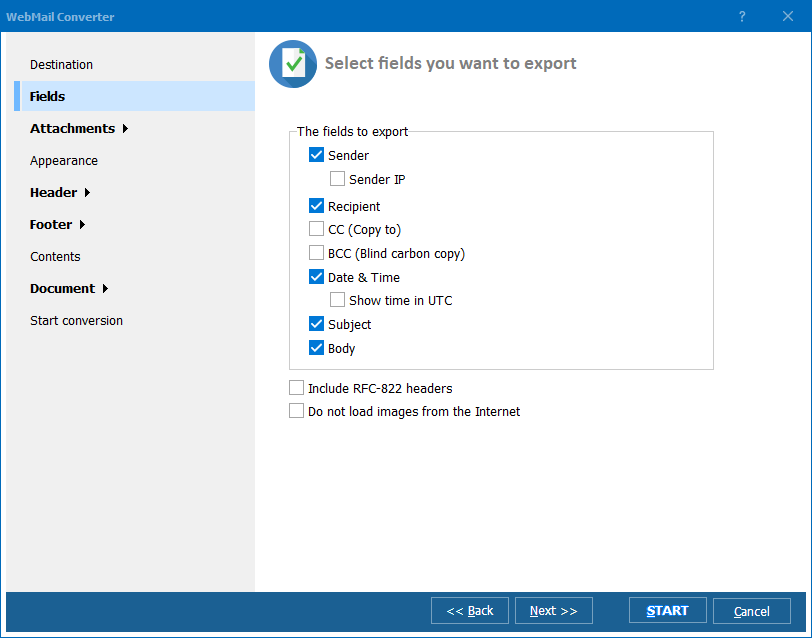
Unlike other email converters Total Webmail Converter will selectively convert email fields (sender, recipient, date, subject, body, sender ip, cc, bcc).

utc
How to deal with emails received from different time zones? Total Webmail Converter is able to switch the dates to Coordinated Universal Time (UTC) to keep them in the right chronological order.

email to pdf
When you convert emails to PDF you can set user permissions, sign with your digital signature, or define document properties. Note that you can get PDF, PDF/A and non-searchable PDFs.


cmd
Run Total Webmail Converter via command line (can be auto generated from GUI settings).


rename emails
Give your emails new descriptive names using the email's elements like sender, date, subject, etc. Attachments can be renamed as well to know which attachment refers to which email.

Download Now!

Updated Fri, 05 Jun 2026

Buy License

(only $49.90)


Screenshots


Total WebMail Converter Preview1
Total WebMail Converter Preview2
Total WebMail Converter Preview3

Frequently Asked Questions About Total Webmail Converter ▼

How do I convert Gmail or Office 365 emails to PDF?

Total Webmail Converter receives emails directly from your POP3 account, so you just enter your Gmail, Office 365, Outlook.com, or Windows Live account details and the program locates your messages. Select the emails, choose PDF as the output format, set your options, and click Start. There is no need to export the emails from your webmail first.

Can I convert emails in batch?

Yes. Total Webmail Converter is built for batch work — select an entire folder and it converts many emails in a single pass, giving each file a new descriptive name based on the sender, date, or subject. You can also combine multiple emails into one multi-page PDF, DOC, TIFF, HTML, or TXT file.

How do I archive emails without keeping them in the webmail account?

Total Webmail Converter saves your emails as regular PDF, DOC, or TXT files on your hard drive, so you can refer to them later without any email app. This lets you empty a crowded Gmail or Windows Live mailbox while keeping every message safely archived offline.

How much does Total Webmail Converter cost and is there a free trial?

A personal license for Total Webmail Converter is a one-time payment of $49.90 — there is no subscription. You can download a fully functional free trial and use it for 30 days before you decide to buy.

Is my data safe when I use Total Webmail Converter?

Total Webmail Converter runs locally on your own Windows computer. It connects only to your own POP3 mailbox to download your messages, and the conversion happens on your machine, so your emails are never uploaded to a third-party service. You can even tell it not to access the internet for images to save time and traffic.

Can I run Total Webmail Converter from the command line?

Yes. Total Webmail Converter can be run via the command line, and the command line can be auto-generated from your GUI settings. This makes it easy to schedule recurring email-to-PDF or email-to-TIFF jobs on a Windows machine.

Does Total Webmail Converter convert attachments too?

Total Webmail Converter keeps attached files intact and can save them to the same or a new folder alongside the converted emails. If you also need the attachments themselves converted to PDF, DOC, and other formats together with the emails, use Total Webmail Converter Pro.
Download Now!

Updated Fri, 05 Jun 2026

Buy License

(only $49.90)


Start working now!

Download free trial and convert your files in minutes.
No credit card or email required.

⬇ Download Free Trial Windows 7/8/10/11 • 28 MB
Pro Suite

System Requirements