Need help? Reach us at 

 +1 (855) 418-2323
Need help? Reach us at
+1 (855) 418-2323

 File Converters TIFF and PDF apps Forensic Freeware
Print the tree of your directories and their content easily with Print Maestro
Windows
2000/2003/Vista
7/8/10/11/Citrix
Print Maestro is a Windows utility that lets you print a list of files in a folder, export a complete directory tree, or generate detailed file reports — all without using the command line. Whether you need to document your file structure for an IT audit, catalog a music or photo library, or simply get a printed list of what is stored on a drive, Print Maestro handles it in a few clicks.
Quick answer: Print Maestro is a Windows tool that prints a list of files in a folder, exports a full directory tree, or builds detailed file reports without the command line. Select a folder, choose the report type (file list, tree, or a media report with EXIF, audio or video data), then print or export to PDF, Excel, HTML, CSV and more — all in a few clicks.
Windows does not offer a built-in way to print folder contents. The usual workaround — opening CMD and running dir /s > filelist.txt — produces a plain text dump with no formatting, no filtering, and no export options. Print Maestro replaces that workflow with an intuitive graphical interface: select a folder, choose what to include, and print or export the result. No scripting, no copy-pasting from a terminal window.
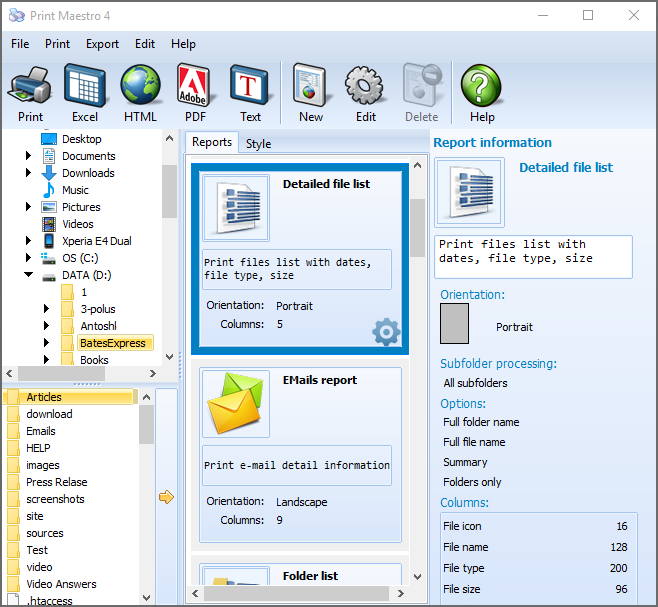
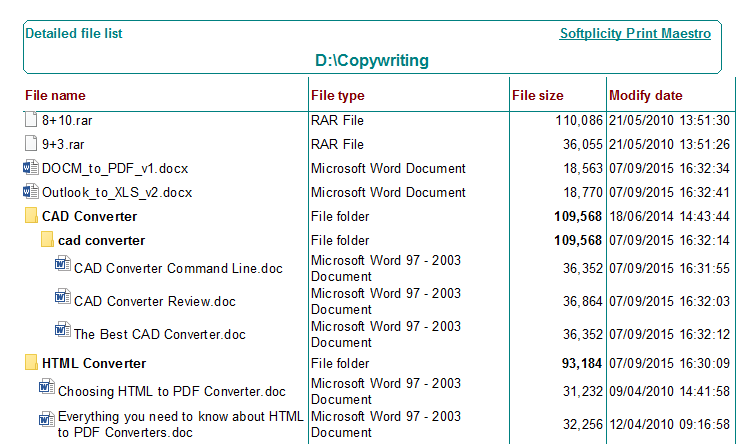
Print Maestro goes far beyond a simple file listing. You can generate:
Every report can be exported to multiple formats: PDF, Excel (XLS), HTML, Rich Text (RTF), CSV, SQL, DBF, XML, and plain text. Need to export folder contents to a text file? Or send a formatted directory listing to Excel for further analysis? Print Maestro supports both scenarios and everything in between. The HTML export is especially useful for publishing a file catalog on an intranet or website.
Using Print Maestro to print a directory listing is straightforward:
You can preview the result before printing, apply file masks to include only certain file types, and sort the output by name, size, date, or type.
Print Maestro is used by IT professionals, librarians, music collectors, photographers, and everyday users who need to keep track of their files:
The Windows dir command and PowerShell's Get-ChildItem can list files, but they lack formatting, filtering, and export flexibility. Print Maestro provides a visual interface where you can preview the output, customize columns, filter by file type or size, and export directly to PDF or Excel — without writing a single command. For users who need a quick, reliable way to print a directory tree on Windows 10 or Windows 11, Print Maestro is the simplest solution available.
Try it for free for 30 days. Works on Windows 7/8/10/11. $39.90 lifetime license. We also create custom report templates on demand — contact us if you have a specific use case.
| Feature | Print Maestro | Command Line (dir /s) |
|---|---|---|
| Visual interface with preview | Yes | No — text output only |
| Export to PDF, Excel, HTML, CSV | Yes (9 formats) | Text file only |
| Custom columns (size, date, type...) | Yes | Fixed format |
| Media metadata (EXIF, audio tags, video info) | Yes | No |
| Filter by file type or size | Yes | Basic wildcards only |
| Print directly to printer | Yes | No — copy/paste needed |
| Directory tree visualization | Yes | tree command (limited) |
| Sorting options | Name, size, date, type | Limited |
| No scripting needed | Yes | Requires CMD/PowerShell |
| Pricing | $39.90 one-time | Free but limited |
(includes 30 day FREE trial)
(only $39.90)

"We are doing a migration project, which involves transfer of many files. We take the opportunity to archive old files and to be able to discuss what will only be taped and not transferred, we use your software. I tested a couple of programs, and your program suits our requirements best."
 Sayan Kreher
Helios MPPD BV
"I just had to pass along a few personal comments, to let you know what I thought about Print Maestro...I found it through a Google search for "can't print folders" - and I'm so glad I found it! It did EXACTLY what I wanted. I downloaded the demo, tried it, saw what it was trying to do and had to order it right away. I'm a music nut (lots of music files), and a picture nut (lots of Webshots pictures) and no real way to sort them out and find all my duplicates! This is absolutely perfect. A living snapshot of what is in my computer, arranged in an easily-read form, and even providing room for notes and comments on the print-out! How thoughtful! Congratulations to the developers of such a fine piece of software! Please keep up the great work! Thanks so much for a wonderful, useful, productive program!"
Sandy
"I'm quite happy with the utility thanks. We use it to capture directory status and drop it into excel were we annotate file uses .. such as ' master file for Study ' etc."
Steve J.
"This tool really saved me some time presenting my customer with their directory structure so I could show them what was backing up locally and off-site."
James McGowan
"PrintMaestro has been an absolute essential for cataloguing my huge listings of Vinyl Recordings converted to mp3's. I convert up to and more than 30 LP's a week! PrintMaestro allows be to keep my records up to date. PrintMaestro is FIVE STAR Plus Program."
David Nichols
"I'm very happy with PrintMaestro. I had a problem getting a listing of a few directories into Excel so that I could set up a literature database. Windows will not do it, and in fact, the only utility I could find that would do what I want easily was PrintMaestro."
Billy Grierson | www.perthinnovation.co.uk
Updated Tue, 15 Sep 2026
(only $39.90)
Updated Tue, 15 Sep 2026
(only $39.90)
Download free trial and convert your files in minutes.
No credit card or email required.



