Need help? Reach us at 

 +1 (855) 418-2323
Need help? Reach us at
+1 (855) 418-2323

 TIFF and PDF apps
You merge 30 documents into one PDF and get a 200-page file with no navigation. The reader scrolls page by page looking for the right section. Bookmarks fix this — they add a clickable table of contents to the PDF panel so anyone can jump to a specific document in one click. PDF Combine Pro merges PDF, DOC, DOCX, XLS, TIFF, JPEG, HTML, and TXT files into a single PDF and creates bookmarks automatically from file names, document titles, or a custom caption list.
Quick answer: To combine PDF files with bookmarks, launch PDF Combine Pro, tick the files you want to merge, click Combine to PDF, open the Bookmarks tab, choose a bookmark source (file names, document titles, or an external caption list), then click Start Conversion. The result is one PDF with a clickable bookmark panel that jumps to each merged document.
Bookmarks are a navigation panel built into the PDF format. When you open a PDF in Adobe Reader, Foxit, or any other viewer, a sidebar shows a tree of clickable links. Each link jumps to a specific page or section in the document. Bookmarks do not change the page content — they sit in a separate metadata layer.
In a combined PDF, bookmarks serve as a table of contents. If you merge 15 invoices, each bookmark points to the first page of that invoice. If you merge chapters of a manual, each bookmark points to the chapter start. The reader navigates a 500-page file as easily as a 5-page one.
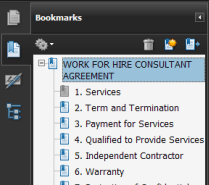
Bookmarks let the reader jump to any section of the combined PDF.
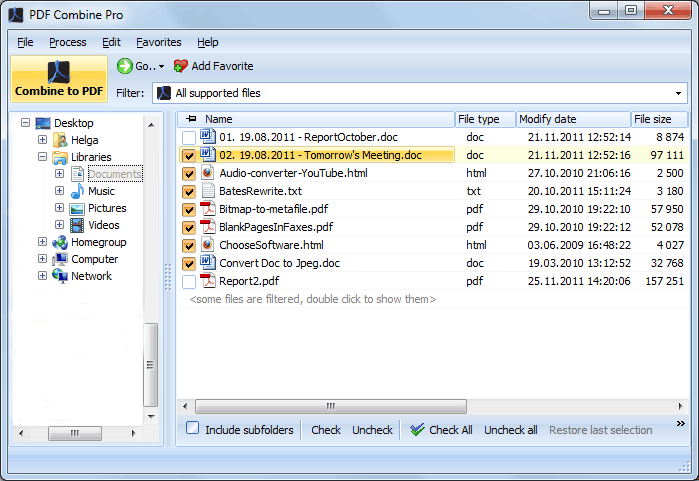
Invoice_January.pdf and Invoice_February.pdf and get bookmarks "Invoice_January" and "Invoice_February".Launch PDF Combine Pro. The folder tree on the left shows your drives and directories. Navigate to the folder with the files you want to merge. Tick individual files or select an entire folder. Supported formats: PDF, DOC, DOCX, XLS, XLSX, RTF, TXT, HTML, TIFF, JPEG, PNG.
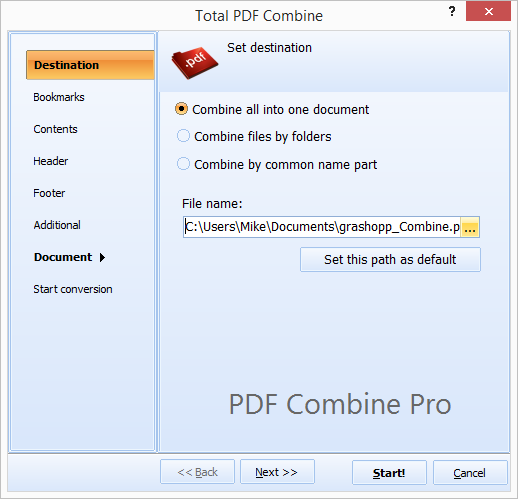
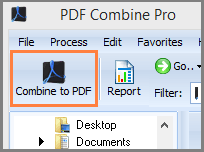
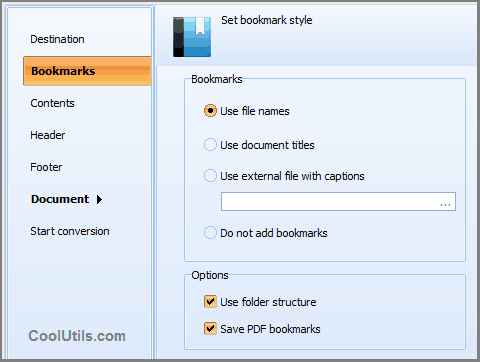
Click the Combine to PDF button in the top-left corner of the toolbar. The settings wizard opens with tabs for Destination, Bookmarks, Contents, Header, Footer, and Document options.
Go to the Bookmarks tab. Choose the bookmark source:
Check Use folder structure to create a hierarchical bookmark tree from subfolders. Check Save PDF bookmarks to preserve the internal bookmarks of source PDF files.
On the other tabs, set page size (A4, Letter, Legal), add headers and footers, insert page numbers, configure PDF encryption, or attach a digital signature.
Click Start Conversion. PDF Combine Pro reads every selected file, converts non-PDF formats on the fly, builds the bookmark tree, and writes a single output PDF. A progress log shows the status. When finished, the output folder opens automatically.
PDF Combine Pro includes a command-line interface for unattended processing:
PDFCombinePro.exe "C:\Reports\*.pdf" "C:\Output\Combined.pdf" -bFileName -fStructure
Parameters: source path (wildcards supported), output file, -bFileName sets bookmark source to file names, -fStructure preserves folder hierarchy. Save this in a .bat file and run it via Windows Task Scheduler. The command line supports all options available in the GUI: encryption, headers, footers, page numbers, and digital signatures.
| Bookmark Source | Best For | Requires | Example |
|---|---|---|---|
| File names | Files with descriptive names | Nothing — automatic | Contract_2024.pdf → "Contract_2024" |
| Document titles | Files with metadata filled in | Title field in document properties | Title: "Service Agreement" → "Service Agreement" |
| External file | Custom labels, different from file names | A .txt file with one label per line | Line 1: "January Report" → first file gets "January Report" |
| Folder structure | Files organized in subdirectories | Subfolder names as category labels | Folder "Q1" → parent bookmark "Q1" with child files |
| Feature | Online PDF Mergers | PDF Combine Pro |
|---|---|---|
| Automatic bookmarks | Rarely — most online tools merge without bookmarks | Yes — four bookmark sources with folder hierarchy |
| Preserve existing bookmarks | No | Yes — nested under file-level bookmarks |
| Batch size | 5–20 files, often with size limits | Unlimited files, no size limit |
| Input formats | PDF only | PDF, DOC, DOCX, XLS, XLSX, RTF, TXT, HTML, TIFF, JPEG, PNG |
| Privacy | Files uploaded to third-party servers | 100% offline — files never leave your computer |
| Command-line automation | No | Yes — full CLI with all options |
| PDF encryption | Rarely | Yes — password protection and permission control |
| Speed | Depends on upload/download bandwidth | Local processing — limited only by disk speed |
A 300-page PDF without bookmarks is a wall of pages. PDF Combine Pro adds a clickable table of contents automatically, so every reader can find the right section in seconds. No manual bookmark creation in Acrobat needed.
Most PDF merge tools accept only PDF input. PDF Combine Pro converts DOC, DOCX, XLS, XLSX, RTF, TXT, HTML, TIFF, JPEG, and PNG on the fly during the merge. You do not need to convert files to PDF first — drop them all in and get one combined PDF.
Organize source files into subfolders, and PDF Combine Pro mirrors that structure in the bookmark tree. Folder names become parent bookmarks, files become children. One merge operation produces a multi-level table of contents.
Encrypt the output PDF with user and owner passwords. Set permissions to prevent printing, copying, or editing. Attach a certificate-based digital signature to prove the document has not been tampered with after merging.
The command-line interface handles scheduled and on-demand merges without opening the GUI. Schedule a nightly task that collects files from a shared folder and produces a combined PDF with bookmarks, delivered to an output directory by morning.
Download the free 30-day trial — no email or credit card required. A personal license costs $129.90 and includes one year of free upgrades. Works on Windows 7/8/10/11.
Download Free Trial Buy License — $129.90
Download free trial and convert your files in minutes.
No credit card or email required.