Logo
Home Products Support Contact About Us
arrow1 File Converters
arrow1 TIFF and PDF apps
arrow1 Forensic
arrow1 Freeware

PDF Combine Pro Video & Key Features

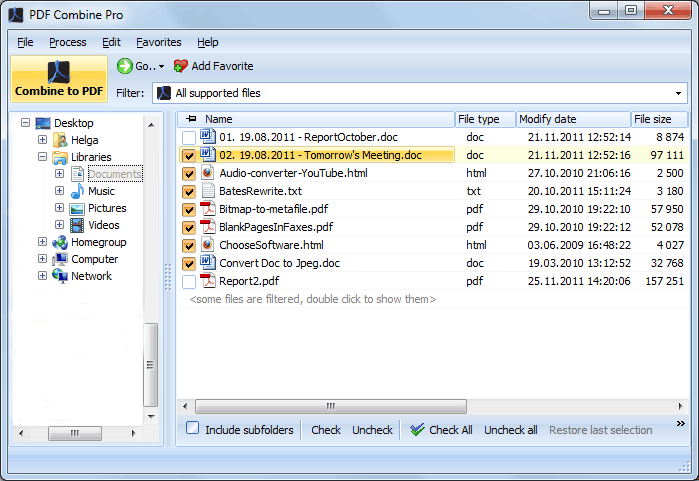
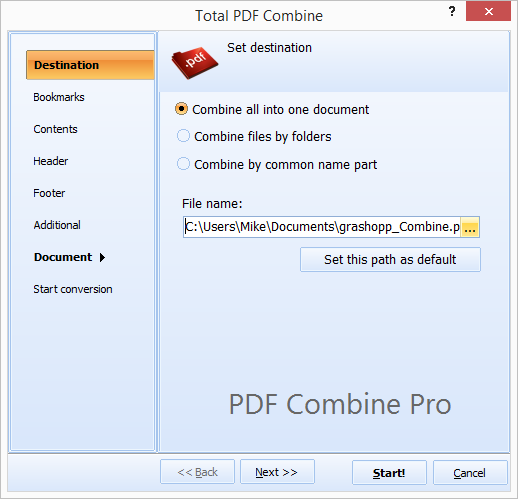
Quick answer: PDF Combine Pro combines DOC, DOCX, RTF, TXT, XLS, HTML, TIFF, JPEG, PNG and PDF files into one PDF. Select the files in the folder tree, click Combine to PDF, set options such as page numbers, watermarks, bookmarks from file names, digital signatures or user permissions, then click Start. It outputs PDF, PDF/A or non-searchable PDF, runs fully offline, and supports the command line for automation.


Why Should You Try PDF Combine Pro


    • PDF Combine Pro is unique. No other program can combine so many file types into one PDF and offer so many additional options.
    • Supported file types include DOC, DOCX, RTF, TXT, XLS, XLSX, HTML, HTM, MHT, PS, EPS, PRN, PDF, TIFF, JPEG, PNG

    • Produces PDF, PDF/A, non-searchable PDF. PDF Combine

    • Adds page numbers or watermarks

    • Creates bookmarks based on files' names

    • Adds your digital signature

    • Applies user permissions

    • Fatures great interface and full command line support

PDF Combine Pro — FAQ ▼

PDF Combine Pro merges DOC, DOCX, RTF, TXT, XLS, XLSX, HTML, HTM, MHT, PS, EPS, PRN, PDF, TIFF, JPEG, and PNG files into a single PDF. You can mix several formats in one job.
Run the program, check the files in the folder tree, click the Combine to PDF button, set the output options, then click Start. Every selected file is joined into one PDF.
Yes. Select a whole folder or many individual files and they are combined in a single run. There is no limit on the number of files you can merge.
Yes. PDF Combine Pro adds page numbers or watermarks, creates bookmarks based on file names, applies a digital signature, and can set user permissions on the output PDF.
PDF Combine Pro produces standard PDF, PDF/A for archiving, and non-searchable PDF. You choose the output type in the settings wizard before merging.
Yes. PDF Combine Pro runs entirely on your Windows PC. Your files are never uploaded to any server, which keeps confidential documents private.
Yes. It features full command-line support, so you can automate merging jobs in .bat scripts and run them with Windows Task Scheduler.


Start working now!

Download free trial and convert your files in minutes.
No credit card or email required.

⬇ Download Free Trial Windows 7/8/10/11 • 151 MB

Support
PDF Combine Pro Preview1
PDF Combine Pro Preview2

Latest News

Newsletter Subscribe

No worries, we don't spam.


© 2026. All rights reserved. CoolUtils File Converters

Cards