Need help? Reach us at 

 +1 (855) 418-2323
Need help? Reach us at
+1 (855) 418-2323

 File Converters TIFF and PDF apps Forensic Freeware
Download Total CAD Converter and start converting DWG drawings to PLT today.
(includes 30 day FREE trial)
(only $99.00)
Quick answer: To convert DWG to PLT, install Total CAD Converter, browse to the folder with your DWG files, check the files or click Check All, click PLT in the format toolbar, set the paper size, pen width, and destination, then press Start. The whole folder converts to plotter-ready HPGL PLT in one batch, offline, with no AutoCAD required.
DWG is AutoCAD's native binary format, in use since 1982. A DWG file stores complete design data: 2D and 3D geometry, layers, blocks, dimensions, linetypes, hatches, text styles, and metadata. The format is proprietary — reading it correctly requires AutoCAD or a DWG-compatible viewer like DraftSight or LibreCAD. DWG files are the working format for engineers, architects, and drafters who need to edit and revise drawings.
PLT is a plotter file based on the HPGL (Hewlett-Packard Graphics Language) and HPGL2 standard. It contains pen-movement instructions: pen-up, pen-down, pen selection, coordinate sequences, and line speed parameters. Plotters, wide-format printers, and CNC cutting machines read PLT natively. No CAD software is needed on the device that receives the file. PLT is the print-ready format — it describes what the plotter physically does, not what a designer intended to draw.
You cannot send a DWG file directly to most plotters. The plotter needs HPGL instructions, not CAD geometry. Converting DWG to PLT strips the design-level data and produces a lightweight, device-readable file. This lets you send drawings to plot stations, print shops, and CNC machines that have no AutoCAD license installed.
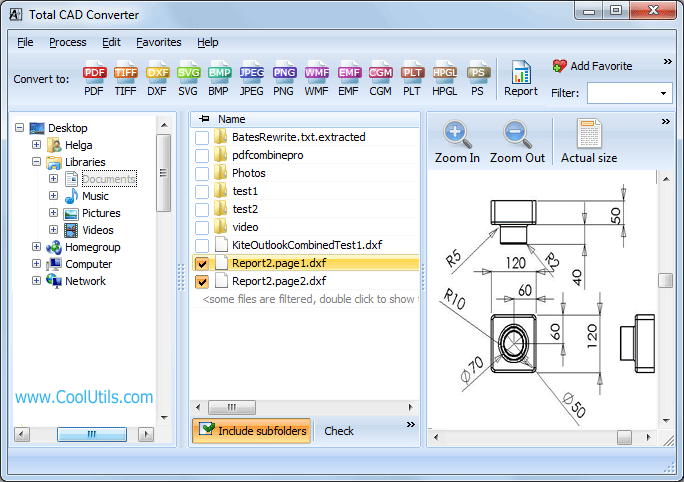
Batch jobs with hundreds of DWG files typically complete in under a minute. The converter remembers your last settings, so repeat jobs require only selecting files and pressing Start.
Total CAD Converter includes a command-line interface for automated and server-side workflows. Example:
CADConverter.exe C:\Drawings\*.dwg C:\Output\ -cHPGL
Use this in a .bat file or Windows Task Scheduler job to convert incoming DWG drawings to PLT overnight, on a fixed schedule, or whenever new files arrive in a watched folder. The command-line version runs without any GUI and fits into existing plot pipelines.
 No AutoCAD required. Total CAD Converter uses its own DWG rendering engine. You do not need AutoCAD, DraftSight, or any other CAD application on the conversion machine. Install the converter, point it at your DWG files, and convert.
Batch processing. Select a folder with 200 DWG drawings and convert them all to PLT in a single run. Each drawing gets its own PLT file, named to match the source. No manual file-by-file handling.
Plotter-specific settings. Adjust pen width, line weight scale, paper size (A4, A3, A1, custom), orientation, and scale factor before conversion. The PLT output matches what your plotter expects — no adjustments needed at the print station.
Layer control. Choose which layers to include or exclude in the PLT output. Construction lines, reference layers, or notes can be omitted from the plotter file without editing the source DWG.
100% offline processing. All conversion runs locally on your PC. Technical drawings with proprietary dimensions, client floor plans, or classified schematics never leave your machine.
13+ output formats. Beyond PLT/HPGL, convert DWG to PDF, TIFF, JPEG, PNG, BMP, SVG, WMF, CGM, DXF, and more — all from the same interface.
| Feature | Online Tools | Total CAD Converter |
|---|---|---|
| File size limit | 10–50 MB | No limit |
| Batch conversion | One file at a time | Unlimited |
| Privacy | Drawings uploaded to cloud | 100% offline |
| AutoCAD required | Varies | No |
| Plotter settings | None | Pen width, paper, scale, orientation |
| Layer selection | No | Yes |
| Automation | Not available | Built-in command line |
| Pricing | Subscription / per-file | One-time $99.00 |

(includes 30 day FREE trial)
(only $99.00)
Download free trial and convert your files in minutes.
No credit card or email required.