Logo
Home Products Support Contact About Us
arrow1 File Converters
arrow1 TIFF and PDF apps
arrow1 Forensic
arrow1 Freeware

How to convert HTM to Doc


If you have been using the internet for a while, you must have come across HTM and DOC files. HTM is the file extension for an HTML file while DOC is the file extension for a Word Document. While both HTM and DOC are document formats, there are some differences between them. An HTM file can only be created in a text editor while a DOC file can be created in a word processor like Microsoft Word. HTM files are static while DOC files are dynamic. HTM files can only be viewed in a web browser while DOC files can be viewed in any word processor.
 

How to convert HTM to Doc by Coolutils software?


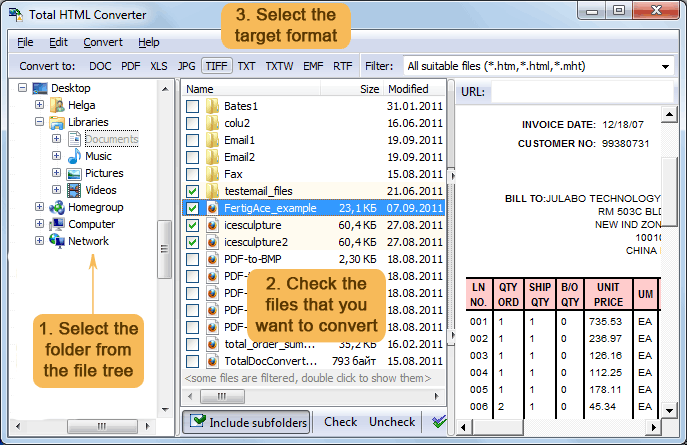
Step One: Download and install CoolUtils HTML Converter
Step Two: Upload your HTM file and select DOC as the output format
Step Three: The converter will then create a DOC file that you can download and open in Microsoft Word.
 

To convert an HTM file to a DOC file, you can use the CoolUtils converter. The CoolUtils converter is a free online HTM to DOC converter that can be used to convert HTM to DOC files without any limit. To use the CoolUtils converter, simply upload the HTM file you want to convert and select the output format as DOC. The converted file will be available for download immediately.

So, there you have it. A complete guide on how to convert HTM to DOC by CoolUtils. Give it a try and see how easy it is to use!


quote

Total HTML Converter Customer Reviews 2026

Rate It
Rated 4.8/5 based on customer reviews
5 Star

"Authors submit manuscripts as HTM files. We batch-convert them to DOC for our editorial workflow. Total HTML Converter preserves footnotes, tables, and styling accurately. Processes 100+ files per batch."

5 Star David Morrison Publishing Coordinator, Oxford University Press

"Court documents downloaded as HTM need to be in DOC format for filing. Total HTML Converter converts them in batch with perfect formatting. The command-line option lets us automate the daily process."

5 Star Laura Bianchi Office Manager, Studio Legale Bianchi

"We convert internal knowledge base articles (HTM) to DOC for offline distribution to field engineers. Total HTML Converter handles our complex CSS layouts and produces clean, editable Word files."

4.5 Star Kenji Yoshida Web Developer, Sony Interactive Entertainment

FAQ: Converting HTM to DOC ▼

HTM and HTML are the same format. HTM is a shorter file extension used historically on systems with 3-character extension limits. Total HTML Converter handles both identically.
Open Total HTML Converter, select your HTM files, click DOC, set output options, and press Start. The result is an editable DOC file for Microsoft Word.
Yes. Total HTML Converter renders all CSS styles including tables, colors, fonts, margins, and page breaks. The DOC output matches the original appearance.
Yes. Images referenced in the HTM file are embedded in the DOC output. Both local and relative-path images are supported.
Yes. Select an entire folder of HTM files and convert them all in one run. Each file becomes a separate DOC document.
Yes. The command-line interface lets you script conversions with .BAT files or Windows Task Scheduler.


Start working now!

Download free trial and convert your files in minutes.
No credit card or email required.

⬇ Download Free Trial Windows 7/8/10/11 • 100 MB

Support
HTML Converter Preview1
HTML Converter Preview2

Latest News

Newsletter Subscribe

No worries, we don't spam.


© 2026. All rights reserved. CoolUtils File Converters

Cards