Logo
Home Products Support Contact About Us
arrow1 File Converters
arrow1 TIFF and PDF apps
arrow1 Forensic
arrow1 Freeware

Convert BMP to RAW in Batch on Windows


Machine vision systems, embedded display controllers, and custom image processing pipelines often require raw pixel data — a flat binary buffer with no headers, no compression, and no metadata. BMP files carry a Windows bitmap header that most processing libraries and firmware loaders either ignore or reject. Total Image Converter strips the BMP wrapper and writes the raw pixel bytes to disk, in batch, so you can feed the output directly into your pipeline without writing a custom parser.

What Is RAW Image Data

In this context, RAW means a plain binary dump of pixel values — no file header, no color profile, no compression. Each pixel is represented as consecutive bytes in a defined channel order (typically RGB or BGR), at a fixed bit depth. The file contains nothing but image data from the first byte to the last.

This is distinct from camera RAW formats (CR2, NEF, ARW, DNG). Camera RAW files are proprietary formats that encode sensor data along with white balance, lens correction, and exposure metadata. The RAW format described here is the simple unstructured pixel buffer used in embedded systems, FPGA image processing, and industrial machine vision — where the consuming code already knows the image dimensions and channel layout and does not need a header to interpret the data.

Typical uses include loading images into microcontroller display framebuffers, feeding pixel arrays into OpenCV or custom C++ processing code, and programming image data into flash memory on embedded devices.

BMP vs. RAW: What Is the Difference

FeatureBMPRAW pixel buffer
File headerYes — 54 bytes minimum (BITMAPFILEHEADER + BITMAPINFOHEADER)None — pixel data starts at byte 0
CompressionOptional (RLE for 4-bit and 8-bit BMP)None — always uncompressed
PortabilityWidely supported by Windows appsRequires external dimension and format metadata
Use caseWindows GUI applications, legacy softwareEmbedded systems, machine vision, custom pipelines
File sizeSlightly larger (header overhead)Minimal — only pixel bytes

BMP is self-describing: the header tells any viewer the width, height, bit depth, and color order. A RAW file contains none of that — the consuming code must know the image geometry in advance. This makes RAW unsuitable for general use but ideal for controlled environments where the pixel format is fixed and the overhead of a header is unwanted.

How to Convert BMP to RAW in Batch

  1. Download and install Total Image Converter. The 30-day trial is fully functional — no email or credit card required.
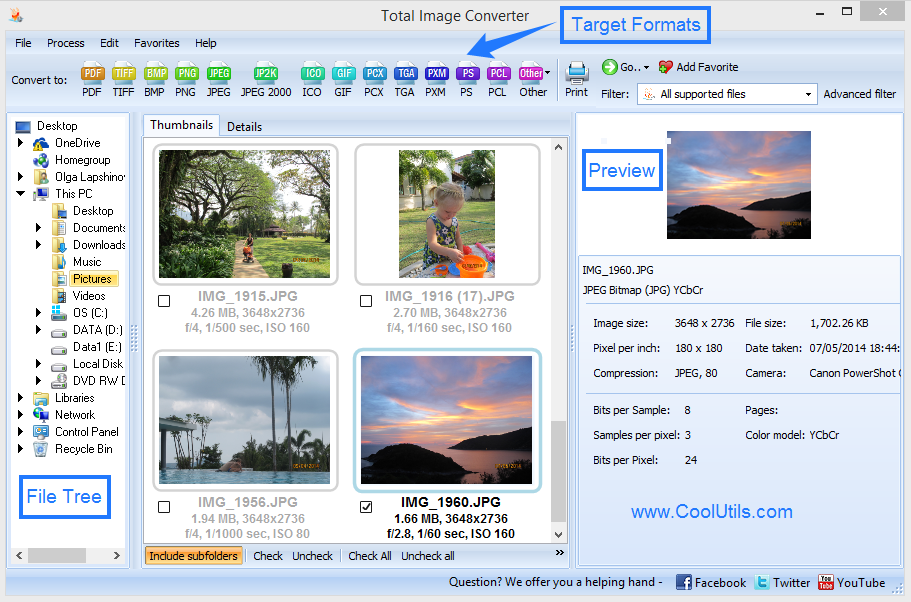
  2. Open the program. In the left panel, navigate to the folder containing your BMP files. Thumbnails appear in the right panel.
  3. Select the files you want to convert: click one file, Shift-click for a range, or press Ctrl+A to select every BMP in the folder.
  4. Click the RAW button in the format toolbar at the top of the window.
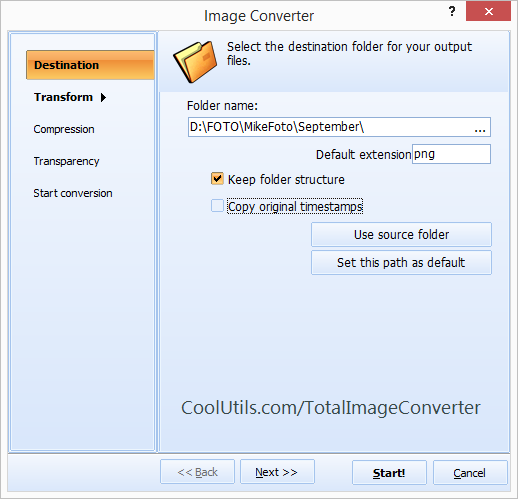
  5. In the conversion options dialog, confirm the color channel order and bit depth. For most embedded and machine vision targets, 24-bit RGB or BGR is the required output.
  6. Choose the output folder and click Start. Each BMP is converted to a headerless RAW pixel file and saved with a .raw extension.

Command-Line BMP to RAW

Total Image Converter includes a command-line executable for scripted pipelines, build systems, and server-side processing. Convert all BMP files in a folder to RAW:

TotalImageConverter.exe C:\Images\*.bmp C:\Output -c raw

To convert a single file and specify the output filename explicitly:

TotalImageConverter.exe C:\Images\frame001.bmp C:\Output\frame001.raw -c raw

Embed either command in a .bat file and call it from your build script or post-processing pipeline. This is the standard approach when generating firmware image assets or preparing datasets for training a vision model.

Why Use Total Image Converter

Batch processing without a file count limit

Select an entire folder of BMP files and convert all of them in one run. When a machine vision dataset contains thousands of labeled images, processing them one by one is not an option. Ctrl+A selects everything in the current folder; the conversion starts immediately.

Exact pixel output with no processing artifacts

The converter reads the BMP pixel data and writes it out directly without resampling, color shifting, or gamma correction unless you explicitly request it. What goes in comes out — the pixel values in the RAW file match what was in the BMP source exactly.

No metadata overhead in the output

The output file contains only pixel bytes. No EXIF, no ICC profile, no comment blocks. This keeps the output compatible with low-level loaders that expect a fixed-size binary blob at a known offset.

Scriptable via command line

The command-line version integrates directly into build scripts, Makefiles, and CI pipelines. Generate your BMP files upstream, call the converter, and your RAW assets are ready for the next build step — without opening any GUI.

Works offline, files stay local

Everything runs locally on Windows. No files leave your machine. This is important when working with proprietary training datasets, unreleased product imagery, or sensitive industrial camera footage.

Personal license from $49.90

One-time purchase. Free updates and technical support included. Works on Windows 7, 8, 10, and 11, both 32-bit and 64-bit.

Online Converter vs. Desktop Converter

FeatureOnline ConverterTotal Image Converter
Batch processingOne file at a timeEntire folder in one run
File size limitUsually 10–50 MBNo limit
RAW output (headerless pixel data)Not availableYes
PrivacyFiles uploaded to a serverAll local, never uploaded
AutomationNot possibleCommand line, .bat scripts, build integration
Resize / color conversion optionsRarelyYes, in the same pass
Works offlineNoYes

When Do You Need BMP to RAW Conversion

  • Machine vision and inspection systems. Industrial cameras often capture reference images as BMP for easy review. The actual processing library — whether OpenCV, Halcon, or a custom C++ pipeline — reads raw pixel buffers directly. Converting BMP to RAW removes the header-parsing step and makes the data immediately consumable.
  • Embedded display firmware. Microcontrollers and SoCs with LCD or OLED displays load image assets from flash as raw pixel arrays. Converting BMP UI graphics or splash screens to RAW produces the binary file that gets linked directly into firmware or written to a display framebuffer address.
  • Custom image processing pipelines. Researchers and developers writing their own image processing code in C, Python, or MATLAB often prefer to read raw binary pixel data rather than deal with BMP parsing. A RAW file with known dimensions loads with a single fread call.
  • Industrial camera calibration datasets. Calibration targets are often stored as BMP for human review. Feeding them into calibration algorithms requires stripping headers. Batch converting the entire calibration set to RAW prepares all frames in one step.
  • Research and academic image processing. Computer vision research pipelines frequently use flat pixel buffers as the exchange format between components written in different languages. Converting a BMP dataset to RAW makes the images compatible with any code that knows the pixel format, without imposing a library dependency for BMP decoding.

quote

Total Image Converter Customer Reviews 2026

Rate It
Rated 4.7/5 based on customer reviews
5 Star

"I maintain the display firmware for a line of industrial control panels. The UI assets are designed as BMP files and need to be converted to headerless RGB pixel arrays before they get linked into the firmware image. Total Image Converter handles the entire asset folder in one command-line call. I added it to our Makefile as a build step — BMP files in, RAW files out, ready for the linker. Saves a manual step on every release cycle."

5 Star Dmitri Volkov Embedded Systems Engineer

"Our inspection pipeline reads pixel buffers directly using a custom C++ loader. Reference images come from a Windows capture tool that saves BMP. I batch convert the entire reference set to RAW before each calibration run. The output is exactly what the loader expects — no header bytes to skip, correct channel order, correct dimensions. The converter is straightforward and does not add any processing I did not ask for."

4 Star Rachel Okonkwo Machine Vision Developer

"We use a vision camera system that outputs BMP frames for defect reference images. The downstream analysis tool consumes raw pixel buffers. Converting 300–400 BMP frames to RAW before each production run used to be a manual step. Now it is a scheduled .bat file that runs after the camera job finishes. Total Image Converter processes the whole folder in well under a minute. The integration into our automation workflow took about ten minutes to set up."

5 Star Lars Eriksson Industrial Automation Specialist

FAQ ▼

RAW here means a plain binary file containing only pixel data — no file header, no compression, no metadata. The output file starts at byte 0 with the first pixel value and ends with the last pixel value. This is the format used by embedded display loaders, machine vision libraries, and custom image processing code that expects a raw pixel buffer rather than a self-describing image format.
By default, the output follows the channel order of the source BMP, which stores pixels in BGR order (Blue, Green, Red). If your consuming code expects RGB, you can set the channel order in the conversion options. Check the options dialog before starting the batch to match the channel layout your pipeline expects.
The output bit depth matches the source BMP by default. A 24-bit BMP (8 bits per channel, 3 channels) produces 3 bytes per pixel in the output. A 32-bit BMP (with alpha) produces 4 bytes per pixel. You can change the bit depth in the color options if your target system requires a different format, such as 16-bit RGB565 for embedded displays.
Use: TotalImageConverter.exe C:\Folder\*.bmp C:\Output -c raw. This converts all BMP files in the folder to RAW pixel buffers and saves them with a .raw extension. Embed this command in a .bat file or a Makefile step to automate the conversion as part of a build or data preparation pipeline.
There is no file count limit. Use Ctrl+A to select all files in a folder, or pass a wildcard path on the command line. For large datasets with thousands of images, the command-line version is more practical — it processes files sequentially without keeping a GUI open.
Camera RAW formats (CR2, NEF, ARW, DNG) are proprietary or standardized formats that store raw sensor data along with white balance, lens correction, exposure settings, and other metadata. They require a camera RAW decoder to interpret. The RAW format produced by Total Image Converter is a simple binary pixel dump — it has no structure beyond the pixel bytes themselves and is intended for systems that already know the image dimensions and pixel format.
Windows 7, 8, 10, and 11, both 32-bit and 64-bit.


Start working now!

Download free trial and convert your files in minutes.
No credit card or email required.

⬇ Download Free Trial Windows 7/8/10/11 • 41 MB

Support
Image Converter Preview1
Image Converter Preview2

Latest News

Newsletter Subscribe

No worries, we don't spam.


© 2026. All rights reserved. CoolUtils File Converters

Cards