Logo
Home Products Support Contact About Us
arrow1 File Converters
arrow1 TIFF and PDF apps
arrow1 Forensic
arrow1 Freeware
div style="background: #88d7f4; color: white; padding: 1%;">

Convert MSG to EML — Export Outlook Emails to Universal EML Format


Outlook stores every email as an .msg file — a proprietary binary format that only Outlook and a handful of specialized tools can open. If you are migrating to Thunderbird, Apple Mail, eM Client, or any other email application, those clients expect .eml files, not .msg. Total Mail Converter reads MSG files directly from disk, extracts all headers, body content, and attachments, and writes standard EML files that any RFC 5322-compliant client can open.
  • Converts MSG to EML without requiring Microsoft Outlook installed
  • Batch mode — process thousands of MSG files in one session
  • Preserves all email headers, HTML body, inline images, and attachments
  • Customizable file naming templates: date, sender, subject, or any combination
  • Command-line interface for automated and server-side conversion
  • Free 30-day trial — no credit card or email required


Download Now!

(includes 30 day FREE trial)

Buy License

(only $59.90)

Quick answer: To convert MSG to EML, install Total Mail Converter, open the folder of MSG files, tick the messages or click Check All, click the EML button, choose the destination folder and a file-naming template, then press Start. Each MSG becomes a standard RFC 5322 EML file with headers, body, and attachments intact — in one batch, with no Outlook required.

MSG vs EML: What Is the Difference?

MSG (Outlook Message)

MSG is Microsoft Outlook's proprietary format based on OLE Compound Document (CFBF) binary structure. Each MSG file contains the complete email: sender, recipients, subject, date, message body (HTML, RTF, or plain text), embedded images, file attachments, and Outlook-specific metadata such as categories, follow-up flags, and reminders. Only Outlook or MSG-aware utilities can parse this format. You cannot open an MSG file in a text editor, a web browser, or a non-Microsoft email client.

EML (Electronic Mail)

EML is a plain-text format defined by RFC 5322. Each file stores one email message with MIME-encoded headers, body (HTML and plain-text alternatives), inline images, and file attachments. Open any .eml file in a text editor and you see human-readable From, To, Subject, and Date lines. Thunderbird, Apple Mail, Windows Mail, eM Client, Mailbird, and dozens of other clients read EML natively. One EML = one email = one portable, universally accessible file.

MSG locks your emails inside Microsoft's ecosystem. EML gives you universal access and long-term portability. If you leave Outlook, your .msg files become inaccessible without a converter. EML files remain readable on any platform, any operating system, and any email client for years to come.

How to Convert MSG to EML

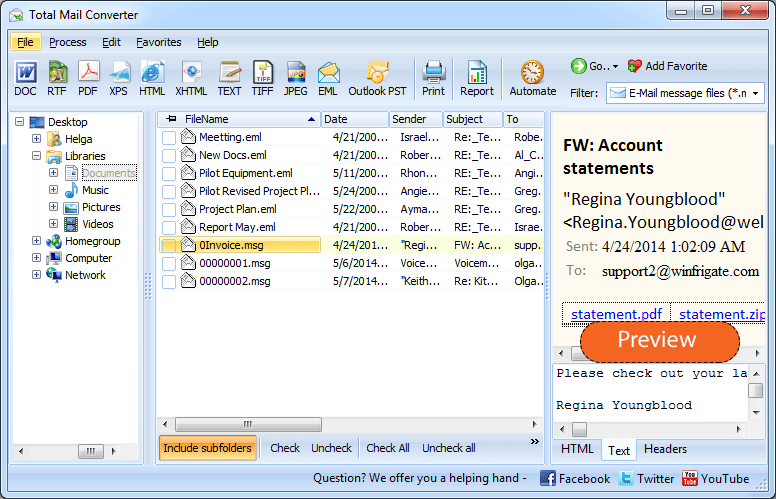
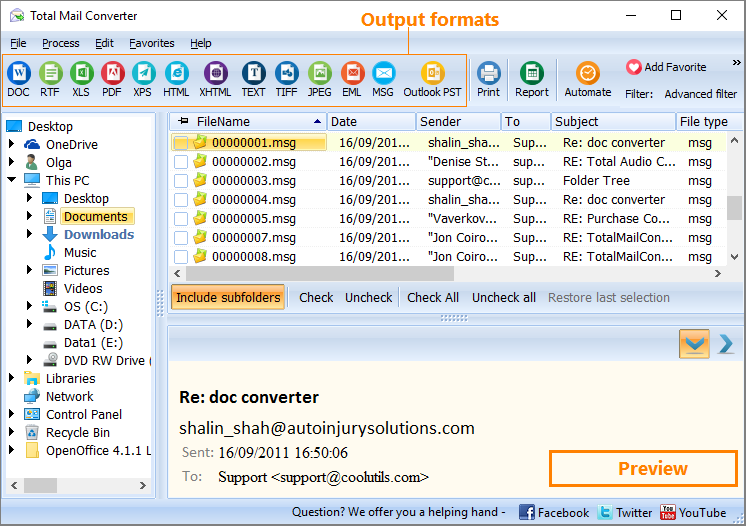
  • Step 1. Launch Total Mail Converter. The folder tree on the left shows your local drives and network paths. Navigate to the directory containing your MSG files. The file list displays every email with sender, subject, date, and size.
  • Step 2. Select the messages. Tick individual MSG files or click Check All to select every file in the folder. Use subfolders to include nested directories.
  • Step 3. Click the EML button on the toolbar. The conversion wizard opens with EML-specific settings.
  • Step 4. Choose the destination folder where converted EML files will be saved. The converter creates one .eml file per MSG.
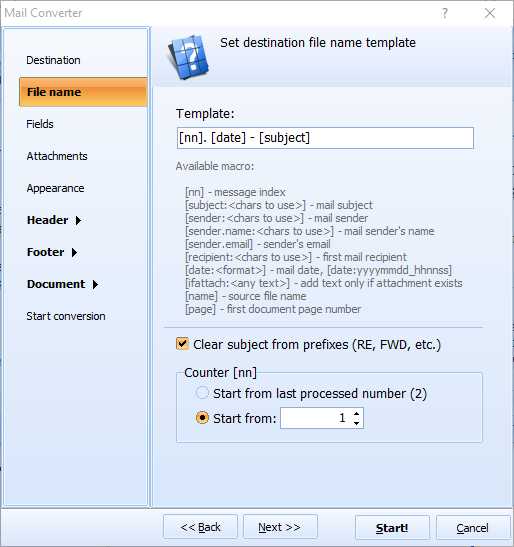
  • Step 5. Configure output options. Set the file naming template using macros: date, sender name, subject line, or any combination. Choose whether to replicate the source folder structure in the output directory.
  • Step 6. Press Start. Each MSG file is parsed and written as a standard RFC 5322 EML file with all headers, HTML body, plain-text alternative, inline images, and attachments preserved as MIME parts.

Once converted, import the EML files into Thunderbird by dragging them into a folder in the mailbox panel. Apple Mail, eM Client, and Windows Mail also accept EML files directly — copy them to the client's storage directory or use the built-in import function.

Command-Line Conversion

MailConverter.exe "C:\Emails\*.msg" -sEML "C:\Output\EML\"

Parameters: source files (wildcards supported), -sEML sets the target format, and the last argument is the output folder. Save this command in a .bat file and schedule it with Windows Task Scheduler to automate nightly MSG-to-EML exports. The command-line version supports all options available in the GUI: file naming patterns, folder structure, and attachment handling.

Why Use Total Mail Converter?

  • Full format fidelity. Every header field, HTML body, plain-text alternative, inline image, and file attachment from the MSG is preserved in the output EML. No data loss, no stripped formatting.
  • Batch conversion. Select a folder with thousands of MSG files, click Check All, and convert them in one session. No need to process files one by one.
  • Customizable file naming. Name output EML files by date, sender, subject, or a custom template with macros. Avoid generic names like "message.eml" — every file gets a meaningful, searchable name.
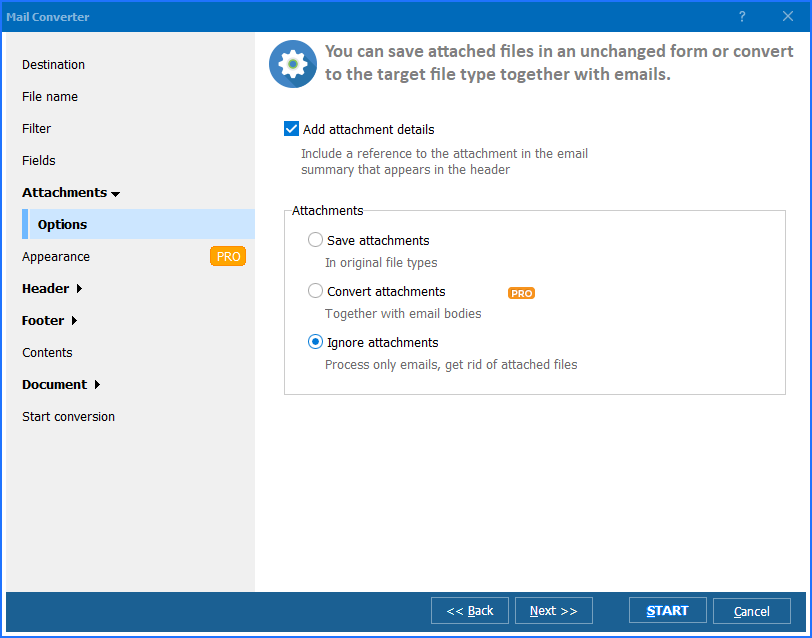
  • Attachment preservation. All attachments are embedded in the EML file as standard MIME parts. The target email client reads them just as if the email had been received directly.
  • Outlook not required. Total Mail Converter reads MSG files using its own parser. No Outlook installation, no MAPI library, no Microsoft Office license needed on the machine.
  • Multiple output formats. Beyond EML, the same tool converts MSG files to PDF, DOC, HTML, TXT, RTF, TIFF, PST, and more. One application covers all email conversion tasks.

Manual Export vs Total Mail Converter

FeatureManual (drag from Outlook)Total Mail Converter
Batch exportOne email at a timeEntire folders — thousands of files in one click
Attachment handlingEmbedded, no controlEmbedded as MIME parts, full control
Folder structureLost — all files in one pilePreserved — subdirectories mirrored
File namingOutlook's default (cryptic)Custom patterns: Date, Subject, Sender
SpeedManual drag-and-drop per fileThousands of files per minute
Requires OutlookYesNo — reads MSG files independently
Command-line automationNot possibleFull CLI with all options
PricingRequires Outlook license$59.90 one-time, 30-day free trial

Total Mail Converter — convert MSG to EML

When Do You Need MSG to EML Conversion?

Download the free 30-day trial — no email or credit card required. A personal license costs $59.90 and includes one year of free upgrades. Works on Windows 7/8/10/11.

Download Free Trial Buy License — $59.90


quote

Total Mail Converter Customer Reviews 2026

Rate It
Rated 4.7/5 based on customer reviews
5 Star

"We migrated 40 staff mailboxes from Outlook to Thunderbird. Each user had years of MSG files exported from PST archives. Total Mail Converter processed all of them in batch — around 12,000 MSG files total. Every EML imported into Thunderbird cleanly: headers, body formatting, attachments, all intact. The file naming by date and subject made the transition transparent to end users."

5 Star Brian Kowalski System Administrator, Greenfield Municipal District

"We receive custodian email exports as MSG files and need to standardize them to EML for our forensic analysis platform. Total Mail Converter preserves the full MIME structure, including all original headers and routing information. The command-line mode lets us script the conversion into our evidence intake workflow. Reliable output every time."

5 Star Sandra Reeves Digital Forensics Analyst, Reeves & Associates

"Clients regularly hand me MSG files they cannot open because they switched from Outlook to Apple Mail or Thunderbird. Total Mail Converter handles the conversion quickly — even folders with 5,000+ files. The batch mode and custom naming save hours of manual work. Only wish: a native Mac version so I could run it without a VM."

4 Star Martin Delgado IT Consultant, Delgado Tech Solutions

MSG to EML Conversion: FAQ ▼

Do I need Microsoft Outlook installed to convert MSG to EML?

No. Total Mail Converter reads MSG files directly from disk using its own parser. It does not require Outlook, MAPI, or any Microsoft Office component on the machine. Install the converter on a clean Windows PC or server and it works immediately.

Are attachments preserved when converting MSG to EML?

Yes. All file attachments from the MSG are embedded in the output EML as standard MIME parts. The target email client (Thunderbird, Apple Mail, eM Client) reads them exactly as if the email had been received directly. Inline images are also preserved.

Can I convert thousands of MSG files to EML at once?

Yes. Select the folder containing your MSG files, click Check All, choose EML as the output format, and press Start. Total Mail Converter processes the entire batch in one session. Folder structure is preserved in the output directory.

Which email clients can open EML files?

EML is an open standard (RFC 5322) supported by virtually every email application: Mozilla Thunderbird, Apple Mail, Windows Mail, eM Client, Mailbird, The Bat!, and many others. You can also open EML files in any text editor to view the raw MIME content.

Can I automate MSG-to-EML conversion from the command line?

Yes. Total Mail Converter includes a full command-line interface. Example: MailConverter.exe "C:\Emails\*.msg" -sEML "C:\Output\EML\" — this converts all MSG files in the source folder to EML. Save the command in a .bat file and schedule it with Windows Task Scheduler.

What happens to embedded images and RTF formatting in the MSG?

HTML body content and embedded images are preserved as MIME parts in the EML file. If the MSG contains an RTF-only body, Total Mail Converter extracts the text content and writes it into the EML. All formatting that EML supports (HTML, plain text, inline images) is retained.

How much does Total Mail Converter cost?

A personal license costs $59.90 with a free 30-day trial. No email or credit card required for the trial. The license includes one year of free upgrades. The converter runs on Windows 7, 8, 10, and 11.


Start working now!

Download free trial and convert your files in minutes.
No credit card or email required.

⬇ Download Free Trial Windows 7/8/10/11 • 89 MB
Get all CoolUtils products
for $99 only
read more

  (you save up to $500)


Support
Total Mail Converter Preview1
Total Mail Converter Preview2
Total Mail Converter Preview3

Related Topics

Convert EML to Doc
Convert EML to HTML
MSG Converter — Convert Outlook MSG Emails to PDF, DOC, EML and 15+ Formats
EML Converter — Convert EML Emails to PDF, DOC, TIFF and 15+ Formats
Convert EML to TIFF — Save Emails as Multi-Page TIFF Images
Convert EML to PDF
How to Convert MSG to PDF
Convert MSG to TIFF — Archive Outlook Emails as Multi-Page Images
Convert MSG To HTML
Convert EML to PST — Import EML Emails into Outlook
Convert EML to Text — Export Email Messages as Plain Text Files
Convert MSG to PST — Merge Outlook Messages into a PST Archive

Latest News

Newsletter Subscribe

No worries, we don't spam.


© 2026. All rights reserved. CoolUtils File Converters

Cards