Logo
Home Products Support Contact About Us
arrow1 File Converters
arrow1 TIFF and PDF apps
arrow1 Forensic
arrow1 Freeware

OST File Converter — Export Outlook Data to PDF, DOC, TIFF, HTML, and More


You have an OST file full of years of email correspondence. You don't need another PST — you need the data out of Outlook entirely. Archived as PDFs for legal hold. Attached to a report as DOC. Scanned into a document management system as TIFF. Published on an internal wiki as HTML.

Total Outlook Converter reads OST files directly and exports emails with attachments to more than a dozen portable formats. No Exchange connection required, no PST intermediate step, no Outlook installation on the machine doing the work.

  • Exports OST to PDF, DOC, HTML, TIFF, JPEG, RTF, TXT, XHTML, XLS, EML, MBox, MSG, ODT, XPS
  • Handles OST files of any size — tens of gigabytes are routine
  • Attachments converted or extracted in the same pass
  • Batch mode processes thousands of emails in one run
  • Command-line interface for scheduled and server-side automation
  • 30-day free trial, no credit card or email required


Download Now!

(includes 30 day FREE trial)

Buy License

(only $49.90)

OST to PST Is Not Always the Answer

If you only need a straight OST to PST migration, our dedicated converter handles that single case quickly. This article is about the rest of the picture — when PST is the wrong target.

Most OST conversion guides assume PST is the target. That is the default because PST is the only format Outlook natively reads. But PST carries real drawbacks for anyone who is not migrating to another Outlook installation:

  • Size ceilings. Older Outlook versions cap PST at 2 GB or 20 GB. A 40 GB OST will not fit without splitting.
  • Proprietary. PST still needs Outlook or a licensed third-party tool to open. You are swapping one closed format for another.
  • Monolithic. The whole PST loads or nothing does. No grep, no indexing, no per-email access.
  • Corruption risk. A damaged PST can take every message with it. Separate files per email eliminate that risk.

If your goal is to archive, share, print, or index email content — not just move it to another Outlook — PDF, DOC, or TIFF are better targets. Each email becomes its own file. No 50 GB monolith. No Outlook required to view.

How to Convert OST to Any Format

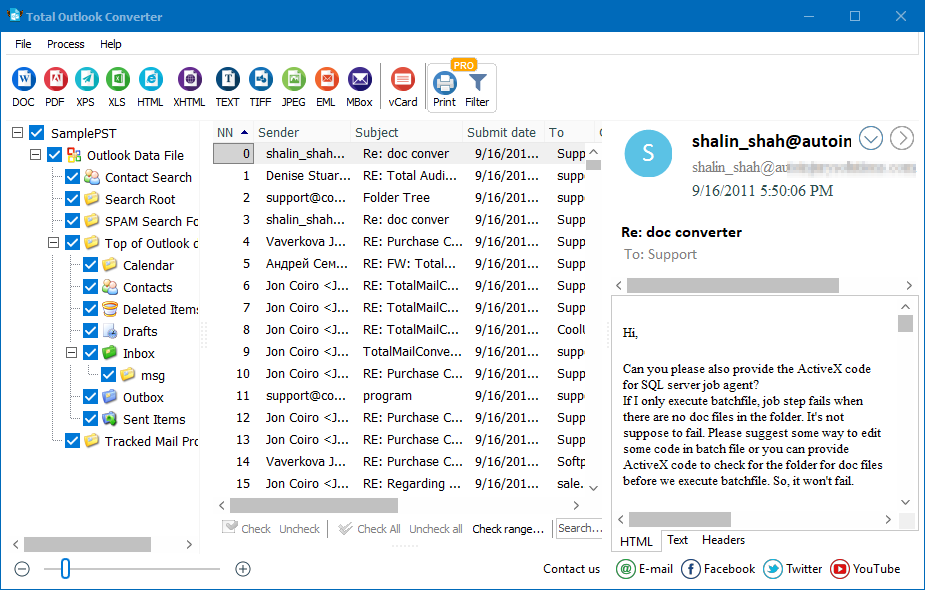
  • Step 1. Launch Total Outlook Converter. The folder tree opens on the left, the email list in the middle, and a preview pane on the right.
  • Step 2. Open your OST file via File → Open Data File. The tool parses OST directly — no Exchange connection, no Outlook account required.
  • Step 3. Select emails. Check individual messages, entire folders, or apply filters by date range, sender, subject, or attachment presence.
  • Step 4. Click the target format in the top toolbar: PDF, DOC, HTML, TIFF, JPEG, RTF, TXT, XHTML, XLS, EML, MBox, MSG, ODT, or XPS.
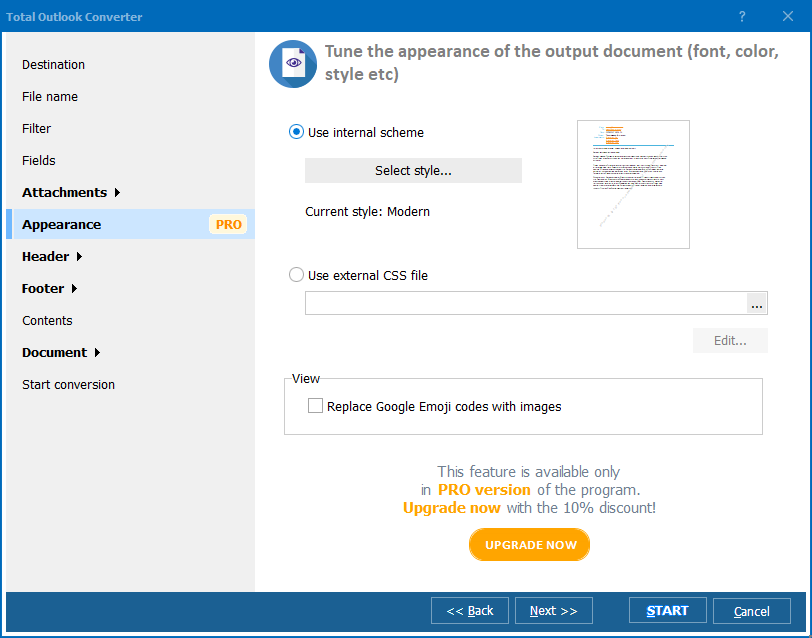
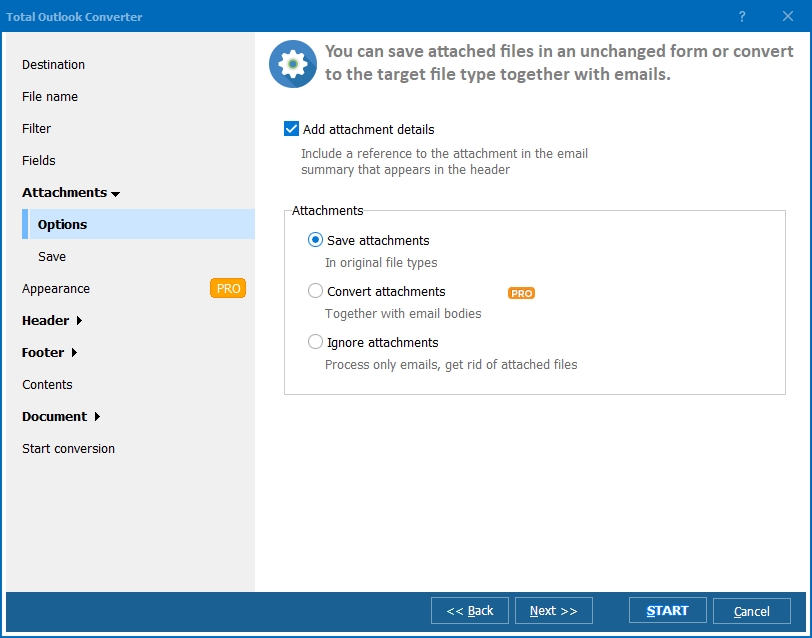
  • Step 5. Configure the wizard. Set the naming template (subject + date, sender + number, or custom), attachment handling (convert, extract to subfolder, embed, or link), and the destination folder.
  • Step 6. Press Start. Each email becomes a separate output file. Ten thousand messages take a few minutes, not a day.

Your original OST file is read-only during the process — it is never modified.

Command-Line OST Conversion

Total Outlook Converter includes a command-line interface that runs from .bat scripts, PowerShell, or Task Scheduler. Example:

OutlookConverter.exe "C:\Mail\archive.ost" "C:\Export\" -c pdf -tf subject-date

Schedule this to run nightly and newly received OST content exports automatically. No GUI interaction, no operator required. The same switches work for DOC, HTML, TIFF, and every other output format.

Why Total Outlook Converter for OST?

Green PlusMulti-format in one pass. A dedicated OST-to-PST tool produces one format. Total Outlook Converter can export the same OST to PDF for your archive and TIFF for an imaging system in the same run.

Green PlusNo Outlook dependency. Many OST tools require Outlook installed and configured. Total Outlook Converter reads OST with its own engine. It runs on headless servers with no Office license.

Green PlusAttachment intelligence. Attachments can be converted alongside the email body. A .docx attachment flattens to PDF in the same pass; an image attachment becomes a TIFF. Every element of every email ends up in your chosen archive format.

Green PlusOrphaned OST recovery. An OST whose Exchange account is gone — employee left, mailbox deleted, server decommissioned — is normally unreadable. Total Outlook Converter parses the file directly without the original account or server.

Green PlusBates numbering and headers. Add Bates stamps, case numbers, or custom headers and footers to every output file — critical for legal hold and e-discovery workflows.

Green PlusLocal processing. All conversion happens on your PC. Confidential email never touches a cloud service, an online converter, or an external server.

OST-to-PST Tool vs Total Outlook Converter

FeatureDedicated OST-to-PST ToolTotal Outlook Converter
Output formatsPST only14+ including PDF, DOC, TIFF, HTML, MBox
Needs Outlook installedUsually yesNo
AttachmentsKept inside PSTConverted or extracted
Per-email filesNo (one PST blob)Yes (each email = one file)
Command-lineRareBuilt-in
Best forMigration to another OutlookArchiving, sharing, legal hold

download OST file converter

Windows 7/8/10/11 • 30-day free trial

When Do You Need to Export OST to Other Formats?

  1. Legal hold and e-discovery. Litigation requires email evidence as PDF/A or TIFF, not PST. Each message stamped with Bates numbers and preserved as an independent file for review.
  2. Employee offboarding. Export the departing employee's mailbox to DOC or PDF for the HR records. A PST nobody will open in three years is not a record.
  3. Exchange migration cleanup. After an Exchange to Microsoft 365 migration, old OST files linger on laptops. Export each to PDF and delete the OST — storage reclaimed, content preserved.
  4. Document management system import. SharePoint, OpenText, iManage, and similar systems accept PDF or DOC but not PST. Convert OST first, then ingest.
  5. Orphaned OST recovery. An employee left, the mailbox was deleted, the Exchange server was decommissioned. The OST still exists on the old laptop. Export before the machine is wiped.
  6. Print and audit trails. Auditors and regulators want printable records. TIFF and PDF are the only formats that survive printer queues, scanners, and records retention systems unchanged.


Download Now!

(includes 30 day FREE trial)

Buy License

(only $49.90)


quote

Total Outlook Converter Customer Reviews 2026

Rate It
Rated 4.8/5 based on customer reviews
5 Star

"We inherited 40+ orphaned OST files from former attorneys and needed PDF/A output for our records retention system. Total Outlook Converter handled each one without Outlook installed on the processing box. Bates numbering worked on first try, attachments converted alongside the email body. Cleared a six-month backlog in two days."

5 Star Rebecca Holt Records Manager, law firm

"Post-migration from on-prem Exchange to Microsoft 365 we had old OST files sitting on about 200 laptops. Wrote a PowerShell loop calling OutlookConverter.exe on each one, export to PDF, delete the OST. Ran unattended over a weekend. No Outlook on the admin workstation, no problem."

5 Star Marcus Flynn IT Infrastructure Lead

"Using this for e-discovery export from client OST archives. The per-email file output is exactly what our review platform ingests — one PDF per message, attachments in a sibling folder, Bates numbered. Would love a built-in dedup pass, but otherwise it does the job our $15k/year enterprise tool does, for a one-time $49.90."

4 Star Priya Shankar E-Discovery Consultant

FAQ ▼

Yes. The program parses OST files directly with its own engine. No Outlook installation, no Exchange connection, and no original email account are required. You can run it on a clean server or on a PC where Outlook was never installed.
Yes. An OST whose Exchange account no longer exists — employee left, mailbox purged, server decommissioned — is still readable. Total Outlook Converter does not need the original account credentials or an active Exchange connection.
PDF, DOC, DOCX, HTML, XHTML, TIFF, JPEG, RTF, TXT, XLS, EML, MBox, MSG, ODT, and XPS. You can also apply Bates numbering, custom headers and footers, and attachment handling rules during conversion.
You choose: convert them to the same format as the email body, extract them to a subfolder, embed them inside the output file, or leave them as hyperlinks. Attachment conversion runs in the same pass as email conversion.
No hard limit. Total Outlook Converter handles OST files of tens of gigabytes without splitting. Processing is streamed, so memory usage stays low even for very large archives.
Yes. The command-line interface accepts all options the GUI offers — source path, target format, naming template, attachment handling, and destination. Schedule it from Task Scheduler, cron-like tools, or any .bat script for nightly or on-demand runs.
A dedicated OST to PST tool writes one output format: PST. Total Outlook Converter writes 14+ formats and produces one file per email, which is the structure document management systems, legal hold platforms, and archival tools expect. If you only need to move a mailbox to another Outlook, a dedicated OST to PST tool is simpler. For anything else — archiving, sharing, legal hold, DMS import — this tool fits better.
The 30-day free trial is fully functional. No watermarks, no email count limits, no feature restrictions. After 30 days a one-time license of $49.90 unlocks continued use — no subscription.
Yes. Windows 7, 8, 10, 11, and all supported Windows Server versions. The command-line build is the usual choice for server deployments — no GUI required.


Start working now!

Download free trial and convert your files in minutes.
No credit card or email required.

⬇ Download Free Trial Windows 7/8/10/11 • 87 MB

Support
Total Outlook Converter Preview1
Total Outlook Converter Preview2
Total Outlook Converter Preview3

Latest News

Newsletter Subscribe

No worries, we don't spam.


© 2026. All rights reserved. CoolUtils File Converters

Cards