Logo
Home Products Support Contact About Us
arrow1 File Converters
arrow1 TIFF and PDF apps
arrow1 Forensic
arrow1 Freeware

Convert Thunderbird Emails to PDF


You want to clear old mail out of Thunderbird but still be able to read it later. Leaving it in the mailbox bloats your profile; deleting it loses it forever. The fix is to turn each email into a PDF you can store on your hard drive and open in any PDF reader — no mail client required. Total Thunderbird Converter exports Thunderbird emails and whole MBOX folders to PDF in batch, one PDF per message.

Quick answer: To convert Thunderbird emails to PDF, open Total Thunderbird Converter, which reads your existing Thunderbird folders directly, check the emails or the whole folder you want, click the PDF button in the format bar, set options such as attaching files in the wizard, and press Start. Each message becomes its own PDF in a batch, offline, with attachments kept alongside the text.

How do I convert Thunderbird emails to PDF in batch?

The program shows your Thunderbird folders as they already are — it is synchronized with your account, so even mail that arrived minutes ago is there. You do not export anything from Thunderbird first.

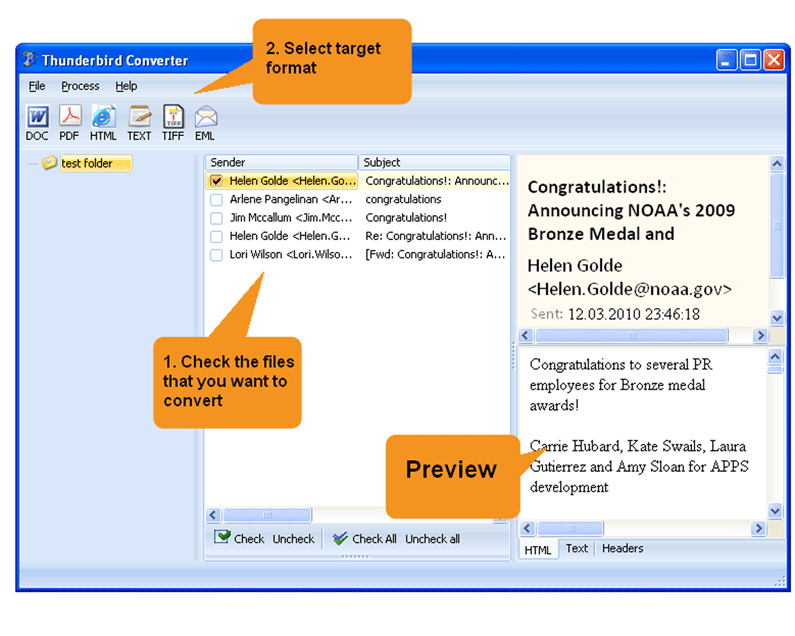
  1. Open Total Thunderbird Converter. Your Thunderbird folders appear in the tree with the built-in email viewer beside them.
  2. Check one email, several, or a whole folder. The program is built for batch work, so selecting hundreds of messages is fine.
  3. Click the PDF button in the format bar at the top.
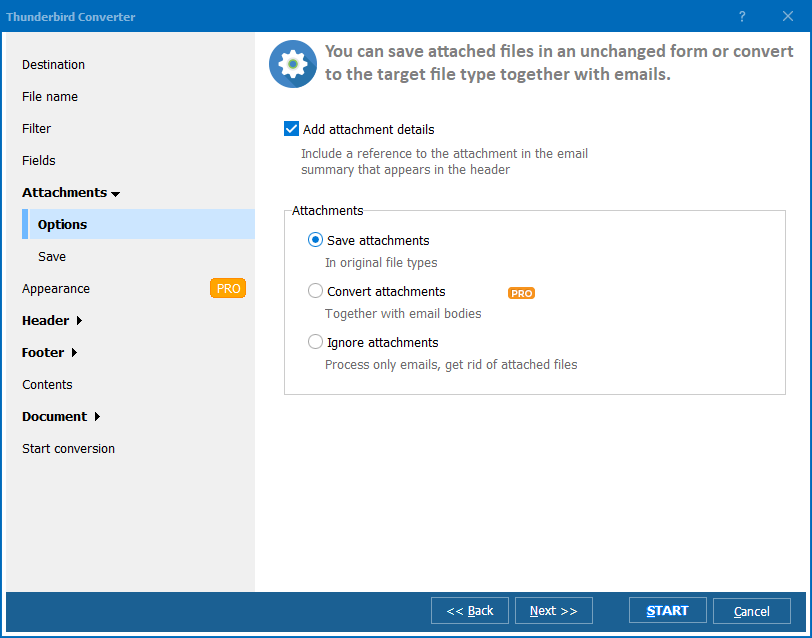
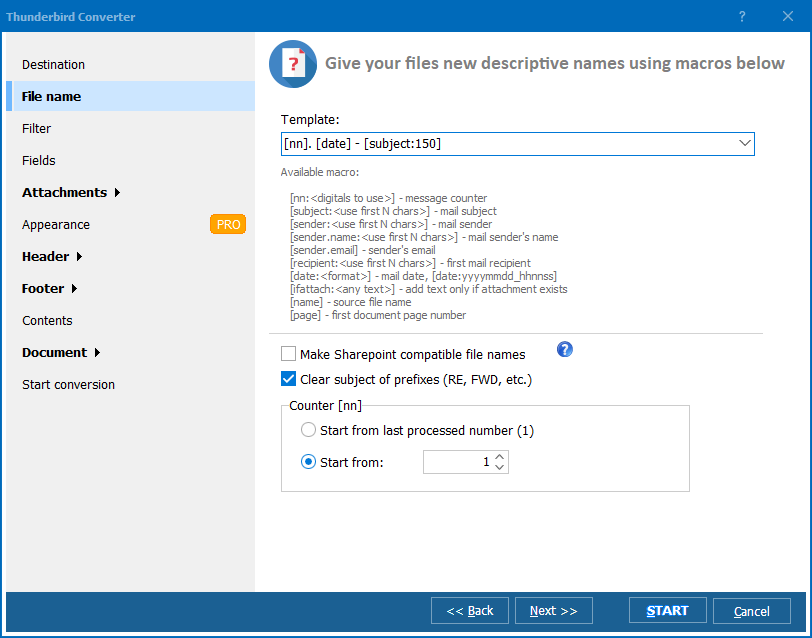
  4. The settings wizard opens. Leave the defaults or set page and attachment options, then click Start!

When the run finishes, the folder of PDF copies opens automatically so you see the result at once. Each message is a separate PDF named for easy sorting.

What happens to attachments?

Total Thunderbird Converter can keep each email's attachments with the message when it builds the PDF, so a converted invoice or contract stays whole. If your goal is instead to pull the attached files out as standalone documents, use the dedicated Thunderbird PDF attachments workflow. And if you need the mailbox itself in Outlook format rather than PDF, see convert Thunderbird to PST.

  • Turn each Thunderbird email into its own PDF in one batch
  • Read archived mail in any PDF reader, without Thunderbird open
  • Keep attachments together with the message text
  • Preview messages in the built-in viewer before you convert
  • Store PDFs on disk, separate from your mailbox, to shrink the profile

Tip: use the built-in viewer to read each letter while you decide what to keep. Sorting before you convert means the PDF archive holds only what you actually need.

Tip: the converter also runs from the Windows command line, so a scheduled .bat file can archive a mail folder to PDF overnight in the background.

The 30-day trial is fully functional — no email or credit card needed. A personal license starts at $49.90 and runs on Windows 7, 8, 10 and 11, with a command-line build for servers.


quote

Total Thunderbird Converter Customer Reviews 2026

Rate It
Rated 4.7/5 based on customer reviews
5 Star

"Patient correspondence was piling up in Thunderbird and slowing the client down. We converted three years of a shared folder to PDF, one file per email, and archived them on the network drive. Attachments came through inside the PDFs, so the referral letters stayed complete. Now the mailbox is lean and anyone can open a message in Acrobat without launching Thunderbird."

5 Star Diane Kowalczyk Office Manager, Brightwater Dental Group

"At year end I need a clean paper trail of client emails. Total Thunderbird Converter batch-exported each message to its own PDF with the invoice attachments kept alongside. I ran it from a .bat file overnight and had the whole folder as PDFs by morning. That command-line option is what sold me on the license."

5 Star Tomasz Bielski Independent Bookkeeper

"For case files we archive email as PDF so it can go into the document system. The built-in viewer let me read and pick the relevant messages before converting, which saved a lot of wrong exports. Each email became a separate, readable PDF outside the mailbox. I would have liked a few more naming templates, but the batch itself was flawless."

4 Star Rachel Nnamdi Paralegal, Harrow and Vance LLP

Thunderbird to PDF — FAQ ▼

How do I convert Thunderbird emails to PDF?

Open Total Thunderbird Converter, which reads your Thunderbird folders directly. Check the emails you want, click the PDF button in the format bar, set options in the wizard, and press Start. Each message is saved as its own PDF, and the output folder opens automatically when the run finishes.

Can I convert Thunderbird emails to PDF in batch?

Yes. Total Thunderbird Converter is built for batch work. Check a whole folder or hundreds of messages at once and the program turns each email into a separate PDF in a single run, with the same settings applied to all of them.

Does it convert MBOX folders too?

Yes. The program works with your Thunderbird mail store, so entire folders convert to PDF the same way single emails do. You do not need to export the MBOX first — the converter reads it in place.

Are attachments included in the PDF?

Total Thunderbird Converter can keep each email attachment with the message when it builds the PDF, so contracts and invoices stay whole. If you would rather pull the attached files out as standalone documents, use the Thunderbird PDF attachments workflow instead.

Do I need Thunderbird open to read the PDFs later?

No. That is the point of converting to PDF. Once an email is a PDF it lives on your hard drive and opens in any PDF reader, so you can archive and delete the original message from Thunderbird to shrink your profile.

Can I convert Thunderbird to PDF from the command line?

Yes. Total Thunderbird Converter ships with a command-line version for automation and server use. A .bat file or a scheduled task can archive a mail folder to PDF overnight in the background.

Is converting Thunderbird to PDF free?

Total Thunderbird Converter offers a fully functional 30-day trial with no email or credit card required. A personal license starts at $49.90 and unlocks unlimited conversion after the trial.


Start working now!

Download free trial and convert your files in minutes.
No credit card or email required.

⬇ Download Free Trial Windows 7/8/10/11 • 46 MB

Support
Total Thunderbird Converter Preview1
Total Thunderbird Converter Preview2
Total Thunderbird Converter Preview3

Latest News

Newsletter Subscribe

No worries, we don't spam.


© 2026. All rights reserved. CoolUtils File Converters

Cards