Need help? Reach us at 

 +1 (855) 418-2323
Need help? Reach us at
+1 (855) 418-2323

 File Converters TIFF and PDF apps Forensic Freeware
Split PDF files by bar codes, invoice number or any text.

Windows
2000/2003/Vista
7/8/10/11/Citrix
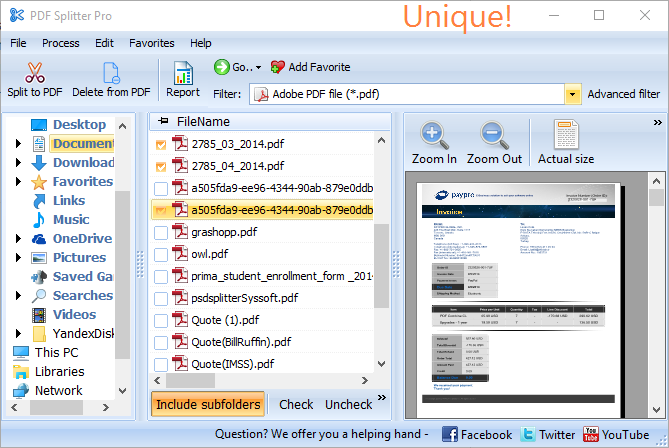
PDF Splitter Pro splits multi-page PDF files by any text line: invoice numbers, company names, dates, patient IDs, or barcodes. Unlike basic splitters that work by page count, PDF Splitter Pro is smart enough to split by document content — one invoice may be 1 page, another 3 pages, and the Pro version handles both correctly.
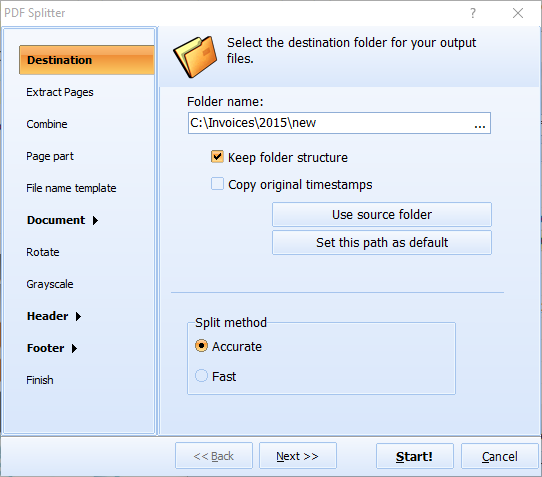
Set which text line marks the start of each document. The app analyzes every page and splits at the right boundaries. One huge PDF with hundreds of invoices — split in one go, automatically.
Quick answer: To split a PDF by content, install PDF Splitter Pro, add your multi-page PDF, set which text line marks the start of each document (invoice numbers, company names, dates, patient IDs or barcodes), and let the app analyze every page and split at the right boundaries. The built-in renamer names files from the separator text, plus GUI and command line, on a free 30-day trial.
Beyond splitting, PDF Splitter Pro also:
Built-in renamer gives files descriptive names using the separator text. Split by invoice number and each file gets the invoice number in its name.
GUI and command line — set everything in the GUI and the app generates a ready-to-use .BAT file. For servers, use PDF Splitter X (ActiveX, no GUI). Works on Windows 7/8/10/11. 30-day free trial. $99 lifetime license.
| Feature | PDF Splitter Pro ($99) | PDF Splitter ($59.90) | Online Tools |
|---|---|---|---|
| Split by text line (invoice #, name) | Yes | No | No |
| Split by barcode | Yes | Yes | No |
| Split by bookmarks / blank pages | Yes | Yes | Rarely |
| Split by page range | Yes | Yes | Some |
| Smart file renaming by content | Yes | Basic | No |
| Bates stamping | Yes | No | No |
| Batch processing | Yes | Yes | 1–3 files |
| Command-line automation | Yes | Yes | No |
| Privacy (files stay local) | Yes | Yes | Uploaded to cloud |
(includes 30 day FREE trial)
(only $99.00)

"I'm loving PDFSplitterPro! Your team has responded quickly to the bug reports I've sent in and fixed the major one with Page part.
My only suggestion to make PDFSplitterPro even better would be an additional option in the "Combine" screen to combine by Analyzing part of the file name like PDFCombine has. In my opinion by adding that you could then market PDFSplitterPRO to companies that generate a large PDF file of invoices who then need them split, combined, and named by invoice number as the company I work for does.
My only suggestion to make PDFSplitterPro even better would be an additional option in the "Combine" screen to combine by Analyzing part of the file name like PDFCombine has.
In my opinion by adding that you could then market PDFSplitterPRO to companies that generate a large PDF file of invoices who then need them split, combined, and named by invoice number as the company I work for does.
There is a company with a program that does this but they lack command line support and the reason I purchased your software bundle and PDFSplitterPro. I absolutely love how every option in the GUI can be triggered by the command line. Thank you and your team for the great software and support! "
 Jason Humphrey
Roytec Industries LLC
http://www.roytecind.com/
Teams that need to split large PDFs by content, not just by page numbers
Split bulk PDFs by invoice number automatically
Accounting departments receive consolidated PDF files containing hundreds of invoices. PDF Splitter Pro splits them by invoice number, names each output file accordingly, and saves hours of manual work every billing cycle.
Split case files by document type with bates stamping
Law firms split large discovery PDFs into individual documents by separator text, then apply bates numbering for court production. The built-in renamer adds case identifiers to each output file for organized legal archives.
Split patient records by name or ID from bulk exports
Healthcare administrators split consolidated PDF reports from EHR systems into individual patient records. PDF Splitter Pro detects patient names or IDs in the text and creates separate files, keeping records organized for distribution or archiving.
Split packing slips and shipping labels by order
Warehouses and logistics teams receive batch PDFs with hundreds of packing slips or shipping labels. PDF Splitter Pro splits them by order number or tracking ID, enabling automated distribution to the right department or shipping station.
Split bulk reports by policy number or client name
Insurance companies and banks split consolidated monthly reports into individual client documents by policy number or account holder name. Automate the entire workflow via command line and integrate splitting into existing batch processing pipelines.
Updated Wed, 07 Oct 2026
(only $99.00)
Updated Wed, 07 Oct 2026
(only $99.00)
Download free trial and convert your files in minutes.
No credit card or email required.





