|
ConvertersTotal Image ConverterTotal Audio ConverterTotal Movie ConverterTotal HTML ConverterTotal PDF ConverterTotal Doc ConverterTotal Excel ConverterTotal Mail ConverterTotal CAD ConverterTotal GIS ConverterTotal Vectorize
|
Contact FormPlease complete the fields below and click the "Send Message" button. We try to answer as soon as possible, normally you will get an answer in your email box within 1 working day. All fields are required.Before sending an email take a look at our FAQ section. Probably you will find the solution to your problem there.
FAQBefore the purchaseWhat are the limitations in trial version?All programs by CoolUtils can be tried out for 30 days. The trial versions are full optional. But you will be shown shareware reminders, which disappear after you enter the registration code. Besides, trial version of Total Image Converter stamps a note 'Converted by Total Image Converter - unregistered' on each converted image. After you enter the reg code, the note will disappear too.Image2Ico produces resulting isons rotated. After that purchase they are normal. Total Audio Converter converts 2/3 of a song. You can listen to the part of the song to understans if you are satisafied with the quality of conversion. To have the full song converted buy the registration code. Do you have money-back guarantee?No. We offer you the free trial copies of all the programs so that you could make sure the program does what you need. You have the chance to try before you buy. Customers are encouraged to fully evaluate the software prior to purchasing a software license. During the evaluation period technical support is available.It is not possible for us to keep track installation, un-installation, removing or deleting downloadable software on customers PC and therefore we don't issue refunds for downloadable products to avoid continued use after reimbursement. But we GUARANTEE that our programs do the things described at the site. For example, if we state that Total Image Converter can convert png files and you send us the .png file that it fails to convert, we will issue a refund.
Registration code delivery timeYour registration code is sent to you right after you've purchased the program. If you haven't get any email within a day, please contact us (fill in the form above).
If I pay for the program will I get upgrades?Sure. Once paid you get all the upgrades.
Why should I register?Our company sells shareware utilities giving you a chance to try a program before buying it. That means that you can use it for free for some time (30 day trial period) but then you must register and pay if you want to have it further. After that you won't have any restrictions or nag screens. Besides, all registered users get professional technical support, free upgrades and all information about newest versions and updates.
I like the tool but it doesn't have option XContact us. We often add additional options to our programs by customer's request. If the the thing you want is hard to implement we will offer you to pay a small customization fee.
How to buy the program?If you want to buy the program of ours, please go to the product page and press the button Buy Now. It is situated right below the description of the program.Fill in the form at the registrator's site. After that you will get an email with your registration code. Enter this code into the program and restart it. Congratulations! Now you are a registered user.
How to order a hard copy?If you need a hard copy, please order it when filling in the purchase form. Note that a hard copy requires extra charge. It is usually delivered within a week depending on the destination country. If you haven't got the CD within 2 weeks, please contact us. We will investigate the issue.
Registration
How to registerFind step-by-step instructions on how to register page.
How do I confirm that the program is registered on my computer?Select Help -> About in the main menu. There must be your name below the dancing stick figure.
What shall I do to setup the program?Download it. Run the .exe file and follow the Wizard's instructions. It won't take you more than 3 minutes to setup the utility. Find step-by-step instructions here.
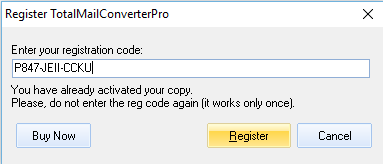
How to enter registration code?If you have a trial version and your trial period hasn't expired, take the following steps:
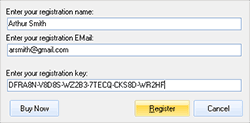
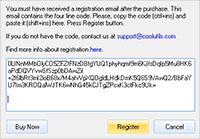
If your trial period has expired or you never downloaded the program, please take the following steps:
I registered the program, but it is still trial.The thing is that there is no actual difference in interface or features between the trial and registered version, but for the trial one uninstalls in 30 days. The registered version shows your name and email address in Help-About (main menu). If you registered the version, but it still asks you to register and shows Unregistered popup window, then contact us (fill in the form above).
How to restore lost registration code?If you lost your registration code, use the form below. Tell us your registration name or/and email address. We will find you in our data base and send you your registration code.We also produce custom applications. Contact us for full details.
CoolUtils Pro Bundle
Upgrade to CoolUtils Bundle after the purchase of another tool"I bought Total Audio Converter just hours ago. Now I see the offer on CoolUtils Pro, which includes Total Audio Converter. Can I get a $19.90 discount on the offer, since I just bought it?"Yes, you can upgrade to CoolUtils Pro bundle after the purchase of one of our tools. You pay just the difference! To get that special purchase link, contact our support team (the form above).
For the $99 purchase all, will new products that you create also be included?Yes, you may contact our support service in a year asking to resend you the keys for the CoolUtils Pro bundle. They will send you the keys of all the programs that will be included into the bundle at that time. Please, note that the products that run on web-servers are not included into the bundle. The full list is here: http://www.coolutils.com/BundlePro.php
If I buy 2, can I "upgrade" to all for the cost difference?According to our rules we offer upgrades after the purchase of one CoolUtils product, not two. For example, if you bought Total Audio Converter and Total Image Converter you still can purchase CoolUtils Pro bundle for 79.20.
I will buy a new computer and will have to re-download everything. Will this be a problem?No. You just go to our site www.CoolUtils.com and download the programs you need (hit Download button). This will be a trial version. You can turn it to normal registered version entering the key. You get the key after the purchase. In case you lose the key contact our support service. They will resend you your key again.All CoolUtils clients get free life-time support and life-time licence. You are welcome!
How many machines can I put these applications on?One registered copy of CoolUtils software may be installed by a single person who uses the software personally on one or 2 computers (for example, on pc and a laptop).
Using CoolUtils Programs
How to upgrade?Download the latest version from the site. Go to the product page and hit Free Download button. Do not uninstall the old version of the program, just rewrite the exe file. The new version will automatically get registered with the key of the old one. Note that the program must be closed before rewriting the exe file.
Cannot install converter. Missing MSVC170.dllIf you face the problem of missing MSVC170.dll, please download it here http://www.coolutils.com/Downloads/msvc_dll.zipSave it to WindowsSystem32
Unicode failure in Windows 98Some users of our software complain of the error message 'Unicode failure' when running our software in Windows 98. That's a bug of Microsoft. Find out how to fix it here http://www.microsoft.com/globaldev/handson/dev/mslu_announce.mspx
AA to MP3 conversionTo properly convert AA to MP3 follow the instructions:
"Insufficient Memory" message in Windows XP/2003"I've been converting 300mb +/- images successfully to JPEG. However it bombs out when trying to convert those same images to JPEG 2000 - saying "Insufficient Memory". I have 2GB of memory, but it doesn\'t touch anything over 1GB.4.3 Total Memory : 2047 Mb 4.4 Free Memory : 1137 Mb The same thing happens when trying to convert 700mb TIFs to JPEG. Any possible solutions?"
Microsoft has a hotfix for the problem:
HTML ConverterX not workingIf you have the similar problem to the one our customer had:"I'm still using TotalHTMLConverterX on a Windows Server 2003 System and suddenly it doesn't work anymore. It's executed out of a php script with an apache webserver via "exec" with the local Systemuser (SYSTEM). It worked perfect all the time. There where several Windows-Updates and I guess that one of these is responsable for the malfunction. For testing I started Apache as "Administrator" and then it works again. But that's too dangerous for a producing system, I can not run apache with admin rights. So it must be the user. But even, if I run it with "runas" as Administrator, it doesn't work." here is the solution for you: BR> Since it's not possible to sign on as the local system user, you may copy the key from my user to the local sytem user in the registry database (the key is located in the registry database). And the program works again :-) Find the step-by-step instruction on how to properly register ActiveX .
How to use iPod AudioBookFind step-by-step instructions with screenshots here.
How to use Total Audio ConverterTotal Audio Converter is very easy-to-use. Even if you are not very computer savvy you will master it inno time. View this three-minute clip.How to use Total Image ConverterTotal Image Converter was designed to be handy. View this clip to see how simple it is to convert image files.
|
FAQBefore the purchase
Registration
CoolUtils Pro Bundle
Using CoolUtils programs |