Need help? Reach us at 

 +1 (855) 418-2323
Need help? Reach us at
+1 (855) 418-2323

 File Converters TIFF and PDF apps Forensic Freeware
Outlook MSG files are locked inside Microsoft Outlook. If you need to archive emails as fixed-layout images for legal compliance, long-term storage, or printing, TIFF is the right format. Total Mail Converter reads MSG files directly and renders each email as a multi-page TIFF image — header, body, and attachments included. It processes hundreds of emails in a single batch run, entirely offline.
Download Total Mail Converter and start converting MSG to TIFF today.
(30-day FREE trial, no sign-up)
(one-time payment, lifetime license)
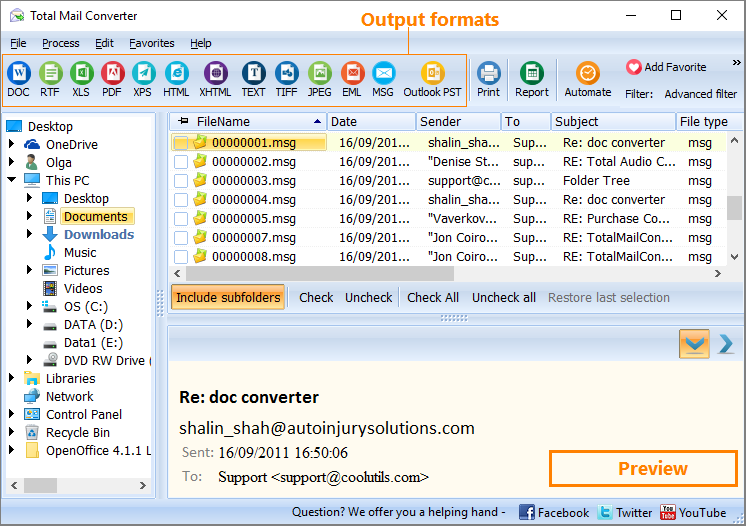
Quick answer: To convert MSG to TIFF, install Total Mail Converter, browse to the folder of MSG files, check the emails or click Check All, click TIFF in the format toolbar, pick which fields to include and how to handle attachments, then press Start. Each email is saved as a multi-page TIFF image in one offline batch — no Outlook needed and no upload.
MSG is Microsoft Outlook’s proprietary email format. Each .msg file contains the email header (From, To, Date, Subject), the HTML or plain-text body, and any attached files. MSG files require Outlook or a compatible email client to open. They are not suitable for archiving outside of the Outlook environment — without the application, the data is inaccessible.
TIFF (Tagged Image File Format) stores documents as rasterized page images. Multi-page TIFF files can hold an entire email — header, body, and attachments — in a single file. TIFF is widely used in legal, medical, and government archiving because it preserves the exact visual layout, cannot be edited, and is supported by every document viewer and imaging system.
Converting MSG to TIFF creates a tamper-proof visual snapshot of each email. The result can be stored in a document management system, attached to a legal case file, or printed on paper — all without requiring Outlook.
| Feature | MSG | TIFF |
|---|---|---|
| Requires | Microsoft Outlook | Any image viewer |
| Editable | Yes (in Outlook) | No (raster image) |
| Multi-page | N/A (single email) | Yes (header + body + attachments) |
| Attachments | Embedded in file | Rendered as pages or extracted |
| Legal use | Requires Outlook to verify | Accepted as document evidence |
| Searchable | Yes (text-based) | No (image-based, unless OCR applied) |
| Long-term archival | Depends on Outlook version | Industry standard for decades |

Each MSG file produces a separate multi-page TIFF file. The email header appears on the first page, followed by the body text. Attachments are rendered as additional pages (if embedded) or extracted to a folder. Original MSG files remain untouched.
Total Mail Converter includes a command-line interface for scripting and automation:
CoolUtils.MailConverter.exe "C:\Emails\*.msg" "C:\Archive\" -cTIFF -fSender -fSubject -fDate -fBody
Parameters: -c sets the output format, -f selects fields to include. You can wrap this in a .bat file or schedule it with Windows Task Scheduler for automated nightly archival of incoming emails to TIFF.
 Multi-page TIFF output. Each email is rendered as a multi-page TIFF file. The header, body text, and embedded images all appear on separate pages within a single file — keeping the entire email in one document.
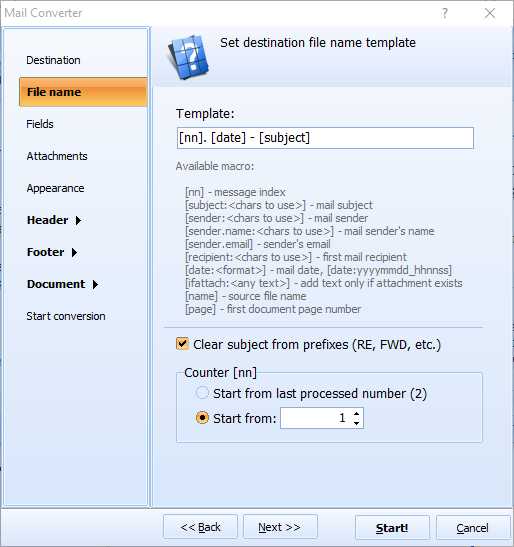
Field selection. Choose exactly which email fields to include in the TIFF: From, To, CC, Date, Subject, Body. Exclude unnecessary headers to keep the output clean and focused on the content that matters.
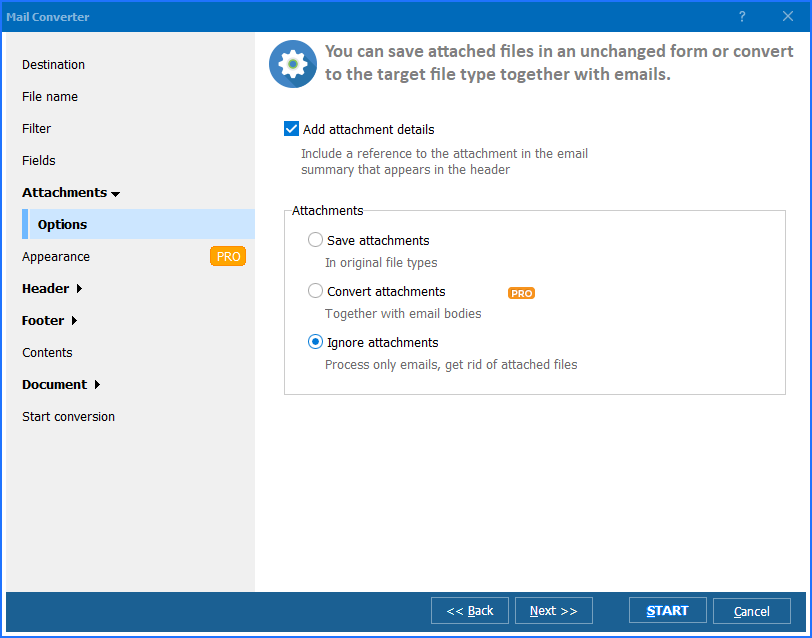
Attachment handling. Decide how to process attachments: embed them as additional TIFF pages, extract them to a separate folder, or skip them entirely. This gives you full control over what ends up in the archive.
Batch processing. Select hundreds of MSG files and convert them all to TIFF in a single run. Each email becomes a separate TIFF file. No need to open emails one by one in Outlook.
No Outlook required. Total Mail Converter reads MSG files directly. It does not require Microsoft Outlook, Exchange Server, or any other email client installed on the machine.
Desktop right-click integration. After installation, you can right-click any MSG file in Windows Explorer and select Convert to → TIFF. The conversion wizard opens immediately — no need to launch the full application.
| Feature | Online Tools | Total Mail Converter |
|---|---|---|
| File size limit | 5–25 MB typical | No limit |
| Batch conversion | One file at a time | Unlimited |
| Privacy | Emails uploaded to cloud | 100% offline |
| Attachment handling | Usually ignored | Embed, extract, or skip |
| Field selection | Not available | Choose From, To, Date, Subject, Body |
| Automation | Manual only | Built-in command line |
| TIFF multi-page | Rarely supported | Full multi-page TIFF |
| Pricing | Subscription or per-file | One-time $59.90 |

(30-day FREE trial, no sign-up)
(one-time payment, lifetime license)
"We convert thousands of MSG files to TIFF for litigation holds. The multi-page output keeps the header, body, and attachments in one file per email. Our DMS imports the TIFFs directly. The batch mode saves our paralegals hours every week."
 Patricia Hawkins Records Manager, Whitfield Legal Group
"Regulatory audits require us to archive all email correspondence in a tamper-proof format. Total Mail Converter runs nightly via command line and produces TIFF archives that our compliance team can access without Outlook. Reliable and fully offline."
Martin Schreiber IT Administrator, KfW Compliance Division
"Solid tool for converting Outlook emails to TIFF images for our scanning-based document management system. Field selection lets us exclude CC and BCC from the output, which keeps the files cleaner. Would appreciate a DPI setting in the GUI, but the default quality is good."
 Yuki Tanaka Document Control Specialist
Download free trial and convert your files in minutes.
No credit card or email required.

Related Topics
MSG Converter — Convert Outlook MSG Emails to PDF, DOC, EML and 15+ Formats

