Need help? Reach us at 

 +1 (855) 418-2323
Need help? Reach us at
+1 (855) 418-2323

 File Converters TIFF and PDF apps Forensic Freeware
Download Total CAD Converter and start converting DWF drawings to PNG today.
(includes 30 day FREE trial)
(only $99.00)
Quick answer: To convert DWF to PNG, install Total CAD Converter, browse to the folder with your DWF files, check the ones you want, click the PNG button, set DPI, dimensions, and transparency, then press Start. The whole folder converts to lossless PNG images in one batch — offline, with no AutoCAD or Autodesk viewer required.
DWF (Design Web Format) is Autodesk's lightweight CAD format designed for sharing and reviewing design data. DWF files are compressed versions of DWG drawings — they contain 2D and 3D geometry, layers, and metadata but in a smaller package. Viewing DWF files requires Autodesk Design Review or a compatible viewer. The format is useful inside the Autodesk ecosystem but presents a barrier when you need to share designs with clients, contractors, or managers who do not have these tools.
PNG (Portable Network Graphics) is a lossless raster image format supported by every operating system, web browser, and image viewer. PNG preserves sharp edges and fine detail without compression artifacts, making it well-suited for technical drawings. The format also supports transparency through an alpha channel, which is useful when overlaying drawings on colored backgrounds or inserting them into presentations.
Converting DWF to PNG removes the need for specialized CAD viewers. The recipient gets a flat image file that displays correctly on phones, tablets, laptops, and desktops. Line weights, text, and hatches render exactly as they appear in the original drawing, at whatever resolution you choose.
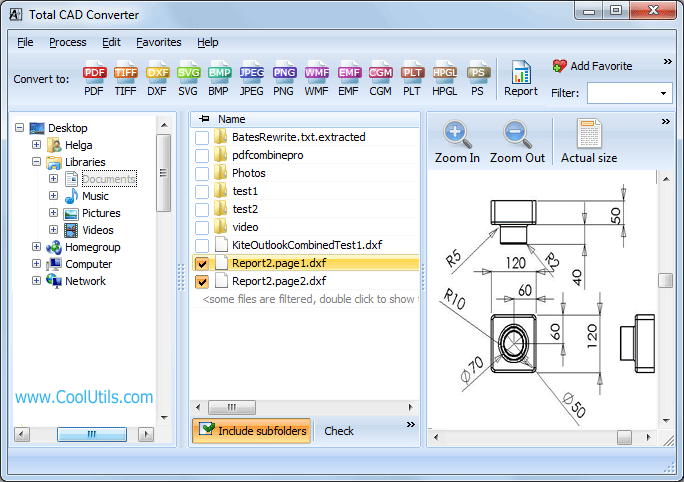
Batch jobs with hundreds of DWF files typically complete in minutes. The converter remembers your last settings, so repeat jobs require only selecting files and pressing Start.
Total CAD Converter includes a command-line interface for automated and server-side workflows. Example:
CADConverter.exe C:\Drawings\*.dwf C:\Output\ -cPNG
Add DPI and size parameters to control the output resolution directly from the command line. Use this in a .bat file or Windows Task Scheduler job to convert incoming DWF files to PNG on a fixed schedule or whenever new files appear in a watched folder. The command-line version runs without any GUI and fits into existing image-processing pipelines.
 No Autodesk software required. Total CAD Converter uses its own DWF rendering engine. You do not need AutoCAD, Autodesk Design Review, or any other Autodesk application on the conversion machine. Install the converter, point it at your DWF files, and convert.
Custom DPI and dimensions. Set output resolution from 72 DPI (screen-ready thumbnails) to 300 DPI (print-quality images). You can also specify exact pixel dimensions for width and height, giving you precise control over the output size for web galleries, reports, or large-format prints.
Batch processing. Select a folder with 500 DWF files and convert them all to PNG in a single run. Each drawing gets its own PNG file, named to match the source. No manual file-by-file handling.
Transparency support. Output PNG files with a transparent background instead of white. This is useful when placing CAD drawings over colored slide backgrounds, map layers, or website elements without a visible bounding box.
100% offline processing. All conversion runs locally on your PC. Architectural plans, engineering schematics, and proprietary designs never leave your machine. No cloud uploads, no third-party servers.
15+ output formats. Beyond PNG, convert DWF to PDF, TIFF, JPEG, BMP, SVG, WMF, CGM, DXF, PLT, and more — all from the same interface.
| Feature | Online Tools | Total CAD Converter |
|---|---|---|
| File size limit | 10–50 MB | No limit |
| Batch conversion | One file at a time | Unlimited |
| Privacy | Drawings uploaded to cloud | 100% offline |
| Autodesk required | Varies | No |
| DPI / resolution control | Limited or none | 72–300+ DPI, custom dimensions |
| Transparency | Rarely supported | Yes (alpha channel) |
| Automation | Not available | Built-in command line |
| Pricing | Subscription / per-file | One-time $99.00 |

(includes 30 day FREE trial)
(only $99.00)
Download free trial and convert your files in minutes.
No credit card or email required.