Logo
Home Products Support Contact About Us
arrow1 File Converters
arrow1 TIFF and PDF apps
arrow1 Forensic
arrow1 Freeware

Convert RTF to HTML — Batch RTF to HTML Converter for Windows


RTF files preserve basic formatting across word processors, but they don't open in web browsers, can't be indexed by search engines, and are difficult to publish online. When you need to move document content to a website, CMS, or browser-based archive, HTML is the target format. Total Doc Converter converts RTF documents to HTML files in batch, preserving text formatting, tables, and embedded images. This RTF to HTML converter:
  • Converts RTF documents to clean HTML files with preserved formatting
  • Processes hundreds of RTF files in one batch run
  • Preserves tables, fonts, colors, and embedded images
  • Supports custom HTML encoding (UTF-8, ANSI, etc.)
  • Works 100% offline — documents never leave your machine
  • Includes a 30-day free trial with full functionality

Download Total Doc Converter and start converting your RTF documents to HTML.


Download Now!

(includes 30 day FREE trial)

Buy License

(only $49.90)

RTF vs HTML: What Is the Difference?

RTF (Rich Text Format) is a document format created by Microsoft in 1987. It stores formatted text with fonts, colors, bold/italic styling, tables, and embedded images. RTF is designed as a cross-platform interchange format — most word processors on Windows, macOS, and Linux can read and write RTF files. However, RTF is a document format, not a web format. Browsers cannot display RTF files natively, and search engines cannot crawl their content.

HTML (HyperText Markup Language) is the standard language of the web. Every browser on every device renders HTML. HTML files are lightweight, searchable, indexable by search engines, and can be styled with CSS. Converting RTF to HTML transforms document content into web-ready pages that anyone can view without installing any software.

The key difference is audience. RTF is for editing and exchanging documents between word processors. HTML is for publishing content on the web and making it accessible to everyone. Converting RTF to HTML bridges the gap between desktop documents and web publishing.

FeatureRTFHTML
Primary useDocument editing and exchangeWeb publishing and display
Browser supportNot natively supportedUniversal
Search engine indexingLimited or noneFull indexing
FormattingRich text (fonts, tables, images)Rich text via CSS
File sizeLarger (verbose markup)Smaller (efficient tags)
EditabilityAny word processorAny text or HTML editor

How to Convert RTF to HTML

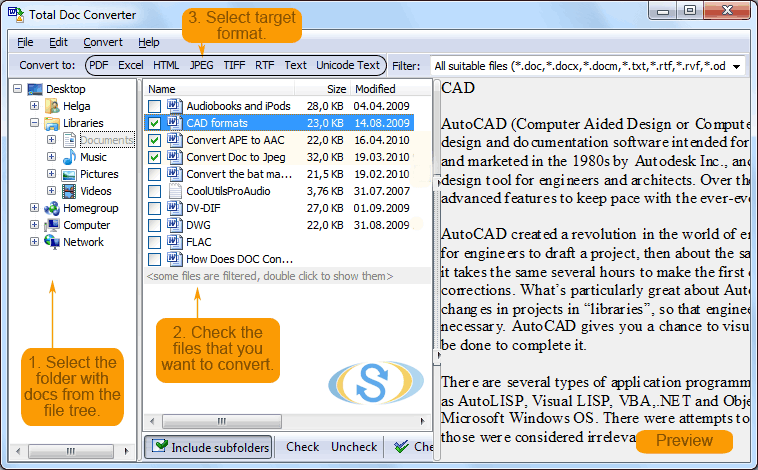
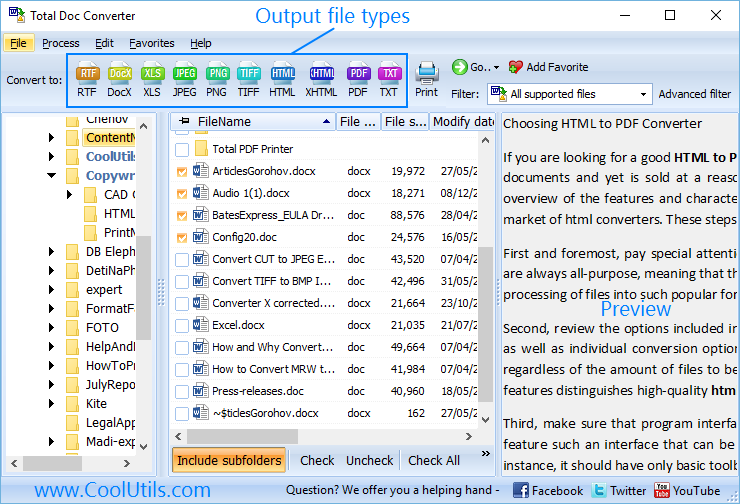
  • Step 1. Launch Total Doc Converter. The left panel shows a folder tree for navigation.
  • Step 2. Browse to the folder containing your RTF files. The file list displays all documents with names, sizes, and dates. Check individual files or click Check All for batch conversion.
  • Step 3. Click HTML in the format toolbar at the top of the window.
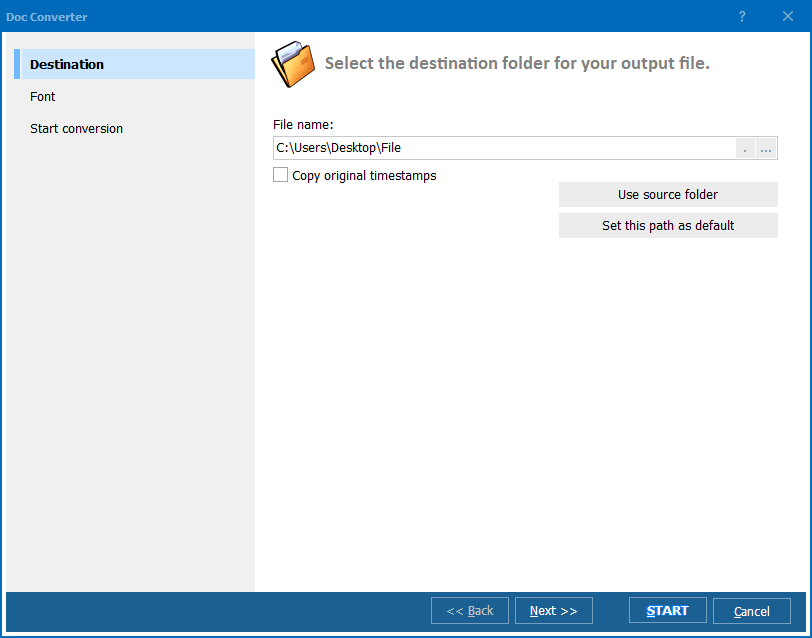
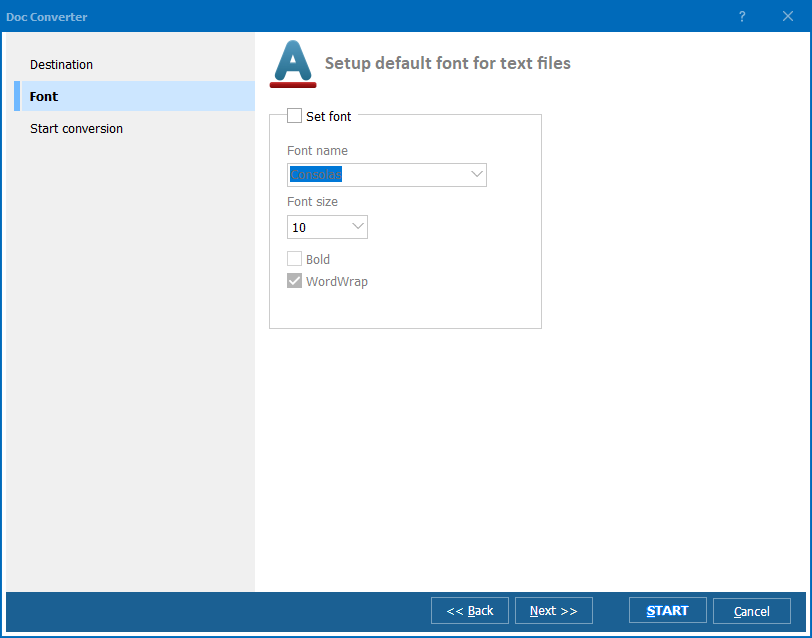
  • Step 4. In the conversion wizard, choose the destination folder. Set the HTML encoding (UTF-8 recommended) and decide whether to embed images inline or save them as separate files.
  • Step 5. Configure output file naming: by original file name, by document title, or a custom pattern. Choose whether to generate a single HTML file or split by page breaks.
  • Step 6. Press Start. Each RTF document becomes an individual HTML file. The original RTF files remain untouched.

Total Doc Converter - RTF to HTML conversion

The converter handles RTF formatting accurately — tables keep their structure, fonts and colors translate to CSS styles, and images are extracted and linked correctly in the HTML output.

Command-Line Conversion

Total Doc Converter includes a command-line interface for scripted and automated workflows. Convert a single RTF file to HTML:

DocConverter.exe C:\Docs\report.rtf C:\Output\report.html -cHTML

Convert all RTF files in a folder with UTF-8 encoding:

DocConverter.exe C:\Docs\*.rtf C:\Output\ -cHTML -Encoding:UTF8

Add this to a .bat script or Windows Task Scheduler for automated RTF-to-HTML exports — useful for web publishing pipelines, document migration, and intranet content updates.

Why Use Total Doc Converter?

Accurate formatting

RTF formatting translates cleanly to HTML. Fonts map to CSS font families, colors become hex values, tables retain their column structure, and embedded images are extracted and linked. The HTML output looks like the original RTF document when viewed in a browser.

Batch processing

Select an entire folder of RTF files and convert them all to HTML in one run. The program handles hundreds of documents without slowing down, producing one HTML file per RTF source.

Image handling

RTF documents often contain embedded images. The converter extracts them and saves them alongside the HTML file, linking them correctly with relative paths. No manual image extraction required.

Clean HTML output

The generated HTML uses standard tags and inline CSS. No proprietary markup, no bloated Word-style code. The output is ready for web servers, CMS platforms, and further processing with HTML tools.

Multiple output formats

Besides HTML, Total Doc Converter handles RTF to PDF, DOC, DOCX, TXT, TIFF, JPEG, XPS, and more. One tool covers all document conversion needs.

No cloud uploads

All conversion runs locally on your PC. Legal documents, internal memos, HR files — nothing leaves your machine. No internet connection required.

Online Converters vs Desktop Converter

FeatureOnline ToolsTotal Doc Converter
File size limit5–50 MBNo limit
Batch conversionOne file at a timeUnlimited
PrivacyDocuments uploaded to cloud100% offline
Image handlingOften lost or brokenExtracted and linked
HTML qualityBloated or basicClean, standards-compliant
AutomationManual onlyBuilt-in command line
PricingSubscription or adsOne-time $49.90

download RTF to HTML converter

Windows 7/8/10/11 • 30-day free trial

When Do You Need RTF to HTML Conversion?

There are several common scenarios where converting RTF documents to HTML is the right solution:
  1. Web publishing. Publishing document content on a website, blog, or intranet. HTML files upload directly to any web server and display in any browser without plugins or downloads.
  2. CMS migration. Importing document content into WordPress, Drupal, SharePoint, or other content management systems. These platforms accept HTML input natively, while RTF requires manual copy-paste.
  3. Document archiving. Creating browser-accessible archives of RTF document collections. HTML archives can be searched with standard tools and accessed from any device.
  4. Email content. Converting RTF documents to HTML for inclusion in email newsletters or web-based email systems that require HTML formatting.
  5. Cross-platform sharing. Not every device has a word processor installed. HTML files open on any phone, tablet, or computer with a browser — no software installation needed.


Download Now!

(includes 30 day FREE trial)

Buy License

(only $49.90)


quote

Total Doc Converter Customer Reviews 2026

Rate It
Rated 4.7/5 based on customer reviews
5 Star

"We migrated 1,200 RTF policy documents to our company intranet. The batch mode converted everything in under ten minutes. Tables and formatting came through cleanly in the HTML output. Images were extracted and linked automatically. Saved us from weeks of manual copy-paste work."

5 Star Sandra Whitfield Web Content Manager

"Set up a command-line script to convert incoming RTF files to HTML every night for a client's document portal. The output is clean HTML without the bloated markup you get from Word. Runs unattended on a Windows Server box with zero issues for months."

5 Star Jonathan Pryce IT Consultant

"Good tool for converting RTF drafts to HTML for our documentation wiki. Font styles and numbered lists convert accurately. The only thing I would add is a template option to wrap the output in a custom HTML header and footer. Otherwise it does exactly what we need."

4 Star Elena Vasquez Technical Writer

FAQ ▼

Total Doc Converter supports HTML, PDF, DOC, DOCX, TXT, TIFF, JPEG, XPS, and more. Choose the target format from the toolbar before each conversion.
Yes. Fonts, colors, bold and italic styling, tables, and embedded images are converted to their HTML and CSS equivalents. The HTML output closely matches the original RTF appearance.
Yes. Total Doc Converter supports batch processing. Select an entire folder of RTF files and convert them all to HTML in one run. The program handles hundreds of documents without issues.
Embedded images are extracted from the RTF file and saved alongside the HTML output as separate image files. The HTML references them with relative paths, so they display correctly in any browser.
UTF-8 is recommended for most use cases. It supports all international characters and is the default encoding for modern web pages. Use ANSI only if your target system specifically requires it.
Yes. The built-in command-line interface supports every option available in the GUI. Run DocConverter.exe with source files, destination folder, and format flag for scripted or automated workflows.
A personal license costs $49.90 as a one-time payment with free updates for one year. A 30-day free trial is available with no credit card or email required.


Start working now!

Download free trial and convert your files in minutes.
No credit card or email required.

⬇ Download Free Trial Windows 7/8/10/11 • 84 MB

Friday Sale
Doc Converter Preview1
Doc Converter Preview2
Doc Converter Preview3

Latest News

Newsletter Subscribe

No worries, we don't spam.


© 2026. All rights reserved. CoolUtils File Converters

Cards