Need help? Reach us at 

 +1 (855) 418-2323
Need help? Reach us at
+1 (855) 418-2323

 File Converters TIFF and PDF apps Forensic Freeware
Download Total Doc Converter and start converting RTF files to PDF today.
(includes 30 day FREE trial)
(only $49.90)
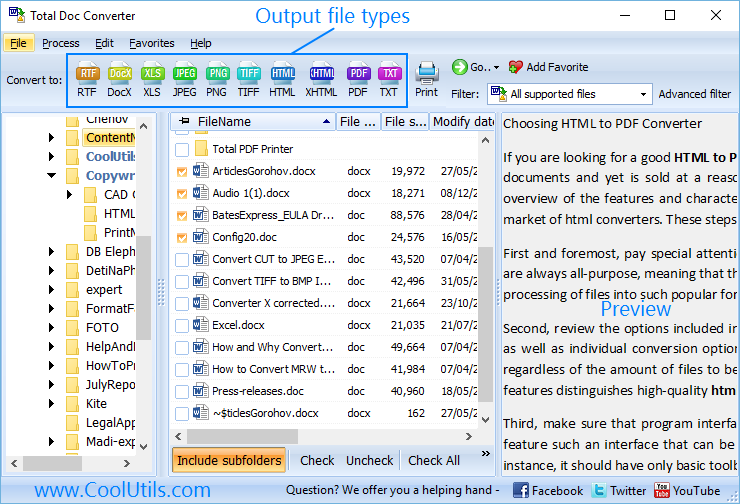
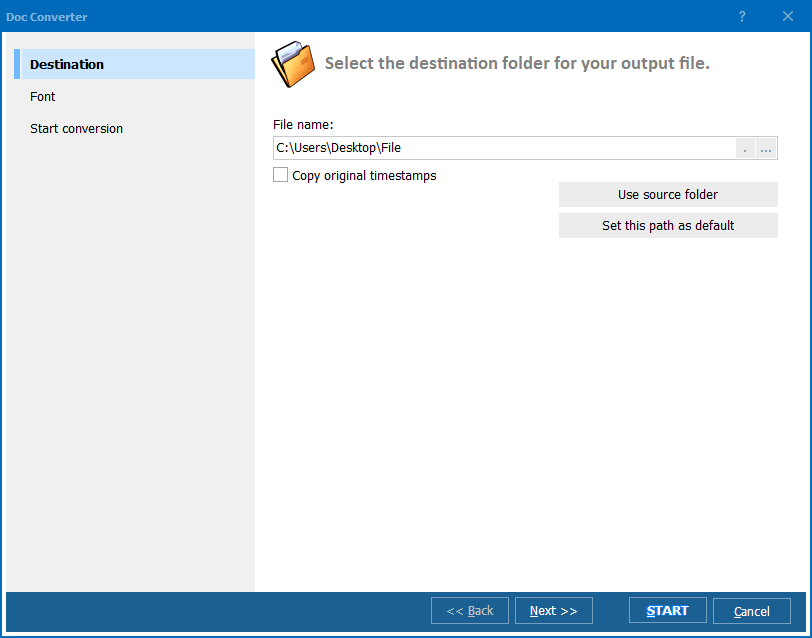
Quick answer: To convert RTF to PDF, launch Total Doc Converter, browse to the folder with your RTF files, check the ones you want, click the PDF button, set page size, margins, headers, and any encryption in the wizard, then press Start. The whole folder converts in one batch — offline, with no upload and no file-size limit, and no Microsoft Word required.
RTF (Rich Text Format) is a document format created by Microsoft that almost every text editor can open — Word, WordPad, LibreOffice, TextEdit, and many others. That portability is its strength, but RTF is an editable format: text reflows, fonts fall back to whatever the reader has installed, and the same file can look different on another computer. RTF also offers no protection against copying or editing.
PDF (Portable Document Format) is a fixed-layout format. A PDF looks identical on every screen, printer, and operating system because fonts are embedded and the page geometry is frozen. PDF is the standard for sharing finished documents — contracts, reports, invoices — and it can carry encryption, digital signatures, and access restrictions that RTF cannot.
When you convert RTF to PDF, the layout is locked: fonts are embedded, images are fixed in place, and the document becomes a faithful, tamper-resistant copy that opens the same way everywhere. If the RTF contains images, Total Doc Converter lets you control their quality so the output PDF stays compact.
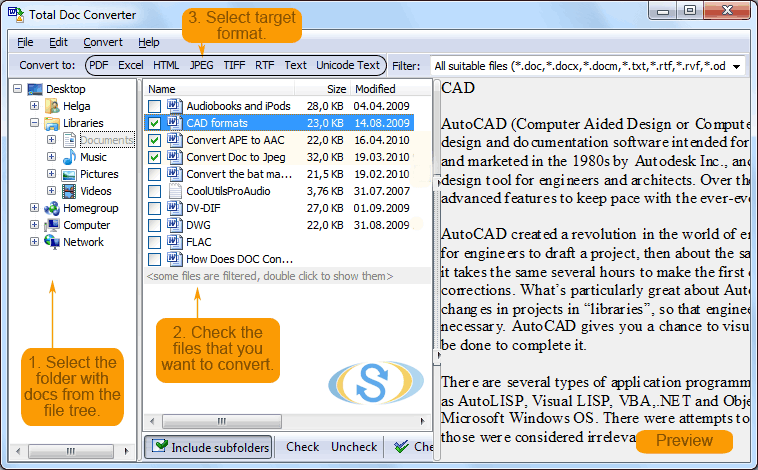
Each RTF file becomes a separate PDF, and the original RTF files stay untouched. You can also merge several RTF files into a single multi-page PDF — useful for combining letters, chapters, or report sections into one document.
Total Doc Converter includes a command-line interface for converting RTF files without the GUI. Example:
DocConverter.exe C:\Data\letter.rtf C:\Output\letter.pdf -c PDF -EncType 1 -OwnerPassword secret
You can wrap this command in a .bat file or a scheduled task to automate recurring conversions — for example, turning RTF output from a legacy application into archived PDFs every night without anyone touching the GUI.
 True batch conversion. Select hundreds of RTF files and convert them all to PDF in one run. Each document becomes a separate PDF, or you can merge them into one. No opening files one by one in WordPad or Word.
PDF security. Set owner and user passwords, restrict printing, copying, and editing, and add digital signatures — applied to every file in the batch, not one at a time in Acrobat.
Headers, footers, and watermarks. Add page numbers, dates, a company name, or a Confidential stamp to every page of the output PDF. Control font, size, and position.
No Microsoft Word required. Total Doc Converter reads RTF with its own engine — no Office installation needed. That makes it ideal for servers and workstations without Word.
Layout fidelity. Fonts, images, tables, and paragraph formatting are preserved in the output PDF. Image quality in the PDF is adjustable to balance sharpness against file size.
Many formats from one program. Besides PDF, convert RTF to DOC, DOCX, HTML, XHTML, TXT, JPEG, and TIFF — all from the same app.
| Feature | Online Tools | Total Doc Converter |
|---|---|---|
| File size limit | 5–50 MB typical | No limit |
| Batch conversion | One file at a time | Unlimited |
| Privacy | Files uploaded to cloud | 100% offline |
| PDF encryption | Rarely available | Passwords, permissions, signatures |
| Headers/footers | No | Custom text, page numbers, dates |
| Automation | Manual only | Built-in command line |
| Pricing | Subscription or per-file | One-time $49.90 |

(includes 30 day FREE trial)
(only $49.90)
Download free trial and convert your files in minutes.
No credit card or email required.

Related Topics
Convert ODT to PDF — Batch OpenDocument to PDF Converter