Need help? Reach us at 

 +1 (855) 418-2323
Need help? Reach us at
+1 (855) 418-2323

 File Converters TIFF and PDF apps Forensic Freeware
Download Total HTML Converter and start turning web pages into TIFF images today.
(includes 30 day FREE trial)
(only $49.90)
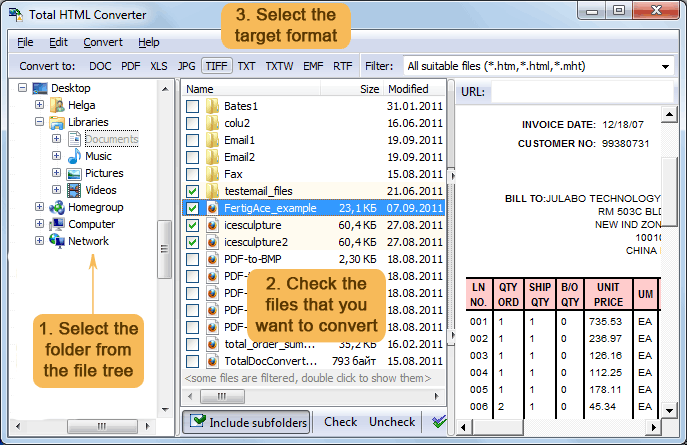
Quick answer: To convert HTML to TIFF, launch Total HTML Converter, browse to the folder with your HTML files, check the files to convert, click TIFF in the format toolbar, set DPI and compression, then press Start. The whole folder converts into pixel-perfect multi-page TIFF images offline in batch, with no upload and no file-size limit.
HTML (HyperText Markup Language) is the standard language for web pages. Browsers render HTML on-the-fly, meaning layout depends on screen size, installed fonts, and CSS stylesheets. HTML files are editable, searchable, and lightweight — but they require a browser to display properly and can look different on every device.
TIFF (Tagged Image File Format) is a raster image format widely used in publishing, scanning, faxing, and document archival. TIFF supports multi-page documents, lossless LZW compression, and high bit-depth color. A TIFF image is pixel-perfect — it looks identical on every screen, every printer, and every viewer.
When you convert HTML to TIFF, the converter renders the web page exactly as a browser would and captures the result as a fixed image. The output preserves the full visual layout — text, tables, images, and CSS styling — in a format that is easy to archive, print, or embed in other documents.

Each HTML file becomes a separate TIFF image. Multi-page HTML documents produce multi-page TIFF files. Original HTML files remain untouched. You can also merge multiple HTML files into a single multi-page TIFF — useful for compiling a set of web pages into one archival document.
Total HTML Converter includes a command-line interface for converting HTML files without the GUI. Example:
HTMLConverter.exe C:\Pages\report.html C:\Output\report.tiff -c TIFF -DPI 300 -CompressType LZW
You can wrap this command in a .bat file or a scheduled task to automate recurring conversions. This is useful for archiving web content — a nightly script converts updated HTML pages to TIFF images automatically.
 Pixel-perfect rendering. Total HTML Converter uses a built-in rendering engine with full CSS support. The output TIFF image matches exactly what you see in a browser — tables, fonts, colors, backgrounds, and layout are all preserved.
Batch processing. Select hundreds of HTML files and convert them all to TIFF in a single run. Each file becomes a separate TIFF image, or merge them into one multi-page TIFF. No need to take screenshots one by one.
DPI and compression control. Set the output resolution from 72 to 600+ DPI. Choose from LZW, CCITT, ZIP compression, or uncompressed output. High DPI produces sharp images for printing; compression reduces file size for archival storage.
Watermarks and headers. Add your company logo, a confidential stamp, or a date watermark to every output page. Position the watermark anywhere and control its opacity. Headers and footers with page numbers are also available.
Multi-page TIFF support. HTML documents that span multiple printed pages produce multi-page TIFF files automatically. You can also combine several HTML files into a single TIFF — one file per page — for convenient archival or faxing.
15+ output formats. Besides TIFF, convert HTML files to PDF, DOC, XLS, JPEG, PNG, SVG, ODT, RTF, and more — all from the same program.
| Feature | Online Tools | Total HTML Converter |
|---|---|---|
| File size limit | 5–50 MB typical | No limit |
| Batch conversion | One file at a time | Unlimited |
| Privacy | Files uploaded to cloud | 100% offline |
| DPI control | Fixed or none | 72–600+ DPI |
| TIFF compression | No choice | LZW / CCITT / ZIP / none |
| Watermarks | No | Logo, text, QR code |
| Automation | Manual only | Built-in command line |
| Pricing | Subscription or per-file | One-time $49.90 |

(includes 30 day FREE trial)
(only $49.90)
Download free trial and convert your files in minutes.
No credit card or email required.

Related Topics
Total HTML Converter