Need help? Reach us at 

 +1 (855) 418-2323
Need help? Reach us at
+1 (855) 418-2323

 File Converters TIFF and PDF apps Forensic Freeware
Download Total Mail Converter and extract readable text from your MSG files today.
(includes 30 day FREE trial)
(only $59.90)
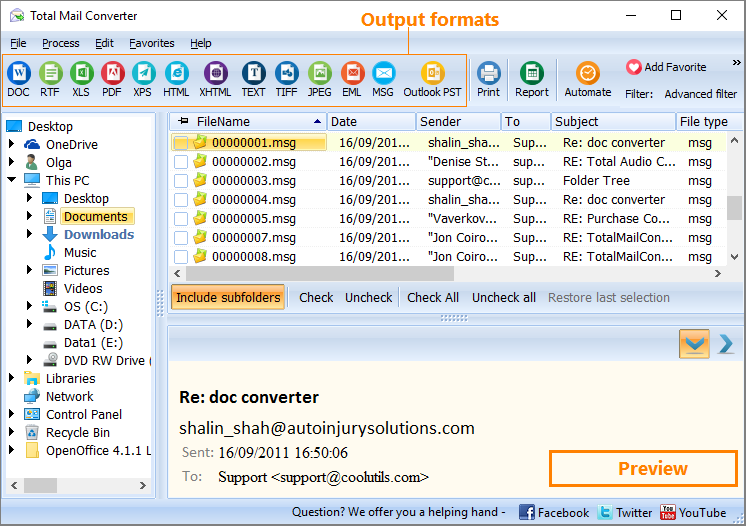
Quick answer: To convert MSG to text, install Total Mail Converter, open the folder with your .msg files, select the messages, click the TXT button, choose which fields to export and a destination folder, then press Start. Each Outlook email is saved as clean readable text in batch, with no Outlook or MAPI required and no file-count limit.
MSG is Microsoft Outlook's native email format. Each .msg file is an OLE Compound Document — a binary container that stores the sender, recipients, subject, date, message body (in RTF or HTML), embedded images, file attachments, and Outlook-specific properties like flags and categories. Opening an MSG file requires Outlook or a compatible MAPI client. The binary structure makes MSG files unreadable in plain text editors.
TXT is the simplest document format. A .txt file contains only human-readable characters and line breaks — no markup, no formatting codes, no binary data. Text files open instantly in Notepad, VS Code, terminal editors, or any viewer on Windows, macOS, and Linux.
Converting MSG to text strips the OLE structure, HTML/RTF formatting, and binary attachments, leaving clean readable content: who sent the email, when, the subject line, and the message body. The result is compact, universally accessible, and easy to search with standard tools.
The output files contain clean, human-readable text. Attachments from the original MSG files are saved separately to a subfolder — they are not embedded in the text output.
Total Mail Converter includes a command-line interface for automation and scripting:
MailConverter.exe "C:\Emails\*.msg" -sTXT "C:\Output\Text\"
Parameters: source path with wildcards, -sTXT sets the target format, and the last argument is the destination folder. Save this in a .bat file and schedule it with Windows Task Scheduler to run nightly exports. The command-line mode supports all the same options as the GUI — field selection, merge mode, and file-naming templates.
 Selective field export. Choose exactly which email fields appear in the output: sender, recipient, date, subject, body, CC, BCC, or any combination. Skip transport headers and Outlook metadata to keep the text file clean and focused on the content that matters.
Merge or separate. Save each email as its own .txt file for individual access, or merge an entire folder of messages into one continuous text document. The merge option is useful for full-text search across thousands of emails.
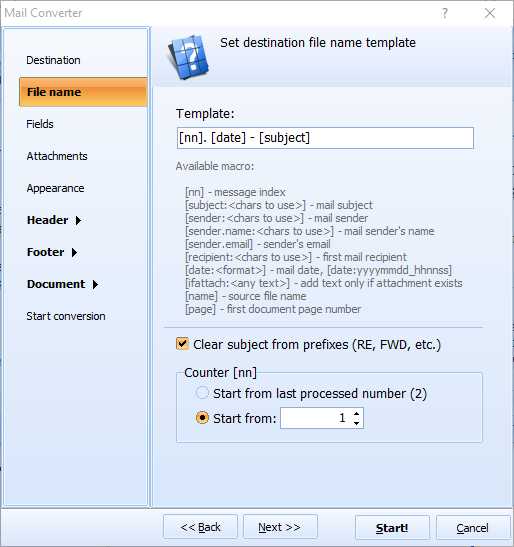
Customizable file naming. Name output files using date, sender, subject, or a custom template. A pattern like [Date]-[Subject].txt produces filenames that sort chronologically and are easy to locate in file managers.
Batch processing. Convert thousands of MSG files in one session. Point the converter at a folder tree and it processes every .msg file it finds. No file-count limit, no memory issues.
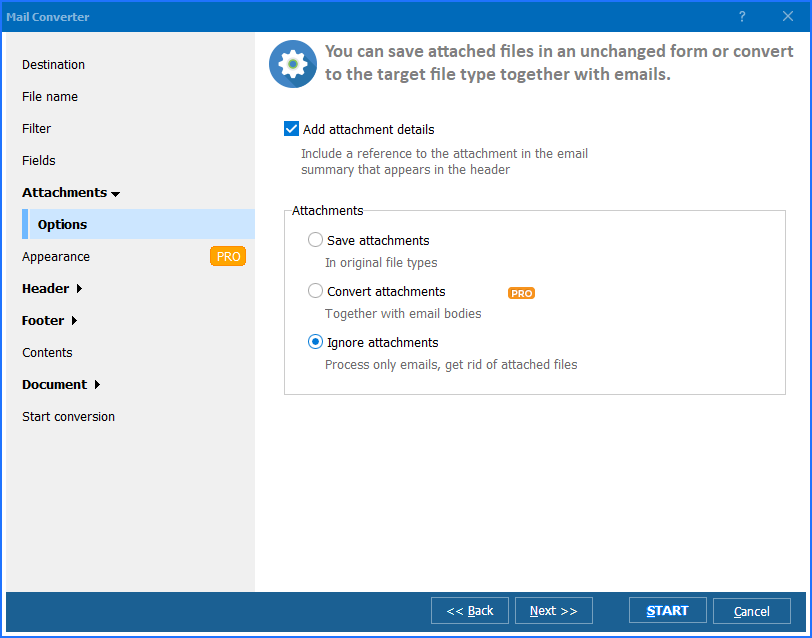
Attachment extraction. Attachments from MSG files are saved as separate files in a subfolder. Documents, images, and archives remain intact and accessible alongside the converted text.
Multiple output formats. Besides TXT, Total Mail Converter converts MSG files to PDF, DOC, PST, HTML, EML, RTF, and TIFF. One license covers every email conversion task.
| Feature | Manual Copy-Paste | Total Mail Converter |
|---|---|---|
| Batch export | One email at a time in Outlook | Entire folders at once, no Outlook needed |
| Field selection | Copy everything or nothing | Choose specific fields |
| File naming | Manual rename for each file | Automatic template-based naming |
| Merge option | Manual concatenation | Built-in merge to one file |
| Speed (10,000 emails) | Days of copy-paste | Under 10 minutes |
| Automation | Not possible | Command-line + .bat scripting |
| Privacy | N/A | 100% offline — files stay on your PC |
| Pricing | Free but impractical at scale | One-time $59.90 |

(includes 30 day FREE trial)
(only $59.90)
"We receive thousands of MSG files from Outlook exports and need the body text for NLP processing. Total Mail Converter extracts just the fields we need — subject and body — into clean UTF-8 text files. Our Python scripts ingest the output directly without any preprocessing. The batch mode handles 20,000 emails in under 15 minutes. It replaced a custom MAPI script that broke every time Outlook updated."
 Priya Venkatesh Data Analyst, Market Intelligence Group
"Compliance requires us to keep email records in a non-proprietary format. We export departing employees' MSG files to plain text for long-term archival. Total Mail Converter includes all the header fields auditors ask for — sender, recipient, date, subject — and the file-naming templates make it easy to organize output by date and sender. No Outlook installation needed on the archive server."
Gerald Whitmore Records Manager, Apex Financial Services
"I convert old project emails to text so I can search them with Windows Search instead of scrolling through Outlook folders. Total Mail Converter handles folders of 500+ MSG files without slowing down, and the merge option gives me one searchable file per project. My only wish is a built-in date range filter so I could skip emails older than a certain year during conversion."
 Laura Brennan Administrative Assistant, Collins & Reid Associates
MailConverter.exe "C:\Emails\*.msg" -sTXT "C:\Output\Text\". Save this in a .bat file and schedule it with Windows Task Scheduler for recurring exports.
Download free trial and convert your files in minutes.
No credit card or email required.

Related Topics
Convert E-mail to Text error-free.

