Need help? Reach us at 

 +1 (855) 418-2323
Need help? Reach us at
+1 (855) 418-2323

 File Converters TIFF and PDF apps Forensic Freeware
Download Total CSV Converter and start converting CSV files to Excel today.
(includes 30 day FREE trial)
(only $59.90)
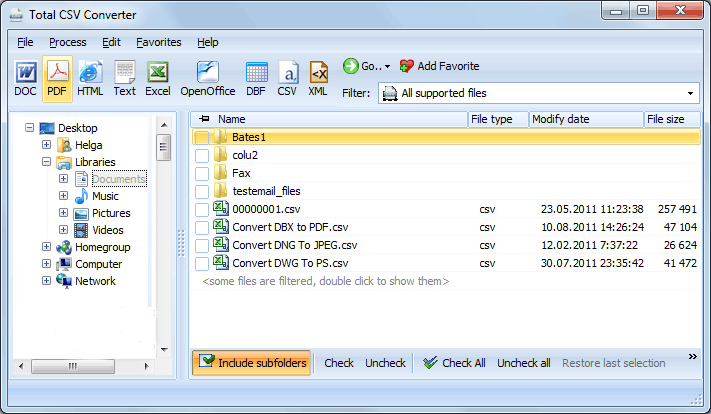
Quick answer: To convert CSV to XLS on Windows, install Total CSV Converter, browse to the folder of CSV files, check the ones you need, click the XLSX or XLS button, set the delimiter and which columns to include, then press Start. Each file becomes a ready-to-use Excel workbook in one offline batch, with no Excel install required and no file-size limit.
CSV (Comma-Separated Values) is a plain-text format where each line represents a row and values are separated by a delimiter (usually a comma or semicolon). CSV files have no formatting, no formulas, no cell types, and no multiple sheets. They are the universal exchange format for tabular data — exported by databases, CRMs, accounting systems, and web applications.
XLS is the native binary format of Microsoft Excel (97–2003). It stores data in structured worksheets with cell formatting, column widths, number types, formulas, and multiple sheets. XLS files open directly in Excel with proper column alignment, headers, and data types — making them far more useful for analysis, reporting, and sharing than raw CSV.
When you convert CSV to XLS, each delimited value lands in its own Excel cell. Numbers are recognized as numbers, dates as dates, and text as text. The result is a ready-to-use spreadsheet that you can filter, sort, chart, and share without any manual cleanup.
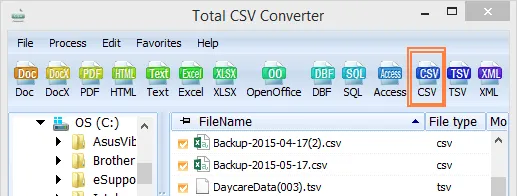
Each CSV file becomes a separate XLS workbook. Original CSV files remain untouched. You can also merge multiple CSV files into a single XLS workbook with multiple sheets — useful for combining monthly reports or data exports into one file.
Total CSV Converter includes a command-line interface for converting CSV files without the GUI. Example:
CSVConverter.exe C:\Data\export.csv C:\Output\export.xls -c XLS -SepChar ;
You can wrap this command in a .bat file or a scheduled task to automate recurring conversions. This is useful for server-side data processing — for example, automatically converting nightly database exports from CSV to XLS for the reporting team.
 Smart delimiter detection. Total CSV Converter automatically detects the delimiter used in your CSV files (comma, semicolon, tab, pipe). You can also set it manually for non-standard files. This ensures every value lands in the correct Excel column.
Batch processing. Select 1,000 CSV files and convert them all to XLS in a single run. Each file becomes a separate workbook, or merge them into one. No need to open files one by one in Excel and re-save.
Column selection. Choose which columns to include in the output and reorder them as needed. This is useful when CSV exports contain dozens of fields but you only need a few for your report.
Encoding support. Handle CSV files in any encoding: UTF-8, ANSI, Unicode, and more. The converter correctly interprets accented characters, CJK text, and special symbols that often break when opening CSV directly in Excel.
No Excel required. Total CSV Converter is a standalone application. It creates XLS files using its own engine — no Microsoft Excel or Office installation needed on the machine.
10+ output formats. Besides XLS, convert CSV files to XLSX, PDF, HTML, TXT, DBF, XML, JSON, and more — all from the same program.
| Feature | Online Tools | Total CSV Converter |
|---|---|---|
| File size limit | 5–50 MB typical | No limit |
| Batch conversion | One file at a time | Unlimited |
| Privacy | Files uploaded to cloud | 100% offline |
| Delimiter control | Auto only | Auto + manual + custom |
| Column selection | No | Choose & reorder columns |
| Automation | Manual only | Built-in command line |
| Pricing | Subscription or per-file | One-time $59.90 |

(includes 30 day FREE trial)
(only $59.90)
Download free trial and convert your files in minutes.
No credit card or email required.

Related Topics
Convert CSV to OpenOffice Calc (ODS)