Need help? Reach us at 

 +1 (855) 418-2323
Need help? Reach us at
+1 (855) 418-2323

 File Converters TIFF and PDF apps Forensic Freeware
Download Total Image Converter and turn your iPhone HEIC photos into JPEG today.
(includes 30 day FREE trial)
(only $24.90)
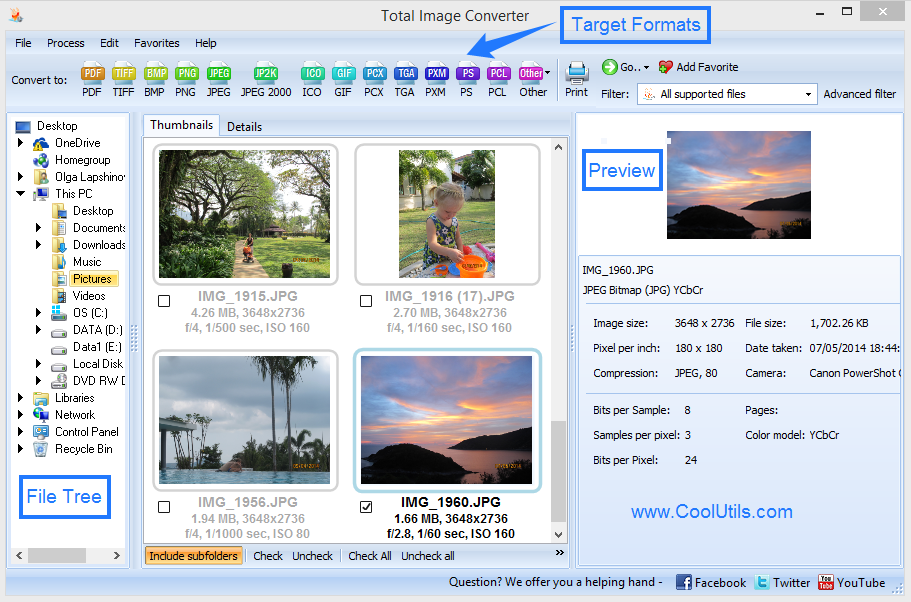
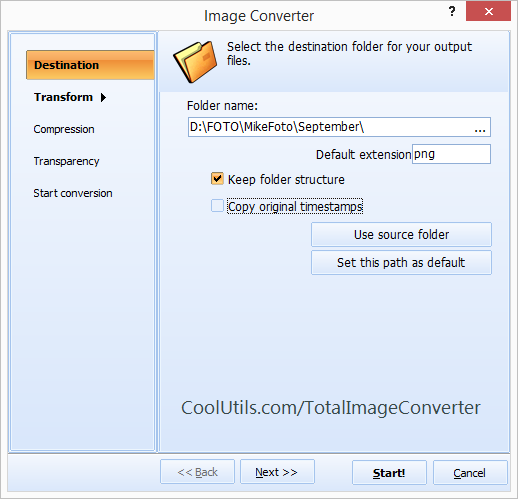
Quick answer: To convert HEIC to JPG, install Total Image Converter, browse to the folder with your HEIC photos, check the ones you need, click the JPEG button, set the quality and any resize option, then press Start. Every HEIC becomes a standard JPG in one offline batch, with EXIF data kept and no file-size limit.
HEIC (High Efficiency Image Container) is the format Apple uses for iPhone and iPad photos since iOS 11. It stores images at roughly half the file size of JPEG at the same quality, which saves space on your phone. The trouble starts when you move the photos off the phone: Windows, older software, many web forms, and most email recipients cannot display HEIC without extra codecs.
JPG (JPEG) is the universal photo format. Every browser, operating system, photo editor, and printing service opens it without any plugin. It has been the default for digital photos for decades. Converting HEIC to JPG trades a little disk space for the certainty that the image will open, upload, print, and share anywhere.
When you convert HEIC to JPG with Total Image Converter, the picture quality is preserved and the EXIF block — date, camera, and location — travels with the new JPEG, so your photo library stays organized.
Each HEIC file becomes a separate JPG. The original photos are never modified. You can convert hundreds of iPhone photos in a single pass.
Total Image Converter includes a command-line interface for converting HEIC without the GUI. Example:
ImageConverter.exe C:\Photos\*.heic C:\Output\ -c JPEG -Quality 90
Wrap this command in a .bat file or a scheduled task to convert HEIC photos automatically — for example, processing every batch dropped into a shared folder overnight.
 True batch conversion. Select an entire camera roll and convert every HEIC to JPG in one run. No dragging files one by one, no per-file upload waits.
EXIF preserved. The date taken, camera model, and GPS location stay in the JPG, so your photos keep their timeline in any gallery app.
Resize while converting. Shrink 12-megapixel iPhone shots to web or email size in the same step — no second tool needed.
100% private. Your photos never leave your PC. Nothing is uploaded to a cloud server, which matters for personal and confidential images.
35+ formats. Besides JPG, convert HEIC to PNG, PDF, TIFF, BMP, GIF, and more — all from the same program.
| Feature | Online Tools | Total Image Converter |
|---|---|---|
| Files per job | 5–20 typical | Unlimited |
| File size limit | 10–50 MB | No limit |
| Privacy | Photos uploaded to cloud | 100% offline |
| EXIF metadata | Often stripped | Preserved |
| Resize & crop | Rarely | Built in |
| Automation | Manual only | Command line |
| Pricing | Subscription or per-file | One-time $24.90 |

(includes 30 day FREE trial)
(only $24.90)
Download free trial and convert your files in minutes.
No credit card or email required.

Related Topics
Convert ICNS to JPEG with ease and smile