Logo
Home Products Support Contact About Us
arrow1 File Converters
arrow1 TIFF and PDF apps
arrow1 Forensic
arrow1 Freeware

Convert JFIF to JPG — Batch JFIF to JPEG Converter


Saved an image from the web and got a .jfif file your software refuses to open? Total Image Converter converts JFIF to JPG in batch — turn a whole folder of JFIF files into standard .jpg images that every app, website, and printer accepts. It runs on your PC, so nothing is uploaded. Unlike renaming files by hand (which does not always work), our converter:
  • Re-encodes JFIF to a proper JPG that opens everywhere
  • Converts an entire folder of JFIF files in one batch
  • Keeps the image quality and EXIF metadata intact
  • Resizes, crops, or rotates the images while converting
  • Lets you set JPEG quality to balance size and sharpness
  • Works 100% offline — no upload, no file-size limit
  • Includes a 30-day free trial with no limitations

Download Total Image Converter and fix your JFIF files in one pass.


Download Now!

(includes 30 day FREE trial)

Buy License

(only $24.90)

Quick answer: To convert JFIF to JPG, install Total Image Converter, browse to the folder with your JFIF files, check the ones you need, click the JPEG button, set the quality and any resize option, then press Start. Every JFIF becomes a standard JPG in one offline batch, with quality kept and no file-size limit.

JFIF vs JPG: What Is the Difference?

JFIF (JPEG File Interchange Format) and JPG use the exact same image compression — the picture data is identical. The difference is the file extension and a small header. Windows and some browsers occasionally save downloaded photos with the .jfif extension, and then image editors, uploaders, and other programs that only look for .jpg or .jpeg refuse to open them.

Because the content is the same, converting JFIF to JPG is quick and lossless when done right. Total Image Converter re-writes each file with a clean JPG header and the .jpg extension, so it opens in Photoshop, on websites, in email, and at print shops without complaint. You can also re-encode at a chosen quality or resize in the same step.
How to Convert JFIF to JPG

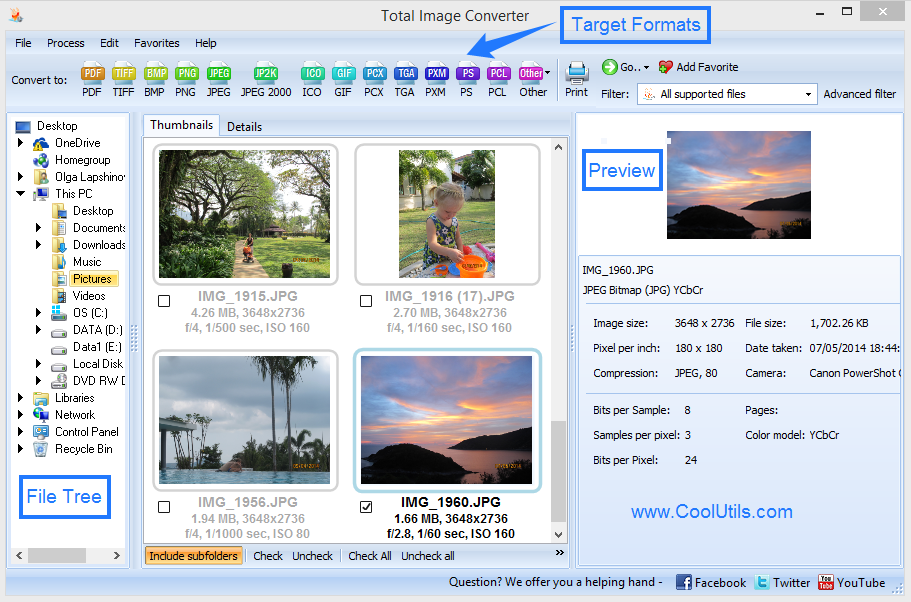
  • Step 1. Launch Total Image Converter. The left panel shows a folder tree for quick navigation.
  • Step 2. Browse to the folder that holds your JFIF files. Thumbnails and details appear in the center.
  • Step 3. Check the images you want, or click Check All to select the whole folder.
  • Step 4. Click JPEG in the format toolbar at the top of the window.
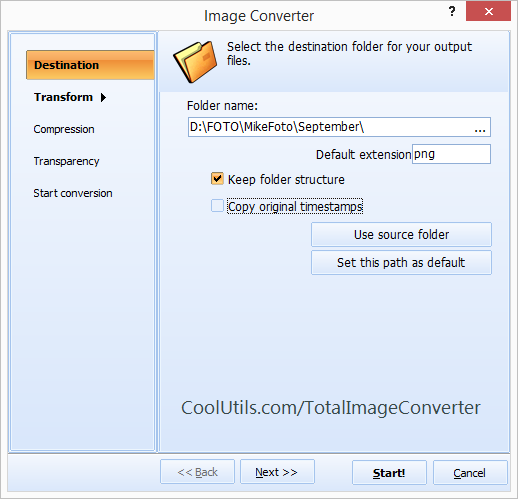
  • Step 5. In the wizard, set the JPEG quality, optional resize or crop, and choose a destination folder.
  • Step 6. Press Start. Total Image Converter writes a .jpg for every JFIF and saves it to your folder.

Total Image Converter - JFIF to JPG batch conversion interface

Each JFIF file becomes a separate JPG. The originals are never modified, and you can convert an entire folder in one pass.

Command-Line Conversion

Total Image Converter includes a command-line interface for converting JFIF without the GUI. Example:

ImageConverter.exe C:\Downloads\*.jfif C:\Output\ -c JPEG -Quality 92

Wrap this in a .bat file or a scheduled task to convert JFIF files automatically — for example, cleaning up everything saved to a downloads folder each day.

Why Use Total Image Converter?

Green PlusReal conversion, not just renaming. Renaming .jfif to .jpg by hand can leave a broken header. Total Image Converter re-encodes the file so it truly opens as a JPG everywhere.

Green PlusBatch processing. Convert one JFIF or a folder of a thousand in a single run. No opening files one at a time.

Green PlusQuality control. Choose the JPEG quality, so you keep the picture crisp or shrink the file for the web — your call.

Green Plus100% private. Your images never leave your PC. Nothing is uploaded to a cloud server.

Green Plus35+ formats. Besides JPG, convert JFIF to PNG, PDF, TIFF, BMP, GIF, and more — all from the same program.

Online Converters vs Desktop Converter

FeatureOnline ToolsTotal Image Converter
Files per job5–20 typicalUnlimited
File size limit10–50 MBNo limit
PrivacyImages uploaded to cloud100% offline
Quality controlRarelySet JPEG quality
Resize & cropRarelyBuilt in
AutomationManual onlyCommand line
PricingSubscription or per-fileOne-time $24.90

download JFIF to JPG converter

Windows 7/8/10/11 • 30-day free trial

When Do You Need JFIF to JPG Conversion?

Here are the most common situations where converting JFIF to JPG is necessary:
  1. Images saved from the web. Chrome and Windows sometimes save photos as .jfif. Convert them to .jpg so your usual apps will open them.
  2. Uploading to websites. Many upload forms accept only .jpg or .jpeg and reject .jfif. Convert first to avoid the error.
  3. Editing in image software. Some editors and viewers do not list .jfif in their open dialog. A .jpg opens in everything.
  4. Sending to others. Recipients are often confused by .jfif attachments. A .jpg is instantly recognizable and opens on any device.
  5. Cleaning up a folder. If a batch download left you with mixed .jfif and .jpg files, convert them all to one consistent format in a single run.


Download Now!

(includes 30 day FREE trial)

Buy License

(only $24.90)


quote

Total Image Converter Customer Reviews 2026

Rate It
Rated 4.7/5 based on customer reviews
5 Star

"Stock images kept downloading as .jfif and my layout tool would not import them. One batch pass and the whole folder was proper JPG. Now it is the first thing I run after a download session."

5 Star Nadia Kovac Graphic Designer

"The listing site rejected every .jfif photo I took from my browser. Converting a folder of them to JPG at once, with a resize to fit the size limit, was exactly what I needed."

5 Star Owen Pritchard eBay Seller

"Half our scanned images came through as .jfif and staff kept asking why they would not open. I convert them to JPG in bulk now and the support questions stopped."

4 Star Lena Hoffmann Office Administrator

JFIF to JPG — FAQ ▼

Install Total Image Converter, add your JFIF files, click JPEG in the toolbar, set the quality, then click Start. Each JFIF becomes a standard .jpg. You can also right-click a JFIF file in Explorer and choose Convert To.
They use the same JPEG compression, so the image data is identical. Only the extension and a small header differ. Total Image Converter re-writes the file with a clean JPG header and the .jpg extension so every program opens it.
Sometimes that works, but a renamed file can keep a header that some programs reject. Converting with Total Image Converter re-encodes the file properly, so it opens reliably everywhere.
Yes. Point Total Image Converter at a folder, select every JFIF file, and convert them all to JPG in one run, or unattended from the command line.
You choose the JPEG quality. At high quality the result is visually identical to the original, since both formats use the same compression.
Total Image Converter comes with a fully functional 30-day free trial, no registration required. A lifetime license is $24.90.
Yes. Total Image Converter includes a command-line interface. Build a .bat file with your quality and resize settings to automate JFIF to JPG conversion on a workstation or server.


Start working now!

Download free trial and convert your files in minutes.
No credit card or email required.

⬇ Download Free Trial Windows 7/8/10/11 • 79 MB

Support
Image Converter Preview1
Image Converter Preview2

Latest News

Newsletter Subscribe

No worries, we don't spam.


© 2026. All rights reserved. CoolUtils File Converters

Cards