Need help? Reach us at 

 +1 (855) 418-2323
Need help? Reach us at
+1 (855) 418-2323

 File Converters TIFF and PDF apps Forensic Freeware
Convert EML to PST with Total Mail Converter, a desktop program for Windows. Combine your EML messages into a PST file for use in Outlook, with batch conversion for multiple emails. Download the free 30-day trial, install the program, and select the EML files on your computer. Choose PST as the output format and save the result to your chosen folder.
⬇ Download Free TrialWindows desktop app · 30-day free trial
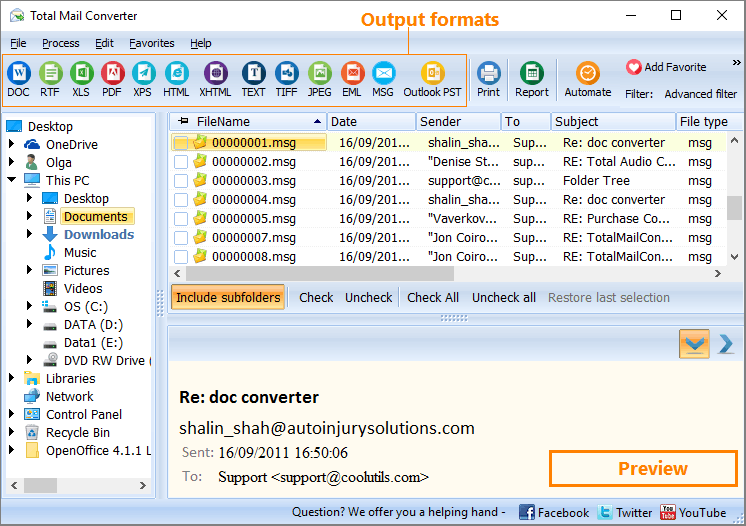
Converting EML to PST may seem strange, but only at first glance. After this EML to PST conversion, you can import emails into the Outlook program. This is just one of the ways to do it. With Total Mail PST Converter, you can convert multiple EML files as well as MSG to a PST format.
PST itself cannot be read as a stand-alone document. It is a data storage for information that is represented in a mail client. Emails, calendar data, contacts, and other info are stored encoded in a PST file.
These files can be imported into Microsoft Outlook for further use of the information inside. A few PST files can be connected to Outlook at once.
This gives the ability to import any message into the program after you convert EML files to PST. Total Mail Converter supports batch conversion of multiple EML files.
Quick answer: To convert EML to PST, download Total Mail PST Converter, install it, drag and drop your EML files into the program, click the Outlook PST icon to set PST as the target format, specify the destination, and press Start. All selected emails are exported into one PST file you can import into Outlook, with batch processing and attachments preserved.
How to export EML to PST
PST file has no specific formatting; it stores emails with their native formatting parameters. That is why there are no styling options available for the PST converter Software in this program. You are given standard data extraction and exporting it to a new format. The procedure is extremely simple:
First, select the source messages (make sure they are MSG or EML files);
Then choose the target format (click on the Outlook PST icon on the top bar);
Specify the destination in the popped-up settings manager;
Press Start on the EML to PST converter!
The difference is in the processes and how they happen. When using Outlook Express, Windows (Live) Mail, Mozilla Thunderbird, Lotus/IBM Notes, or any other mail client that is not Outlook, you'll have EML files stored somewhere on your PC.
While Outlook can view multiple EML files, it doesn't offer a way of importing them in bulk. However, you can achieve this in the following ways.
No matter how many source emails are selected for conversion, they will all be exported to one PST file. You can also specify its name. This conversion is also possible from the command line. If you want to know in detail how to convert EML to PST, check the Help menu.
Total Mail PST Converter is free for the first 30 days. Download and install this EML to PST converter tool to test the quality of the EML to PST conversion.
Download free trial and convert your files in minutes.
No credit card or email required.

Related Topics
How to Convert Email to PDF