Need help? Reach us at 

 +1 (855) 418-2323
Need help? Reach us at
+1 (855) 418-2323

 File Converters TIFF and PDF apps Forensic Freeware
(includes 30 day FREE trial)
(only $59.90)
Quick answer: To convert XML to SQL, install Total XML Converter, browse to the folder of XML files, check the files (or Check All), click the SQL button, choose a destination folder and review the table and field mapping, then press Start. Each XML file becomes a ready-to-run .sql file of INSERT statements — processed as one offline batch with no upload and no file-size limit.
XML (Extensible Markup Language) is a text-based format for structured data. It uses nested tags to describe records, fields, and hierarchies. XML is the standard interchange format for SOAP web services, enterprise systems (SAP, Oracle), data feeds, configuration files, and government reporting. Any programming language can parse XML, but databases cannot execute it directly.
SQL (Structured Query Language) is the standard language for relational databases. An SQL file contains executable statements — CREATE TABLE, INSERT INTO, UPDATE, DELETE — that a database engine runs to build and populate tables. When you convert XML to SQL, each record element becomes an INSERT statement and each child element maps to a table field. The resulting .sql file can be executed in MySQL, PostgreSQL, SQL Server, SQLite, MariaDB, or any SQL-compliant system.
| XML | SQL | |
|---|---|---|
| Purpose | Structured data interchange | Machine-executable database commands |
| Opened by | Any text editor, XML parser, browser | MySQL, PostgreSQL, SQLite, SQL Server |
| Structure | Nested tags with elements and attributes | INSERT statements with field-value pairs |
| Used for | APIs, web services, ERP, data feeds | Database import, migration, seeding |
| Data types | Everything is text (schema-dependent) | Explicit (VARCHAR, INT, DATE, etc.) |
| Automation | Requires an XML parser library | Runs directly in any database client |
Converting XML to SQL bridges the gap between data interchange and database storage. Instead of writing custom parsers for every XML feed, you get a ready-to-execute .sql file.
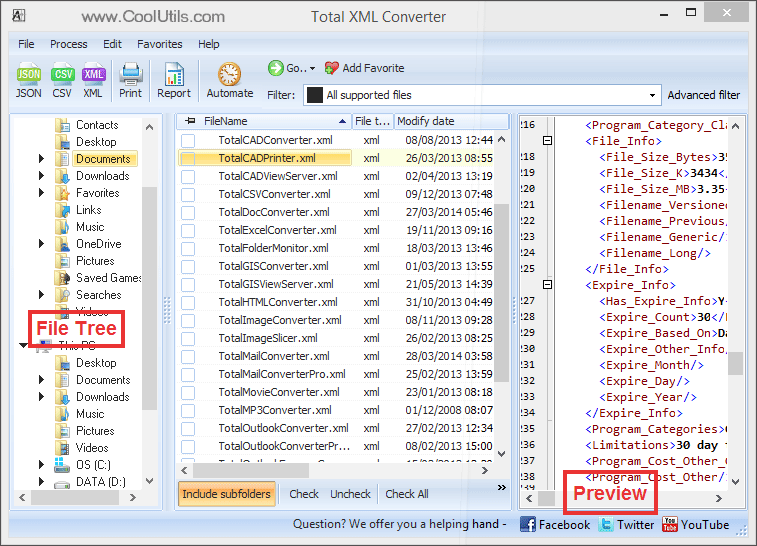
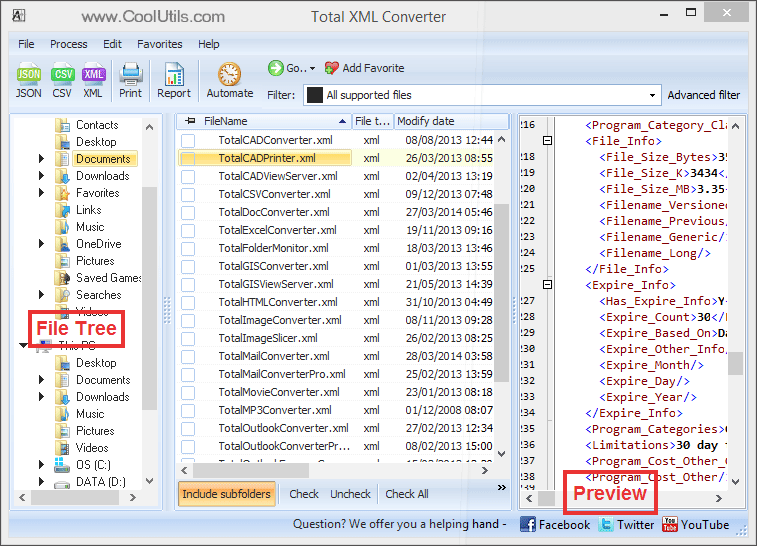
Each XML file produces a separate .sql file with INSERT statements. XML element names become field names, and each record element becomes one INSERT. The output is ready to execute in any SQL client.
Total XML Converter includes a command-line interface for automation:
XMLConverter.exe C:\Data\*.xml C:\Output\ -c SQL
This converts every XML file in the source folder to SQL. Wrap the command in a .bat file or schedule it with Windows Task Scheduler for automated nightly conversions — ideal for ETL pipelines that feed XML data into relational databases.
The converter produces .sql files with proper INSERT statements. XML element names are mapped to field names, values are quoted and escaped correctly for SQL syntax. No manual cleanup — pipe the file into your database client and the data lands in the table.
Select a folder of 10 or 10,000 XML files, click Start, and walk away. Total XML Converter handles the entire batch without interaction. For recurring tasks, use the command line with a scheduled script.
Nested elements, attributes, namespaces, CDATA sections — the converter processes them all. Deeply nested XML feeds from SOAP services or government data portals are flattened into clean INSERT statements.
Total XML Converter uses its own XML parsing engine. You do not need any XML libraries, database tools, or scripting languages installed on the machine. This simplifies server deployments and reduces dependencies.
All conversion runs locally on your Windows PC. Financial feeds, customer records, and healthcare data stay on your machine. Nothing is uploaded to any cloud service.
Besides SQL, Total XML Converter writes JSON, CSV, XLSX, PDF, HTML, DOC, TXT, and more. One license covers all format combinations.
| Feature | Online Tools | Total XML Converter |
|---|---|---|
| Batch conversion | One file at a time | Unlimited files per batch |
| File privacy | Files uploaded to third-party server | 100% offline |
| File size limit | 5–50 MB | No limit |
| SQL syntax | Generic, often broken | Properly escaped INSERT statements |
| Complex XML | Namespaces often stripped | Full support for nested structures |
| Command line | Not available | Full CLI for automation |
| Speed | Depends on upload/download | Instant (local processing) |
| Pricing | Free tier with limits, then subscription | One-time $59.90 |

(includes 30 day FREE trial)
(only $59.90)
XMLConverter.exe C:\Data\*.xml C:\Output\ -c SQL to convert an entire folder. Schedule the command in a .bat file for automated nightly processing.
Download free trial and convert your files in minutes.
No credit card or email required.

Related Topics
Total XML Converter