Logo
Home Products Support Contact About Us
arrow1 File Converters
arrow1 TIFF and PDF apps
arrow1 Forensic
arrow1 Freeware

Convert XLSX to TIFF


You want to share a spreadsheet, but the other side should see it, not edit it, and should not need Excel or a plugin to open it. A TIFF image solves both problems: it opens in any basic viewer and locks the numbers as a picture. With Total Excel Converter you convert XLSX to TIFF in batch, so a whole folder of workbooks becomes image files in one run.

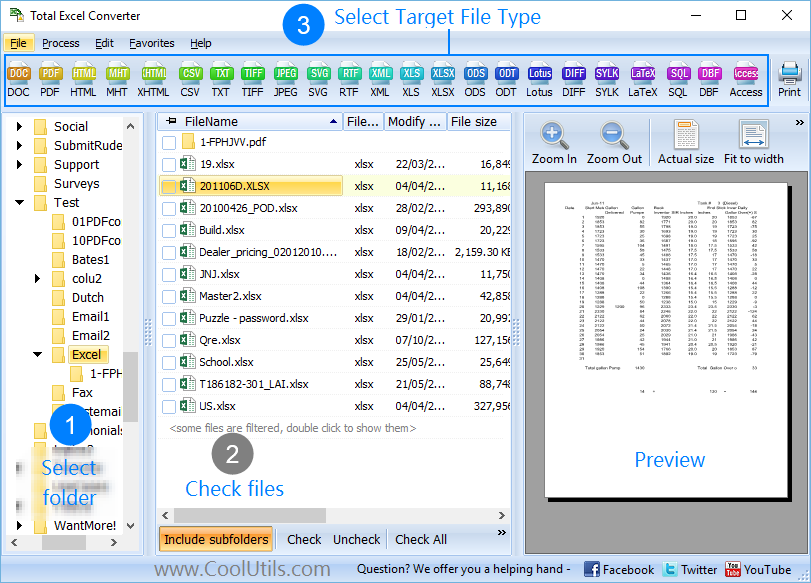
Quick answer: To convert XLSX to TIFF, install Total Excel Converter, open the folder with your XLSX files, check the ones you need, click the TIFF button, set the paper size and orientation, then press Start. Every sheet of every selected workbook is exported to a TIFF image offline, with no upload and no size limit.

Why turn an XLSX file into a TIFF image?

A TIFF is the safe format for archives, fax and image-only sharing. It is a single self-contained picture, so nobody can change a cell, and it survives long-term storage without depending on the Excel version that created it. TIFF also handles multi-page output well, which suits a workbook with several sheets or a wide table that spills across pages. If you prefer a lighter, web-friendly image, the Excel to JPEG route gives you compressed pictures instead.

How do I convert a whole folder of XLSX files?

Total Excel Converter reads every sheet in a workbook and can process many XLSX files in one conversion. For a quick job, keep the defaults: select the files, choose TIFF, press Start, and TIFF copies appear in a minute. For more control, adjust the settings before you start:

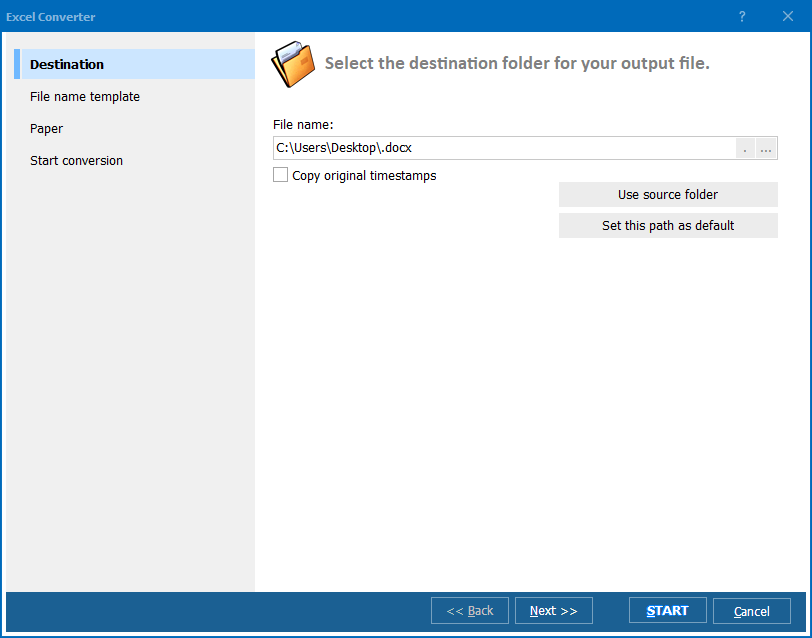
  • Pick the output folder for the TIFF files
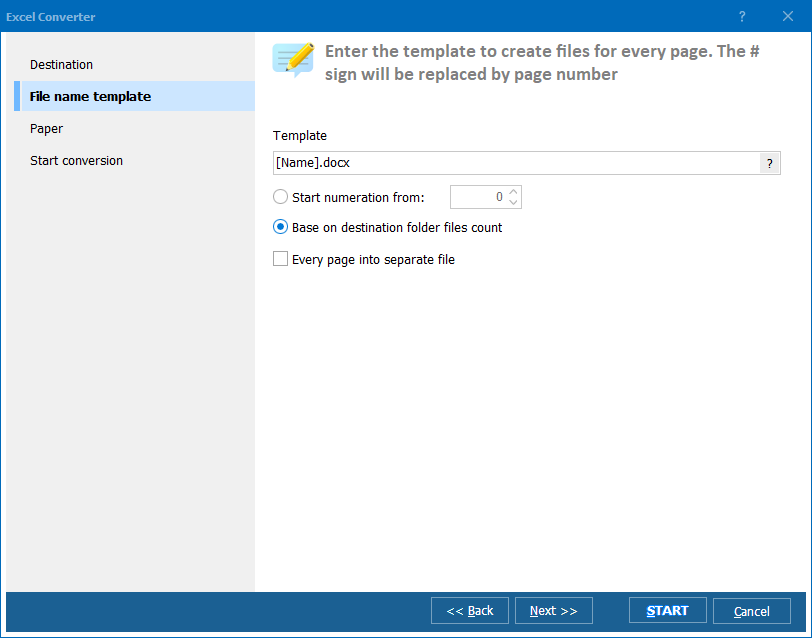
  • Set a standard or custom paper size for the image pages
  • Choose portrait or landscape to fit wide, many-column sheets
  • Process every sheet of every workbook automatically
  • Delete the originals after conversion if you no longer need them

When a sheet is too big for one page, the converter splits it into several TIFF pages of the paper size you chose, so nothing is cut off. Need an editable document instead of an image? Convert the same files to PDF with the offline Excel to PDF option.

For scans, faxes and legal archives, landscape orientation usually reads better for spreadsheets, since most tables have more columns than rows. Set it once and the whole batch follows.

Total Excel Converter runs on Windows 7, 8, 10 and 11. The 30-day trial is fully functional and needs no email or credit card, so you can test the TIFF output on your own workbooks before you buy.

Once your tables are TIFF images you can also treat them as graphics, dropping them into presentations, collages or design mockups.

Download Total Excel Converter and turn your spreadsheets into shareable images every time you need them.


quote

Total Excel Converter Customer Reviews 2026

Rate It
Rated 4.7/5 based on customer reviews
5 Star

"Our retention policy requires financial spreadsheets stored as images, not live files, so they cannot be altered years later. Total Excel Converter turned a decade of XLSX ledgers into multi-page TIFFs in one batch. Landscape orientation kept the wide columns readable, and every sheet came through without a single one being missed."

5 Star Helena Brandt Records Manager, Ashford County Archives

"We still send order confirmations to a few partners by fax gateway, which only accepts TIFF. Converting the day's XLSX confirmations to TIFF used to be a one-file-at-a-time chore. Now I select the folder, pick the paper size and it is done in a minute. The only reason it is not five stars is I wish presets could be saved."

4 Star Kenji Watanabe Operations Assistant, Sunfield Trading

"Auditors asked for read-only copies of our rate tables that open on any machine without Excel. TIFF was perfect and Total Excel Converter processed every workbook, every sheet, in a single pass. The images are clean, nobody can edit the numbers, and they open in the basic viewer on the auditor laptops."

5 Star Rosa Iglesias Compliance Officer, Delmar Insurance

XLSX to TIFF — FAQ ▼

How do I convert XLSX to TIFF?

Install Total Excel Converter, open the folder with your XLSX files, check the files you need, click the TIFF button, set paper size and orientation, then press Start. Every selected workbook is exported to a TIFF image in the output folder you choose.

Can I convert XLSX to TIFF in batch?

Yes. Total Excel Converter is made for batch work. Put your XLSX files in one folder, check them all, and the program converts every workbook to TIFF in a single run, processing each sheet automatically.

Does it convert every sheet in the workbook?

Yes. Total Excel Converter reads all sheets in an XLSX file and exports them, not just the active one. If a sheet is wider than the page, it is split across several TIFF pages of the paper size you set, so nothing is cut off.

Can I set the paper size and orientation for the TIFF?

Yes. Before conversion you can choose a standard or custom paper size and pick portrait or landscape. Landscape usually suits spreadsheets because most tables have more columns than rows.

Why convert a spreadsheet to TIFF instead of PDF?

TIFF is an image, so the recipient cannot edit the cells and needs no Excel or plugin to view it. That makes it a good fit for archives, fax and image-only sharing. If you need an editable or searchable document, convert to PDF instead.

Is converting XLSX to TIFF free?

Total Excel Converter offers a fully functional 30-day trial with no email or credit card required. A personal license starts at 49.90 USD and unlocks unlimited conversions after the trial.

Can I convert XLSX to TIFF from the command line?

Yes. Total Excel Converter includes a command-line version for automation and server use. You can script XLSX to TIFF conversion in a .bat file or a scheduled task to process folders without opening the interface.


Start working now!

Download free trial and convert your files in minutes.
No credit card or email required.

⬇ Download Free Trial Windows 7/8/10/11 • 37 MB

Support
Excel Converter Preview1
Excel Converter Preview2
Excel Converter Preview3

Latest News

Newsletter Subscribe

No worries, we don't spam.


© 2026. All rights reserved. CoolUtils File Converters

Cards