Need help? Reach us at 

 +1 (855) 418-2323
Need help? Reach us at
+1 (855) 418-2323

 File Converters TIFF and PDF apps Forensic Freeware
(includes 30 day FREE trial)
(only $49.90)
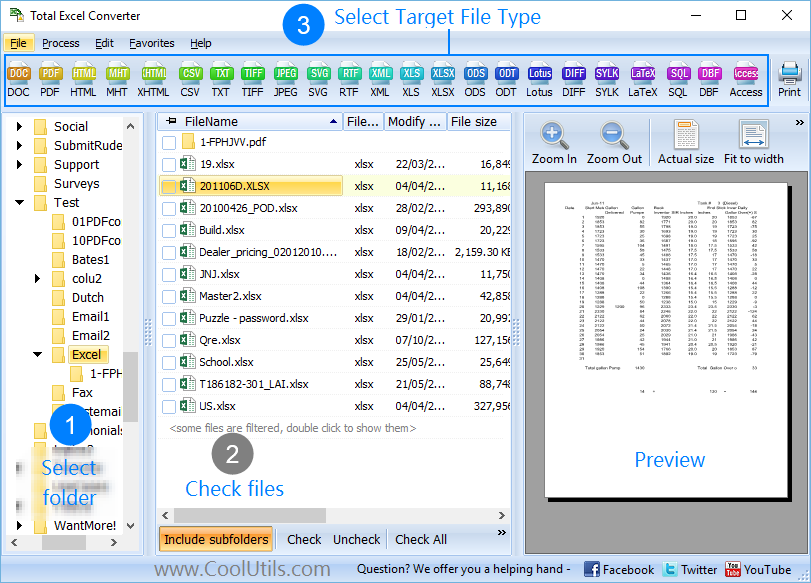
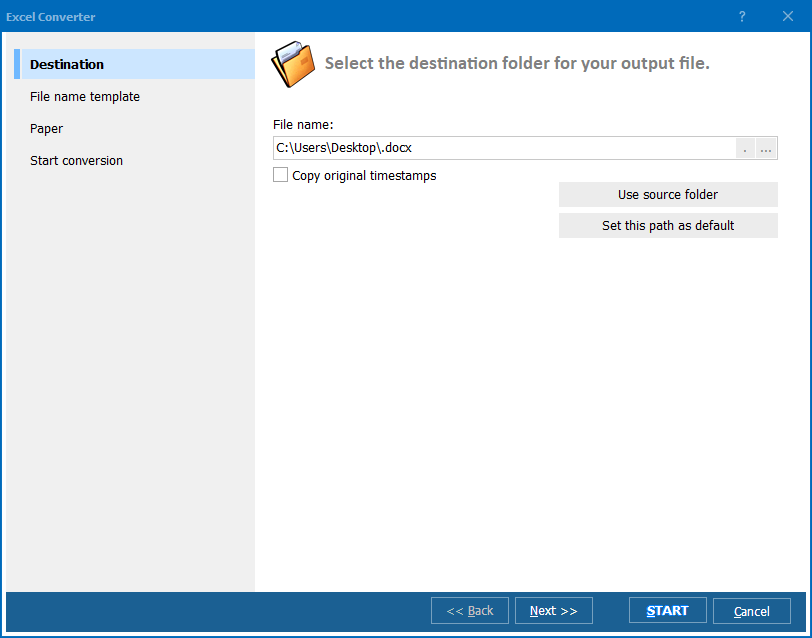
Quick answer: To convert XLSX to XML, launch Total Excel Converter, browse to the folder with your XLSX or XLS files, check the spreadsheets you need, click XML in the format toolbar, choose a destination folder, then press Start. Each file becomes a well-formed XML document with cell values and headers preserved, processed in batch and entirely offline.
XLSX is the default spreadsheet format for Microsoft Excel since 2007. Internally it is a ZIP archive of XML files, but the structure is designed for a spreadsheet application: worksheets, cell formatting, formulas, charts, and styles. XLSX is made for humans working with rows and columns. Software outside the spreadsheet world — databases, APIs, ERP systems — cannot consume XLSX directly.
XML (Extensible Markup Language) is a text-based format for structured data. It uses nested tags to describe records, fields, and hierarchies. XML is the standard interchange format for web services (SOAP, REST), enterprise systems (SAP, Oracle), data feeds, configuration files, and document databases. Any programming language can parse XML natively.
| XLSX | XML | |
|---|---|---|
| Purpose | Human-readable spreadsheet | Machine-readable structured data |
| Opened by | Excel, LibreOffice, Google Sheets | Any text editor, XML parser, database tool |
| Structure | Worksheets with rows, columns, formatting | Nested tags with elements, attributes, values |
| Used in | Reporting, analysis, accounting | APIs, web services, ERP, databases, data feeds |
| Data types | Implied by cell format | Explicit via schema or tags |
| Automation | Requires Excel or a library | Native parsing in every language |
Converting XLSX to XML strips away formatting and extracts the raw data into a clean, parseable structure that any system can import.
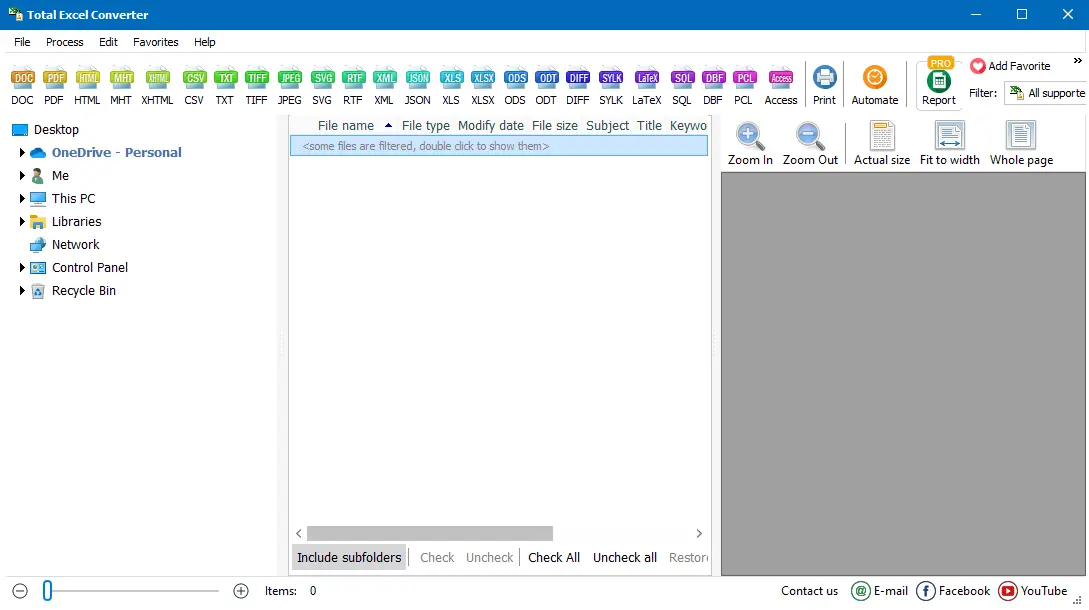
Each XLSX file produces a separate XML file. Cell values, column headers, and sheet names are mapped to XML elements. The output is well-formed and ready for import into databases, XSLT transformations, or API payloads.
Total Excel Converter includes a command-line interface for automation:
ExcelConverter.exe "C:\Reports\*.xlsx" -cXML "C:\Output\"
This converts every XLSX file in the source folder to XML. Useful flags:
-cXML — set target format to XML-SubFolders — include XLSX files from subfolders-log C:\Logs\convert.log — write a log file for trackingSave the command in a .bat file and schedule it with Windows Task Scheduler. Every night, new spreadsheet reports are converted to XML and pushed to your database automatically.
The converter produces valid XML that passes any parser. Cell values are wrapped in descriptive tags based on column headers and sheet names. No manual cleanup required — the output is ready for XSLT, XPath queries, or direct database import.
Select a folder of 10 or 10,000 XLSX files, click Start, and walk away. Total Excel Converter handles the entire batch without interaction. For recurring tasks, use the command line with a scheduled script.
Beyond XLSX, Total Excel Converter reads XLS (Excel 97-2003), ODS (LibreOffice), CSV, TSV, WK1 (Lotus 1-2-3), QPW (Quattro Pro), and Numbers (Apple). All can be converted to XML from the same tool.
The converter uses its own parsing engine. You do not need Microsoft Office, Excel, or any other spreadsheet application installed on the machine. This saves licensing costs and simplifies server deployments.
All conversion runs locally on your Windows PC. Financial reports, HR spreadsheets, and client data stay on your machine. Nothing is uploaded to any cloud service.
Besides XML, Total Excel Converter writes PDF, HTML, DOC, DOCX, JPEG, TIFF, TXT, CSV, ODS, JSON, and more. One license covers all format combinations.
| Feature | Online Tools | Total Excel Converter |
|---|---|---|
| Batch conversion | One file at a time | Unlimited files per batch |
| File privacy | Files uploaded to third-party server | 100% offline |
| File size limit | 5–50 MB | No limit |
| XML structure | Generic, often inconsistent | Clean, well-formed, consistent tags |
| Multi-sheet support | First sheet only | All sheets converted |
| Command line | Not available | Full CLI for automation |
| Speed | Depends on upload/download | Instant (local processing) |
| Pricing | Free tier with limits, then subscription | One-time $49.90 |

(includes 30 day FREE trial)
(only $49.90)
ExcelConverter.exe "C:\Reports\*.xlsx" -cXML "C:\Output\" to convert an entire folder. Ideal for nightly batch jobs and automated data pipelines.
Download free trial and convert your files in minutes.
No credit card or email required.

Related Topics
Total Excel Converter