Need help? Reach us at 

 +1 (855) 418-2323
Need help? Reach us at
+1 (855) 418-2323

 File Converters TIFF and PDF apps Forensic Freeware
Download Total CAD Converter and start converting DWF files to PDF today.
(includes 30 day FREE trial)
(only $99.00)
Quick answer: To convert DWF to PDF, install Total CAD Converter, browse to the folder with your DWF files, check the ones you want, click the PDF button, set page size and any security options, then press Start. The whole folder converts in one batch — offline, with no AutoCAD or Autodesk viewer required and no file-size limit.
DWF (Design Web Format) is a file format developed by Autodesk for sharing and reviewing CAD data. A DWF file is a compressed, stripped-down version of a DWG drawing — it contains 2D and 3D geometry, annotations, markups, and sheet layouts, but removes the editing data that AutoCAD uses internally. This makes DWF files smaller than their DWG originals. The format was designed for design review workflows: architects and engineers publish DWF files so project managers, contractors, and clients can view drawings without owning AutoCAD. However, opening a DWF file requires Autodesk Design Review, Autodesk Navisworks, or another DWF-capable viewer — none of which are standard software on most machines.
PDF (Portable Document Format) is the universal document standard. PDF viewers are pre-installed on Windows, macOS, iOS, and Android. Every web browser can render PDF files natively. The format preserves visual layout exactly as intended — fonts, vector graphics, line weights, and page dimensions remain consistent across devices. PDF supports annotations, digital signatures, password encryption, and text search. It is the accepted format for regulatory submissions, construction archives, print shops, and client communication.
Converting DWF to PDF eliminates the viewer dependency. A PDF file opens on any device without additional software. Print shops accept PDF directly. Regulatory bodies and archive systems require PDF. Clients can annotate and sign PDF documents using free tools. The conversion preserves the visual content of the DWF drawing while wrapping it in a format that everyone can read.
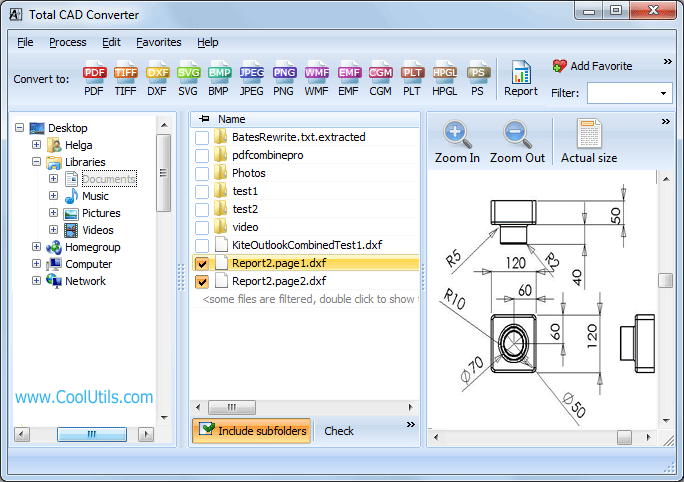
Batch jobs with dozens or hundreds of DWF files complete in minutes. The converter remembers your last settings, so repeat conversions require only selecting files and pressing Start.
Total CAD Converter includes a command-line executable for scripted and server-side workflows. Example:
CADConverter.exe C:\Drawings\*.dwf C:\Output\ -cPDF
This converts every DWF file in the Drawings folder to PDF and saves the output to C:\Output\. Wrap the command in a .bat file or schedule it with Windows Task Scheduler to convert incoming DWF files automatically — overnight, on a fixed schedule, or whenever new files arrive in a watched folder. The command-line version runs without any GUI and fits into existing document pipelines.
 No AutoCAD or Autodesk software required. Total CAD Converter reads DWF files using its own rendering engine. You do not need AutoCAD, Autodesk Design Review, or Navisworks on the conversion machine. Install the converter, point it at your DWF files, and get PDF output.
Batch processing. Select a folder with 300 DWF files and convert them all to PDF in a single run. Each drawing gets its own PDF file, named to match the source. No manual file-by-file handling.
PDF security options. Add password protection, restrict printing, or disable copy-paste on the generated PDF files. Useful when distributing drawings to external parties who should view but not modify the content.
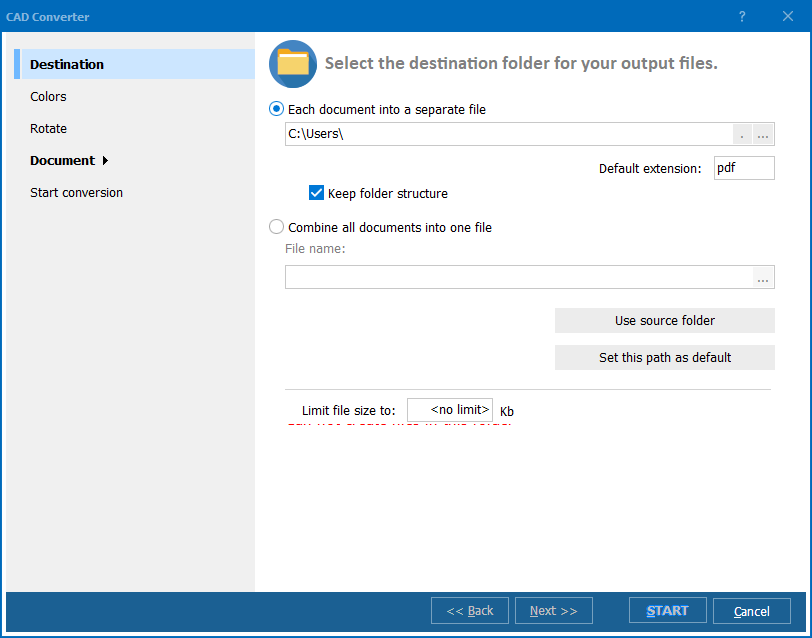
Page size and layout control. Set output page size (A4, A3, A1, Letter, or custom dimensions), orientation, margins, and scale factor before conversion. The PDF output matches your target print format without post-processing.
100% offline processing. All conversion runs locally on your PC. Architectural plans, proprietary designs, and confidential project drawings never leave your machine or touch a third-party server.
15+ output formats. Beyond PDF, convert DWF to TIFF, JPEG, PNG, BMP, SVG, WMF, CGM, DXF, PLT/HPGL, and more — all from the same interface.
| Feature | Online Tools | Total CAD Converter |
|---|---|---|
| File size limit | 10–50 MB | No limit |
| Batch conversion | One file at a time | Unlimited |
| Privacy | Drawings uploaded to cloud | 100% offline |
| AutoCAD / Autodesk required | Varies | No |
| PDF security | Rarely available | Password, print/copy restrictions |
| Page size control | Limited | A4, A3, A1, Letter, custom |
| Automation | Not available | Built-in command line |
| Pricing | Subscription / per-file | One-time $99.00 |

(includes 30 day FREE trial)
(only $99.00)
Download free trial and convert your files in minutes.
No credit card or email required.

Related Topics
Convert DWFX to PDF in batch