Need help? Reach us at 

 +1 (855) 418-2323
Need help? Reach us at
+1 (855) 418-2323

 File Converters TIFF and PDF apps Forensic Freeware
Quick answer: Install Total CAD Converter, add your PDF files or a whole folder, click the DXF button, choose an output folder, then click Start. It rebuilds lines, arcs and text as editable DXF entities instead of a flat page, converts hundreds of sheets in one batch offline, and runs from the command line. Source PDFs must be vector, not scans.
(includes 30 day FREE trial)
(only $99)
Both formats can describe the same set of lines, so the difference is easy to miss until you try to edit something.
PDF is a page description format. It was built to make a document look identical everywhere — on screen, on a laser printer, on a plotter. Inside, it stores drawing operators: move here, stroke a path, fill this shape, place this glyph at these coordinates. Nothing in the file says this is a wall or this is a bolt hole. There are no layers in the CAD sense, no blocks, no entity types, and no coordinate system tied to real millimetres.
DXF (Drawing Exchange Format) is the opposite. Autodesk published it so CAD programs could hand models to each other. A DXF file lists entities — LINE, ARC, CIRCLE, LWPOLYLINE, TEXT — each with coordinates, a layer and properties. That is why a DXF opens in almost any CAD tool and why you can grab an endpoint and drag it.
| DXF | ||
|---|---|---|
| Purpose | Fixed-layout viewing and printing | Exchanging CAD models between programs |
| Content | Paths, fills, glyphs | Named entities with coordinates |
| Editable in CAD | No — imports as a static underlay at best | Yes — select, snap, trim, extend |
| Layers | Optional content groups, rarely meaningful | Native, with names and properties |
| Snap points | None | Endpoints, midpoints, centres |
| Feeds CNC / laser software | Usually rejected | Standard input |
Conversion is what closes that gap. The vector paths already sitting in the PDF get read out and rewritten as DXF entities, which is why the result is genuinely editable rather than an image pasted behind your drawing.
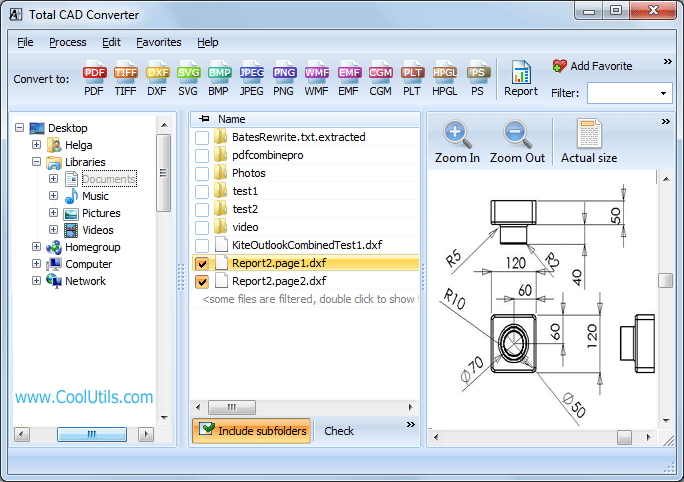
Step 1. Install Total CAD Converter and start it. The left panel is a normal Windows folder tree.
Step 2. Browse to the folder holding your PDF drawings. The central list shows every supported file, and the preview panel renders the selected one so you can confirm you have the right sheet.
Step 3. Tick the files you want. Click Check All to take the whole folder — there is no limit on how many sheets go into one job.
Step 4. Click DXF in the format toolbar along the top. The settings wizard opens.
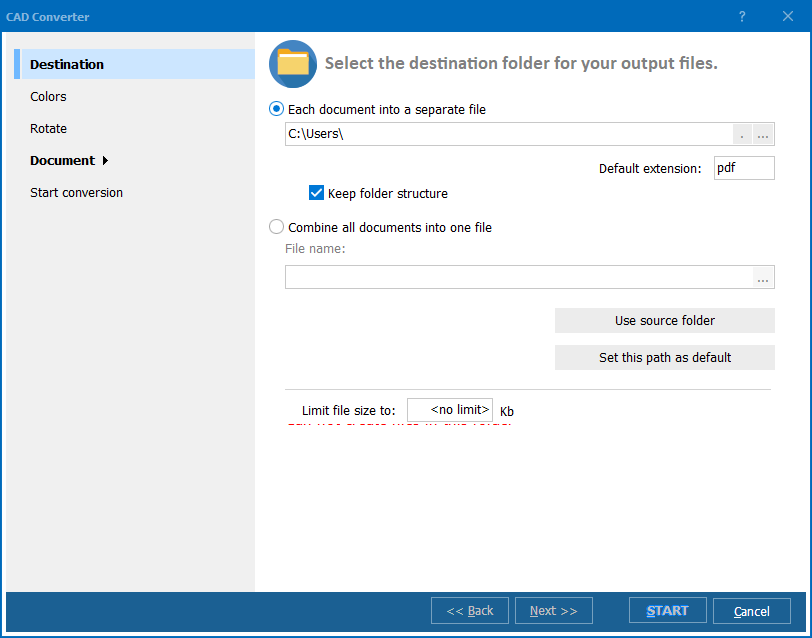
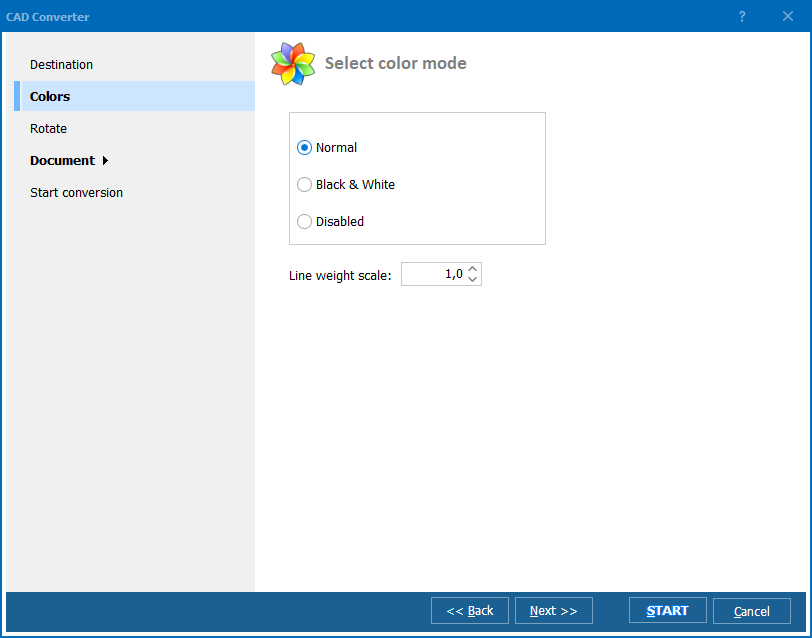
Step 5. Pick a destination folder. If you are converting a nested tree, switch on the subfolder option and the original folder structure is recreated on the output side. Scaling and rotation are available here if the source sheets need straightening.
Step 6. Click Start. Each PDF is processed in turn and a matching .dxf lands in the output folder. Open one in your CAD program and the lines are selectable.
This is the single thing that decides whether the conversion is worth running, and it is worth thirty seconds of checking.
A vector PDF was exported from CAD, printed to PDF from a drawing program, or produced by a plotter driver. The geometry is inside the file as real paths. This converts well: lines come across as lines and text as text.
A scanned PDF is a photograph of paper wrapped in a PDF container. There is one big raster image inside and no geometry whatsoever. Nothing can be recovered from it by conversion, because there is nothing structured in there to recover. Turning a scan into CAD is a different job called raster-to-vector tracing, and it always involves guessing where the lines were.
How to tell them apart in ten seconds: open the PDF in any viewer and zoom in hard on a thin line. Vector geometry stays crisp at 800%. A scan turns into grey mush and visible pixels. The other quick test is the text selection cursor — if you can drag-select the dimension text as text, the file is vector.
The console version takes the same job description as the interface, which makes it straightforward to convert on a schedule or from inside another application:
CADConverter.exe C:\Drawings\*.pdf C:\Output\ -cDXF
Wrap that in a .bat file and a Windows scheduled task and an incoming folder of supplier PDFs turns itself into DXF overnight. For server-side use, ActiveX and a DLL interface come with Total CAD ConverterX.
A supplier sends a part as PDF. You need its outline in your assembly to check clearances. Converting to DXF puts the real profile into your model instead of an eyeballed redraw.
The original CAD file is gone. An old building or an old product survives only as an archived plot. The PDF is the last copy, and DXF is how it gets back into a workflow that can modify it.
A client approves a layout as PDF. Revisions have to be made in CAD, not in a markup tool, so the approved sheet needs converting before the next round starts.
Cutting and engraving. Laser cutters, CNC routers and vinyl plotters take DXF. They do not take PDF. A logo or a panel layout that exists only as a PDF has to be converted before it can be cut.
A whole archive at once. Hundreds of drawings sitting in a folder tree as PDFs are a batch job, not a manual one. Point the converter at the top folder and let it walk the tree.
| Feature | Total CAD Converter | Online Services |
|---|---|---|
| Batch conversion | Entire folder trees | 1–3 files per upload |
| File size limit | None | Usually 10–50 MB |
| Privacy | Files stay on your machine | Uploaded to a third-party server |
| Other vector targets | SVG, CGM, HPGL | DXF only, if that |
| Folder structure preserved | Yes | No |
| Command-line automation | Yes | No |
| Works offline | Yes | No |
| Pricing | $99 one-time | Subscription or per-file |
For a single sheet in a hurry, the free online tools are fine. Confidential drawings, large archives and anything on a schedule belong on the desktop, where nothing is uploaded anywhere.
Total CAD Converter runs on Windows 7, 8, 10 and 11 in 32- and 64-bit. The 30-day trial is fully functional and asks for neither a credit card nor an email address; the licence afterwards is a one-time $99 with no subscription.
Download free trial and convert your files in minutes.
No credit card or email required.

Related Topics
Convert CGM to DXF — Batch CGM to DXF Converter for Windows