Need help? Reach us at 

 +1 (877) 395-3616
Need help? Reach us at
+1 (877) 395-3616

 File Converters TIFF and PDF apps Forensic Freeware
When Outlook refuses to open a damaged PST, you may still be able to retrieve the correspondence inside it. Total Outlook Converter Pro reads broken and problematic PST archives and extracts the messages and attachments it can still find. Save that content in formats you can use outside Outlook, including PDF, DOC, HTML and TXT.
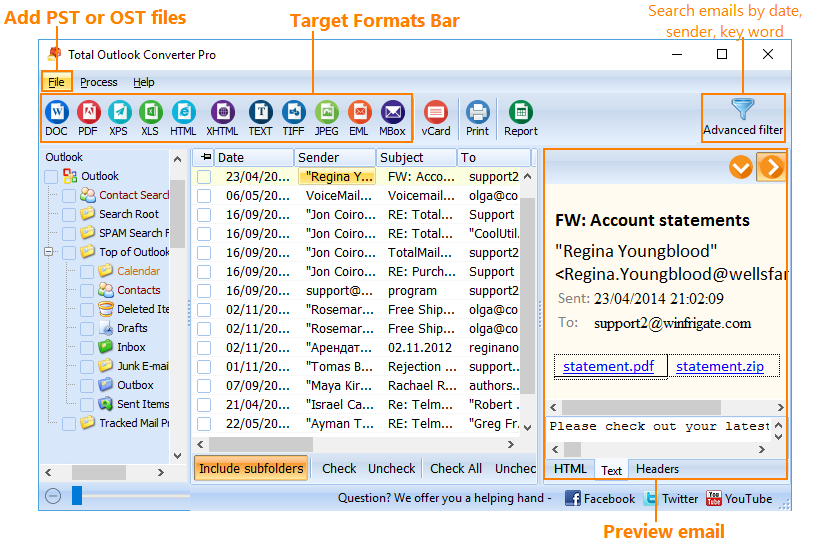
This is paid Windows software with a free 30-day trial. You can open a PST directly in the converter without installing Outlook.
Download Free Trial Buy License
You might need a customer's instructions, a supplier's attached document, or an older exchange that is now trapped in a PST that will not open. The goal is to get the available email content into files you can read, review or share.
Choose the output around the next task:
| What you need | Output to choose |
|---|---|
| A readable copy of the messages | PDF, with separate files for individual emails or a combined document |
| Email text to edit or reuse | DOC or TXT |
| Messages to read in a web browser | HTML |
| An email archive in individual message files | EML |
| Original attached documents for further work | Save attachments in their original file types to a folder |
The result of this workflow is exported correspondence. The amount available depends on what the converter can still find in the damaged archive. Use the trial with your PST to see which messages and attachments are accessible and review the resulting files.
Keep the source PST while you work with the exported copies. A small selection is a useful starting point when you are deciding how to organize a larger batch.
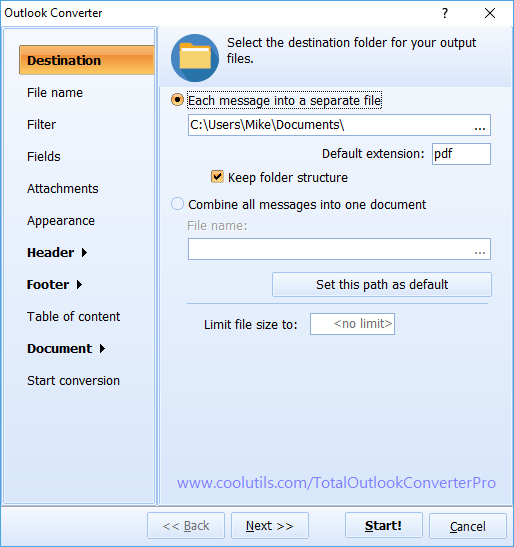
An email can explain why a document was sent, while the attachment contains the information you actually need. Total Outlook Converter Pro gives you a choice about how to handle both.
Save attachments in their original file types when you need to work with a document or spreadsheet in its usual application. You can place them in the same folder as the exported messages or in another folder. Attachment names can include the email name or its counter, helping you keep each file connected to the right message.
For a reading copy, Pro can convert supported attached documents into the same output format as the email. In a PDF workflow, this lets you review the message and the converted attachment content together. Choose this when the recipient needs to read the material, and keep original files when further editing is part of the job.
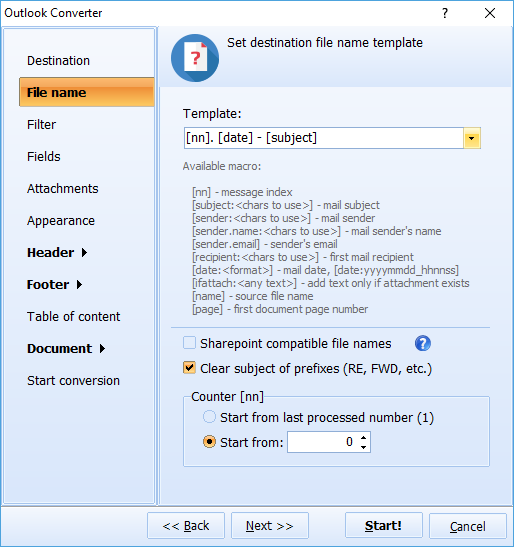
A collection of exported emails is easier to use when the filenames and document fields identify each message. Include the sender, recipient, date and subject as needed. Use a date or counter in output filenames to help distinguish similar conversations.
For a case file or a single review package, combine emails into one PDF and add a table of contents. For a collection that colleagues will sort or distribute separately, keep an individual file for each email. These choices let you prepare the available correspondence for the people who need it next.
No. Total Outlook Converter Pro reads PST files directly and does not require Outlook or an additional library for PST conversion.
This workflow exports the messages and attachments the converter can find into the output formats you choose, such as PDF, DOC, HTML, TXT or EML. Choose it when you need usable copies of the correspondence outside the original archive.
Yes. Total Outlook Converter Pro supports batch conversion. Select the available messages you want to export and apply the output settings to that selection.
Yes. The 30-day free trial has full functionality. Open your PST, export the available content and review the result before choosing a license.
Recover the correspondence the converter can still find and save it in the format your next task requires. Total Outlook Converter Pro runs on Windows 7, 8, 10 and 11.
Download Free Trial View License Options
For the full set of conversion and attachment options, see Total Outlook Converter Pro. For a regular PST-to-PDF workflow, see Convert PST to PDF with Attachments.
Download free trial and convert your files in minutes.
No credit card or email required.

© 2026. All rights reserved. CoolUtils File Converters
