Logo
Home Products Support Contact About Us
arrow1 File Converters
arrow1 TIFF and PDF apps
arrow1 Forensic
arrow1 Freeware

Total Outlook Converter Pro

A reliable tool to convert Outlook emails to PDF, DOC, TIFF, TXT, EML with attachments in batch.
Total Outlook Converter Pro — PST + Attachments to PDF

Windows
2000/2003/Vista
7/8/10/11/Citrix

Total Outlook Converter Pro converts Outlook emails to PDF, DOC, RTF, TXT, HTML, TIFF or Markdown in batch — and, unlike basic converters, it converts the attachments too, not just the message body.

Quick answer: To convert Outlook emails together with their attachments, install Total Outlook Converter Pro, let it connect to Outlook and pick the folder or PST file, select the messages, choose PDF, and set the Attachments options in the wizard. Every email and its attached files are saved as PDF in one batch — offline, with a free 30-day trial.

What Does Total Outlook Converter Pro Do with Attachments?

  • eDiscovery and litigation. Convert Outlook emails to PDF in the most accurate way. Attach or embed attachments to the resulting PDF. Search emails by sender, subject, date or any key word. Our Outlook converter can also stamp bates, add text watermarks (i.e. confidential), rename output files by the bates number.
  • If you feel it's time to migrate to another email app, Total Outlook Converter Pro will export emails to universal EML files or MBOX accepted by Apple.
  • Table reports. Get all emails from a PST file converted over to a single excel file with general info such as date/time/to/from/body information. Then it's easy to load the report in a DB or do further analysys on.
  • Archiving old emails. Once you decide to empty Outlook and save copies of your emails on your hard drive, save them as PDF, PDF/A, DOC, TXT, HTML, TIFF, Markdown or JPEG and open them without any email program. Elderly parents living far or kid's educational bills, anything you may find important should be backed up in case you don't have the Internet connection. All unique options..

How Do I Convert Outlook Email to Markdown?

Choose MD (Markdown) as the output and Total Outlook Converter Pro walks your PST, OST or Outlook folders and writes each message as a clean .md file — subject, sender, date and body as readable Markdown, folder structure mirrored on disk. Because Pro converts attachments too, the Word, Excel and PDF files inside an email are rendered into the same Markdown output, so one .md holds the whole message. Plain-text Markdown drops straight into Obsidian, Notion, documentation, or an AI chat like ChatGPT or Claude, and stays readable for long-term archiving. Batch the whole mailbox in one pass; the command line supports Markdown too.

How Do I Convert Gigabytes of Outlook Email in One Batch?

It handles gigabytes of email at a time — for backup, archiving, or legal review. Get your copy now, covered by a 30-day money-back guarantee.

Download Now!

(includes 30 day FREE trial)

Buy License

(only $99.90)

One-time payment — no subscription30-day money-back guaranteeSince 2003For Windows 7 / 8 / 10 / 11
 
Accept Payment Methods

quote

Total Outlook Converter Pro Customer Reviews 2026

Rate It
Rated 4.8/5 based on customer reviews
5 Star

"I only convert Outlook emails and never tried OST and PST files. At least it worked fine when I did use (definitely cannot say that about a lot of other Outlook converters out there)."

4.5 Star Paulo Miranda

"This is a terrific piece of software. It saved our company days worth of work hours that we would have had to spend to move thousands of documents we had stored in Outlook to a network directory. The one thing that could have made it even better would have been if it could open the public folders directly. I had to export the contents of the public folder to a .pst first before converting the emails and attachments to .pdf files."

5 Star Phil Edmunds Service Support Engineer, Car.com


Unique options of Total Outlook Converter Pro


mail converter
Convert emails from multiple sources to a variety of formats.
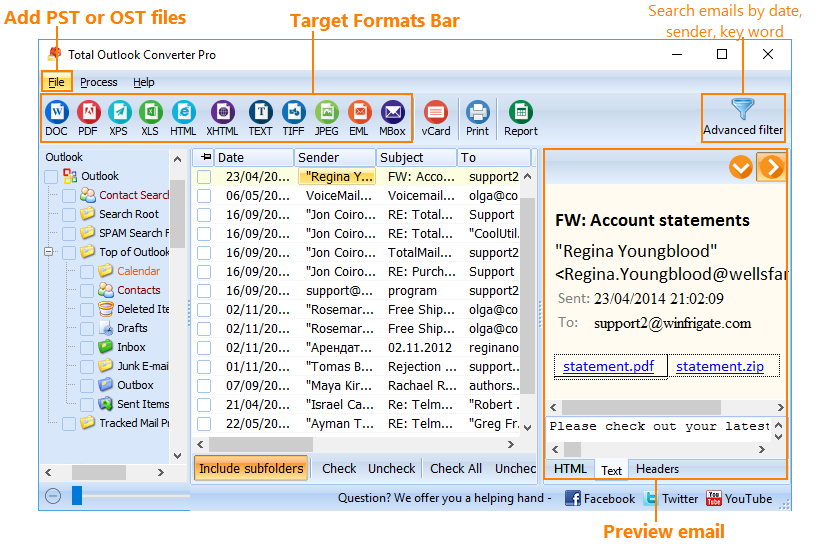
  • Total Outlook Converter Pro connects to your Outlook and gets emails automatically. The app takes the copies, the original emails are still there.
  • You can import your PST or OST files into the converter too.
  • Output file types include PDF, PDF/A, DOC, RTF, XPS, HTML, XHTML, TXT, TIFF, JPEG, EML, MBOX.
  • Total Outlook Converter Pro does not require Outlook or any other additional library to convert PST files.

mail converter
Search emails by sender, date or key words.
  • When you want to find specific emails from a certain sender or date or having a key word in Subject, use our powerful Filter option. Filtering email by size is also allowed.
  • On top of that, Total Outlook Converter Pro can search emails by keywords in the body of the message.

mail converter
Tune the data saving options - save only necessary data from your emails.
  • With Total Outlook Converter Pro you can convert whole emails with attachmnets or only selected fields (Sender, Recipient, Date, CC). Save space and get rid of the data you don't need.
  • Our flexible Outlook converter can include the sender's IP address to the output file.
  • The converter will include RFC-822 headers to output files if you want.
  • There is a special option: "do not load images from the Internet". You can save time if you tell the app to skip the links in the emails that lead to images in the web.
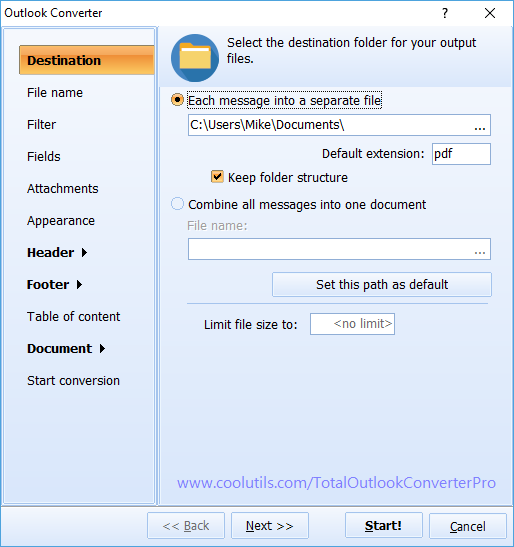
  • Total Outlook Converter Pro perfectly maintains the folder structure.

mail converter
Powerful formatting options - you decide how your files will look.
  • Total Outlook Converter Pro can add the date, time, counter or any text to your documents.
  • "Page X" and "Page X of Y" are supported in page counters. You can start enumeration from any number and check sequential numbering if you don't want the system to start over at each new folder.
  • Legal users can easily stamp bates onto emails to make e-discovery and production very easy. Bates numbers can be embedded into the file names too!
  • Image watermarks are supported. Add your logo, QR code or any image to resulting files. You set the position of the watermark on the page.
  • With Total Outlook Converter Pro you can set the font, size and color of text to your standards. Customize the default internal scheme or add your own external CSS scheme.
  • Converting emails with different attachments, check the fit-to-page option to get the proper view.
  • With this Outlook converter you can combine emails into one multi-page PDF or TIFF file.
  • PDF/A standard is supported.
  • For PDF files you set the compression level to optimize the file size.
  • Add a Table of Contents for easier navigation when you combine several Outlook emails into one multi-page file (works for PDF only).

mail converter
Fair Pricing - pay once for a lifetime license.
  • Total Outlook Converter Pro is competitively priced; a one-time payment gives you lifetime license.
  • Moreover, we offer all major upgrades released within 12 months from the purchase date absolutely free.
  • There is a 30-day free trial version with full functionality available to make sure the program converts your Outlook emails all right.

mail converter
Command line support - convert emails via command line.
  • Total Outlook Converter Pro can be run via a command line if you convert PST files (you don't even need to learn the parameters).
  • We also offer our SDK to developers. If you need the Outlook converter's functionality in your app, contact us for more details.
mail converter
Fast batch conversion - convert thousands of emails at a time.
  • Total Outlook Converter Pro converts emails in batches. There is a handy Check All button to avoid clicking on every email you want to process.
  • Contacts can be converted as well.
  • You can limit the size of the resulting files. Some emails can have huge attachments, so it can be necessary to set the limit of the output PDF to 2MB, for example. If the file is larger, it will be split into two PDFs.

mail converter
High security options - be on the safe side.
  • Worried about the security of the output files? Total Outlook Converter Pro gives you total control over permissions to open, view, print or edit the PDF copies of your emails.
  • The app will also help you sign files with your digital signature.
  • PST to PDF with the Fast Web View option.

mail converter
File naming and date swithing options to help you organize your output files easily.
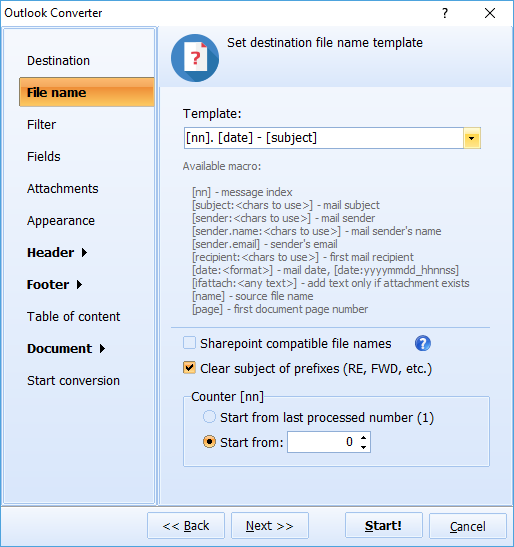
  • Total Outlook Converter Pro adds a new name to each output file using any template you set. Add a counter to the file names for easier file sorting. Or include the date to the file name.
  • If you stamp bates, you can insert the bates number to the file name.
  • The Sharepoint-compatible names option will make sure that non-supported symbols are not added to the file name.
  • You can choose to clear prefixes from the subject (RE, FWD, etc.).
  • Total Outlook Converter will keep your date stamps intact or switch all emails to Coordinated Universal Time for managing emails received in different time zones.

mail converter
Attachment saving options a la carte - how would you like to process attached files?
  • Attachments can be saved as their original file types to the same folder or to a new one.
  • In PDF you can get the attached files in the resulting file as a clickable link. They will be opened in the corresponding program.
  • Zipped attached files can be extracted.
  • Total Outlook Converter Pro allows you to include a reference to the attachment in the email summary that appears in the header (attachment info).
  • When you convert Outlook emails with attached images, the images can be embedded into the output file. If image attachments are too big to fit inside your target document, the app shrinks them down to a more manageable size that will fit your page.
  • Total Outlook Converter Pro can convert attachments to the same file type as the email and embed them or place to a designated folder. It's handy to have all correspondence in one file type!
  • Embedded attachments can go before or after the email body.
  • If your emails have other emails attached, they can be converted and renamed according to your settings too.
  • You can rename attachments including the email name or the counter of the corresponding email, so that you will always know which attachment belongs to which email.

mail converter
Trust - rely on CoolUtils.
  • Coolutils has been in business since 2003; we are well-known experts in file conversions.
  • Over 24,000 users worlwide have chosen Total Outlook Converter Pro: home users, law firms, hospitals, government institutions, small and large corporations convert Outlook emails with our app. If you need references, please, contact us.

mail converter
Enjoy clear user-friendly interface with hints for beginners.
  • Total Outlook Converter Pro is proud of a clear, easy-to-follow interface.
  • New users can rely on default settings.
  • We provide 24/7 email support to all our users. You are also welcome to leave voice mails (1 855 418-2323), we will call you back the same day.

Who Uses Total Outlook Converter Pro?

Trusted by legal teams, corporations, and IT departments worldwide

eDiscovery & Litigation

Legal & Litigation Support

Convert PST emails to PDF with bates stamps for court

Law firms and litigation support teams convert thousands of Outlook emails to PDF with bates numbering, text watermarks, and embedded attachments. Search by sender, date, or keyword to isolate relevant correspondence for case preparation and court production.

Compliance & Audit

Regulatory Compliance

Archive emails in PDF/A for long-term retention

Compliance officers convert Outlook mailboxes to PDF/A for regulatory retention requirements. Generate Excel reports with sender, date, and subject metadata for audit trails. Password-protect and digitally sign output files for tamper-proof archival.

IT & Migration

Email Migration & Backup

Export PST to EML, MBOX, or universal formats

IT departments migrate mailboxes from Outlook to other platforms by exporting PST files to EML or MBOX format. Back up critical correspondence as PDF or TIFF files accessible without any email client. No Outlook installation required for PST conversion.

Corporate Archiving

Enterprise Email Archiving

Batch-convert gigabytes of email with attachments

Large organizations archive years of Outlook correspondence by converting entire PST files to PDF with all attachments embedded or saved alongside. Maintain folder structure, add tables of contents, and rename output files using custom templates for easy retrieval.

Forensic Investigation

Digital Forensics & Security

Extract and analyze email evidence from PST/OST files

Forensic investigators extract emails from PST and OST files without Outlook, preserving RFC-822 headers and metadata. Filter by sender IP, date range, or keywords. Generate comprehensive reports in Excel or HTML for evidence analysis and chain-of-custody documentation.

Download Now!

Updated Mon, 13 Jul 2026

Buy License

(only $99.90)

One-time payment — no subscription30-day money-back guaranteeSince 2003For Windows 7 / 8 / 10 / 11

Screenshots


Total Outlook Converter Pro Preview1
Total Outlook Converter Pro Preview2
Total Outlook Converter Pro Preview3

Frequently Asked Questions About Total Outlook Converter Pro ▼

What is the difference between Total Outlook Converter and Total Outlook Converter Pro?

The Pro version converts email attachments along with the message body. When an email carries a DOC, XLS or PDF file, Total Outlook Converter Pro turns both the message and its attachments into the output document in one operation. The standard version only saves attachments in their original format.

How does Total Outlook Converter Pro handle attachments?

You choose the behavior in the Attachments section of the conversion wizard: convert attachments together with the email body, embed the original files into the resulting PDF, or save them separately with descriptive names.

Can I convert an Outlook email and its attachments into one PDF?

Yes. Select the messages, choose PDF as the target format and enable attachment conversion. Each email and its attached files are merged into a single PDF document, which is ideal for case files and client dossiers.

Does Total Outlook Converter Pro support Bates stamping?

Yes. You can stamp Bates numbers, add text watermarks such as Confidential, and rename output files by the Bates number. This makes the Pro version a practical tool for eDiscovery and litigation workflows.

Can I get a summary report of a PST file?

Yes. The table report feature exports all emails from a PST file into a single Excel file with date, time, sender, recipient and body columns. Such a report is easy to load into a database or analyze further.

Can I migrate my Outlook emails to another email client?

Yes. Total Outlook Converter Pro exports emails to universal EML files or MBOX archives accepted by Apple Mail, Thunderbird and most other clients.

How many emails can it process at once?

The converter handles gigabytes of email in one run. Batch mode processes entire folders and PST archives, and your settings are remembered for the next session.

Is there a server version available?

Yes. Total Outlook Converter ProX is the server edition with ActiveX support and no GUI. It integrates into your own applications for automated conversion on Windows servers.

How do I convert Outlook email and its attachments to Markdown?

Pick your PST or OST file (or connect to Outlook), choose MD (Markdown) as the output format, and enable attachment conversion in the Attachments section. Total Outlook Converter Pro writes each message as a clean .md file and renders its Word, Excel and PDF attachments into the same Markdown, so one file holds the whole email. The output is ready for Obsidian, Notion, documentation, or an AI chat like ChatGPT or Claude, with the mailbox folder structure mirrored on disk.
Download Now!

Updated Mon, 13 Jul 2026

Buy License

(only $99.90)

One-time payment — no subscription30-day money-back guaranteeSince 2003For Windows 7 / 8 / 10 / 11

List of supported conversions:

 
  • Batch PST Converter
  • PST to PDF with Attachments
  • PST to TXT with Attachments
  • PST to Text with Attachments
  • PST to DOC with Attachments
  • PST to HTML with Attachments
  • PST to XHTML with Attachments
  • PST to TIFF with Attachments
  • PST to JPEG with Attachments
  • PST to RTF with Attachments
  • PST to XPS with Attachments
  • PST to EML with Attachments
 
  • Batch OST Converter
  • OST to PDF with Attachments
  • OST to Text with Attachments
  • OST to Text with Attachments
  • OST to DOC with Attachments
  • OST to HTML with Attachments
  • OST to XHTML with Attachments
  • OST to TIFF with Attachments
  • OST to JPEG with Attachments
  • OST to RTF with Attachments
  • OST to XPS with Attachments
  • OST to EML with Attachments

Release Notes

  • 23 December 2025 Fixed an issue with PDF/A output

Start working now!

Download free trial and convert your files in minutes.
No credit card or email required.

⬇ Download Free Trial Windows 7/8/10/11 • 174 MB
Pro Suite

Key Features Of Full Registered Version

    • Save Outlook emails as PDF, DOC, TIFF with attachments
    • Convert PST to PDF, DOC, TIFF, EML.
    • Convert OST to PDF, DOC, TIFF, EML.
    • Attachments can be converted to DOC, RTF, TXT, HTML, HTMLX, JPEG, TIFF, PDF.
    • Attachments can be saved as new files with new descriptive names.
    • Migrate from Outlook to MBOX.
    • Converts all *.pst files in one folder.
    • Built-in batch email renamer
    • Adds date or page counter to converted emails
    • Stamp bates or add legal notes.
    • Can convert Outlook contacts to vCard
    • Command line support
    • ActiveX and Server version
    • Supports contacts, tasks and meetings

System Requirements