Need help? Reach us at 

 +1 (855) 418-2323
Need help? Reach us at
+1 (855) 418-2323

 File Converters TIFF and PDF apps Forensic Freeware
Batch HTML/HTM/MHT/XHTML with CSS-aware rendering, CLI, watermarking, URL→PDF. Free 30-day trial.
Windows
2000/2003/Vista
7/8/10/11/Citrix
HTML files are not designed for archiving, printing, or sharing. They depend on external CSS, images, and scripts that break when moved. Total HTML Converter transforms HTML, HTM, MHT, XHTML, WEBARCHIVE, ePub, FB2, CHM, and Markdown files into PDF, DOC, XLS, TXT, RTF, TIFF, JPEG, PNG, SVG, and ODT — in batch, with full CSS rendering and command-line support.
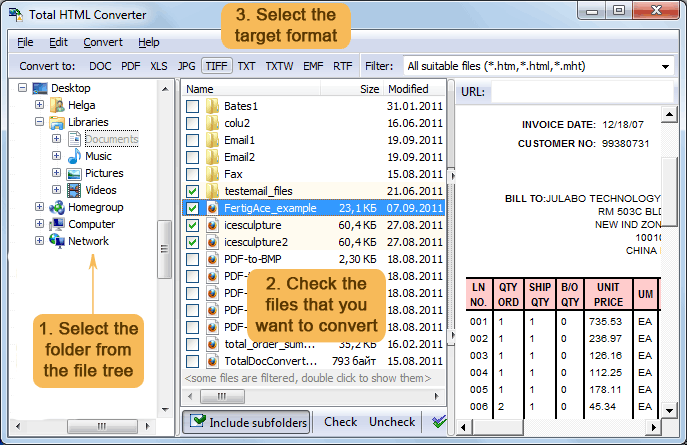
Quick answer: To convert HTML to PDF, install Total HTML Converter, browse to your HTML, HTM, MHT, or XHTML files, check the ones you need, click the PDF button, set page size, headers, and watermarks, then press Start. The whole folder converts offline in one batch, with full CSS rendering, URL-to-PDF support, and no file-size limit.
It also reads Safari Web Archive files (.webarchive) — the single-file snapshots Safari saves on a Mac or iPhone, with the page text, images and styles bundled inside. On Windows nothing opens them: no browser, no editor, not even a text viewer, because the format is a binary property list. Point Total HTML Converter at a folder of .webarchive files and they come out as PDF, DOC or images, so pages someone archived on a Mac stay readable on any machine.
Total HTML Converter also handles web page conversion — enter a URL and get the result in seconds. For one-off jobs in the browser, try the free online tools — no install, no signup: MD to PDF, HTML to JPG. For servers and automated pipelines, use Total HTML Converter X (ActiveX available). Works on Windows 7/8/10/11. Download size: 56.6 MB. 30-day free trial, no credit card or email required.
| Feature | Total HTML Converter | Online Services |
|---|---|---|
| Batch conversion (thousands of files) | Yes | 1–5 files per upload |
| File size limit | None | Usually 10–50 MB |
| Full CSS rendering | Yes — all tags + styles | Often broken or partial |
| Convert URL to PDF | Yes | Some services |
| Privacy (files stay local) | Yes | Uploaded to third-party servers |
| Watermarks & digital signatures | Yes | Rarely |
| Output formats | 12+ (PDF, DOC, XLS, TIFF...) | Usually PDF only |
| Command-line automation | Yes | No |
| MHT / ePub / CHM / Markdown input | Yes | Rarely |
| Pricing | $49.90 one-time | Monthly subscription or per-file |
(includes 30 day FREE trial)
(only $49.90)

"We use TotalHTMLConverter in one of our medical software products to generate reports. Our software produces HTML output which is then being converted by means of this tool. We have chosen TotalHTMLConverter by CoolUtils because of ease of use and integration in our product. Our technical questions during the integration process have always been answered quickly and fully satisfactory. The tech support has been wide above what we are used to and we can fully recommend not only this product but also the company."
 Dr. Bernhard Wandernoth
EEG Info - www.eeginfo.com
Dr. Bernhard Wandernoth
EEG Info - www.eeginfo.com
"I use a lot of information from the internet for analysis and research. With Total HTML Converter I can easily turn HTMLs into DOCs and edit them as I want in MS Word. It makes my life easier. It supports all web page formats, so flexible enough for my needs. Thanks, I am happy to have it on my laptop!"
 Corey Mattoni
Teams that convert HTML pages, ePub, CHM, and Markdown files to PDF, DOC, and images in batch
Convert saved HTML pages and URLs to PDF for archival
Researchers, librarians, and compliance teams convert saved web pages and live URLs to PDF for offline archival. Total HTML Converter recognizes all HTML tags including CSS page breaks, and auto-fits wide HTML tables to the chosen PDF page size — producing print-ready documents from any web content.
Convert Markdown, CHM, and ePub files to PDF and DOC
Technical writers and publishers convert Markdown documentation, CHM help files, ePub books, and FB2 files to PDF, DOC, or RTF for distribution and print. Batch-convert entire folder trees at once, add page counters and date stamps, and apply image watermarks to every output page.
Extract tables and text from HTML files to XLS and TXT
Analysts extract data from HTML reports and saved web pages by converting them to XLS for spreadsheet analysis or TXT for text processing. Process thousands of HTML files in one batch, and convert MHT web archives alongside standard HTML and XHTML files without any preprocessing.
Convert web pages to PDF documents for legal records
Legal teams convert saved HTML pages and MHT web archives to PDF or TIFF for evidence preservation and regulatory filing. Add watermarks with confidentiality notices, include date and page counters on every sheet, and produce court-ready documents that faithfully reproduce the original web layout.
Batch-convert HTML files via command line
IT departments automate HTML-to-PDF and HTML-to-image conversion using the command line interface. Convert report output from web applications, email templates, or generated HTML files into distributable formats on schedule. For server-side integration with ActiveX, use Total HTML ConverterX.
Updated Sat, 29 Aug 2026
(only $49.90)
Updated Sat, 29 Aug 2026
(only $49.90)
Download free trial and convert your files in minutes.
No credit card or email required.


