CoolUtils Logo
German  Spanish  Russian
Are you happy with CoolUtils products? Tell your friends and co-workers about them!

If you have a site in the web feel free to put our text link below from your site.

<A HRef= "http://www.CoolUtils.com"> Advanced Software by CoolUtils.com</A> Audio, image, html and pdf converters, directory print utilities, file rename utilities and much more.

Total HTML Converter

The versatile HTML file converter for converting HTML to Doc, PDF, Excel, JPEG, Text

Buy Total HTML Converter NOW!
(only $49.90)

FREE DOWNLOAD Total HTML Converter
Total HTML Converter is an all-in-one solution to convert HTML files to PDF, DOC, XLS, JPEG, TIFF, RTF, and TXT (both text files and Unicode text files).

Total HTML Converter converts several HTML documents or several folders at one go. When you convert HTML to PDF or HTML to TIFF the program can combine all output files into one document. For example, you convert 5 HTML files to PDF and get 1 PDF file.

The converter fully supports all HTML tags, including page breaks control with CSS styles (CSS 1,2). You may add IE's headers and footers (date, time, page count, etc.) to the output document.

Besides, you can convert MHT files to DOC, XLS, PDF, JPG, TIFF, and Text files. If you have FLASH on your page, Total HTML Converter will create a screenshot of it when converting the page to another format.

Total HTML Converter converts web pages as well. Enter the url and get the converted file in seconds. On top of that you can capture the site page as an image. Just enter the url and get the JPEG or TIFF file.

The program has "Fit HTML Width to the chosen PDF-Page-Size" option which is very important for printing html-tables. Besides, Total HTML Converter is the only converter to deal right with east code pages (Korean, Chinese and other).

Unlike other HTML converters Total HTML Converter is very powerful but easy-to-use due to a most consistent interface with logical steps. Download your free trial copy now to convert your HTML files in seconds. Windows 2000/NT/XP/2003/Vista/7

dowblaod html converter

You can convert HTML documents in 3 ways:

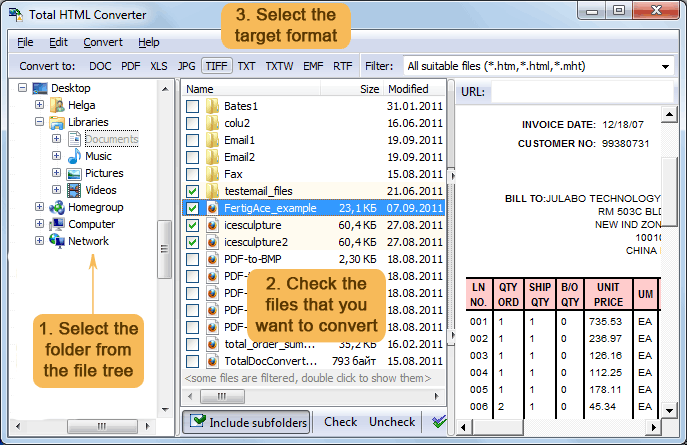
  1. via user interface. Launch the converter, select the folder with HTML files from the files tree, check the files you want to convert and press target format button (DOC, XLS, PDF, JPEG, TIFF, TXT). The wizard of the program guides you through the settings. You may leave default settings or enter your own parameters.
  2. via command line. All parameters and command line examples can be found at convert HTML files via command line.
  3. from your desktop. Select the HTML file and make right button mouse click. You will see the popup menu with Convert To option.

Choose the most powerful Total HTML Converter to convert your HTML files. Try it for free now(30 days trial period, no limitations) and find out if it's that good.

helpOnline help
Find out how to convert HTML files to other formats via user interface and command line. Step-by-step tutorials with screenshots.

Folder MonitorWant to convert all new HTML files to other formats automatically? Take a look at Total Folder Monitor. It will watch any folder and launch Total HTML Converter when a new file arrives.

For use on web-servers or services - use Total HTML ConverterX (Active X is available for registered users).

Total HTML Converter tailored to YOUR needs.

Customization

  • If you have a special requirement
  • If you want additional options

Contact us. We will gladly enhance Total HTML Converter so that it fit your needs perfectly. Customization is often free to our customers.

Success stories.

Attention!

Complete list of supported conversions

For developers

If you want to:

  1. use HTML converter in your asp or php application
  2. have ActiveX
  3. use HTML Converter SDK
  4. get command line HTML converter without GUI
Or if you are ASP or .NET developer -

try Total HTML ConverterX
(Active X is available for registered users).


Total HTML Converter is our blog:
HTMLconverterHTML to XLS - Improved

Useful articles

Combine Several HTML Files into One PDF
Convert HTML to PDF with Header and Footer
HTML to PDF Converter
Convert HTML to DOC
Convert HTML to JPEG
Why Shall I Convert HTML to PDF
Buy Total HTML Converter NOW!
    FREE DOWNLOAD Total HTML Converter
(only $49.90)
Updated Thu, 19 Aug 2010
 

What are users saying

"I just wanted to thank you for the high level of first, support and second the high level of integrity you have exhibited in attempting to assist me in finding a solution to my problem. Even though we weren't able to resolve the issues you still provided me with great support.

I will return to the website whenever I need a product you can provide. After several bad experiences with other companies I can say your firm is definitely in a league of its own.

Thanks!"
Bill Spencer

"Html to pdf? Nothing easier with your HTML Converter! Thank you for the excellent converting program."
Charles Brown

"I've converted hundreds html pages to pdf with your Total HTML Converter. The results are splendid. Considering the price I think your program to be the best. Thanks."
Johannes Bridge

"I use your program to convert html pages to excel. The two things I'm grateful to you for are batch converting and command line. Thank you very much."
Michael
"So far, so good! Everything was super easy - download, installation, and use. The support has also been responsive. Thanks again for a great product!"
Michelle Taylor

Leave your testimonial


Best Deal!

Get 55 CoolUtils tools
for the price of 4
read more
  (you save up to $500)
 

Key Features

  • A set of conversion tools in one converter (html to doc, html to rtf, html to txt, html to pdf)
  • MHT format is also supported (mht to doc, mht to rtf, mht to txt, mht to pdf, mht to mht)
  • Supports flash
  • Batch conversion mode
  • MS Office toolbar integration
  • No need for Adobe Acrobat or MS Word
  • Includes PDF information in the output file
  • Supports different charsets and encoding tables
  • Command line
  • Dynamic page breaks with headers and footers
  • Specify HTML from URL, or local file
  • Fit HTML Width to the chosen PDF-Page-Size
  • Extremely easy-to-use
  • Vista compatible

Windows 7 Compatible
MS Windows®
2000/XP/2003/2008/
Vista / Windows 7

Awards

Softpedia awards
OneKit awards
NFD awards
Site Map  |  Contacts |  Press Center | Resellers | About |    Copyright © 1998-2010 CoolUtils Development. All rights reserved.