Need help? Reach us at 

 +1 (855) 418-2323
Need help? Reach us at
+1 (855) 418-2323

 File Converters TIFF and PDF apps Forensic Freeware
Need to save important Thunderbird correspondence as editable Word documents? Total Thunderbird Converter Pro lets you convert Thunderbird emails to DOC while keeping all attachments intact. The resulting files can be opened and edited in Microsoft Word, LibreOffice, or Google Docs.
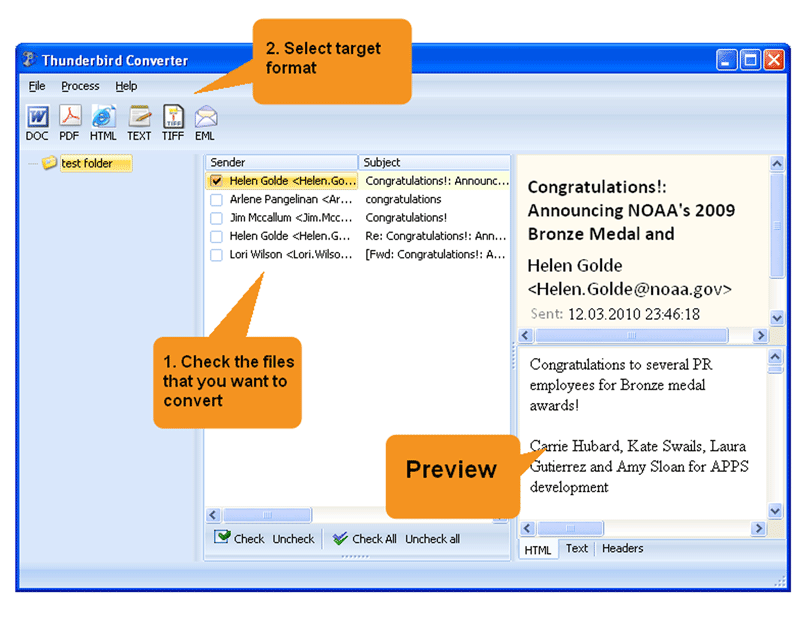
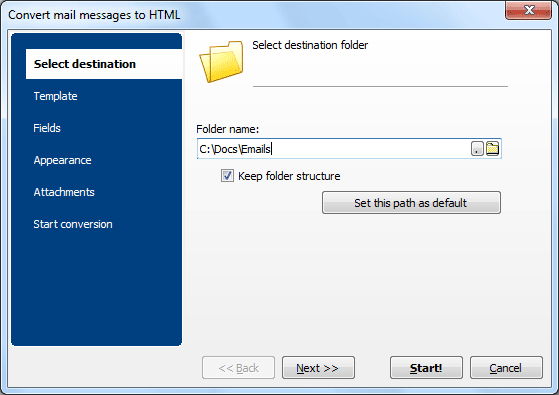
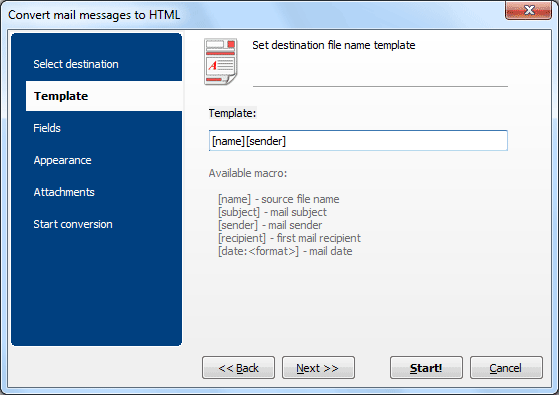
Quick answer: To convert Thunderbird emails to DOC, install Total Thunderbird Converter Pro, let it sync your profile, check the emails you need, click the DOC icon in the format bar, set the destination and fields, choose how to handle attachments, then click Start. Thousands of emails convert to editable Word files in one batch — offline, with attachments kept intact.
The program processes thousands of emails in minutes. Each email becomes a separate DOC file, or you can merge multiple emails into one document for convenient archiving.
 Attachment conversion. Attached documents (PDF, XLS, images) are converted to DOC format and included alongside the email content. No other Thunderbird converter offers this.
Customizable appearance. Control fonts, margins, headers, and footers. Add page counters or Bates stamps to every page.
Selective field export. Include only the fields you need — drop headers, keep just the body, or export metadata only.
MBOX import. Besides Thunderbird profiles, the converter accepts standalone MBOX files from Apple Mail, SeaMonkey, and other clients.
Command line. Configure settings in the GUI once, then run the same conversion from the command line for automation and scheduled tasks.

Download free trial and convert your files in minutes.
No credit card or email required.

Related Topics
Export Thunderbird Emails to PDF with Attachments | CoolUtils